
Participant
June 1, 2020
Answered

Layer thumbnail bug?

  • June 1, 2020
  • 2 replies
  • 4064 views

Hi! I've been having this problem in the past couple of weeks, where my layers do not show the content properly and are no longer transparent, but instead they do this (see image below/attached).
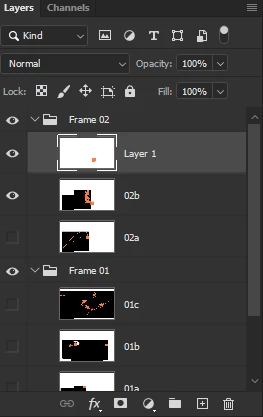
 

They used to be transparent and show the content more clearly. I don't recall having done anything to make it change, except update to the most recent version of Photoshop CC 2020.


Is this a bug, or something I can fix? It's very frustrating when I'm trying to go through what I've done!

This topic has been closed for replies.
Correct answer c.pfaffenbichler

What are the Photoshop > Preferences > Transparency & Gamut settings? 

2 replies

Participating Frequently
March 31, 2021

Hi, I still have this problem even when background layer is on or off, no background grid selected in Transparency setings. Has been going on for about the last 3 Photoshop editions. I've attached a screenshot of work area, layers palette and transparency settings. Can you advise?

Many thanks

c.pfaffenbichler
Community Expert
Community Expert
April 1, 2021

Just a »stab in the dark« but does turning off »Use Graphics Processor« in the Performance Preferences (Photoshop > Preferences > Performance > Graphic Processor Settings) and restarting Photoshop have any bearing on the issue? 

Participating Frequently
July 13, 2021

No that didn't work. Converting files from RGB to CMYK solves the issue. However I mostly require RGB files so this is not a useable solution other than to detect what might be causing the issue. 

c.pfaffenbichler
Community Expert
Community Expert
June 1, 2020

Is the Transparency Grid still being used on the Canvas when you hide the Background Layer? 

Participant
June 1, 2020

I didn't think to check that until you asked.

No, the transparency grid doesn't display.

c.pfaffenbichler
Community Expert
c.pfaffenbichlerCommunity ExpertCorrect answer
Community Expert
June 1, 2020

What are the Photoshop > Preferences > Transparency & Gamut settings?