
johncarreon
Participant
July 17, 2020
Answered

Layered files grayed out and overlapping image duplication
  • July 17, 2020
  • 2 replies
  • 327 views

OS Catalina 10.15.6

Photoshop 21.2.0

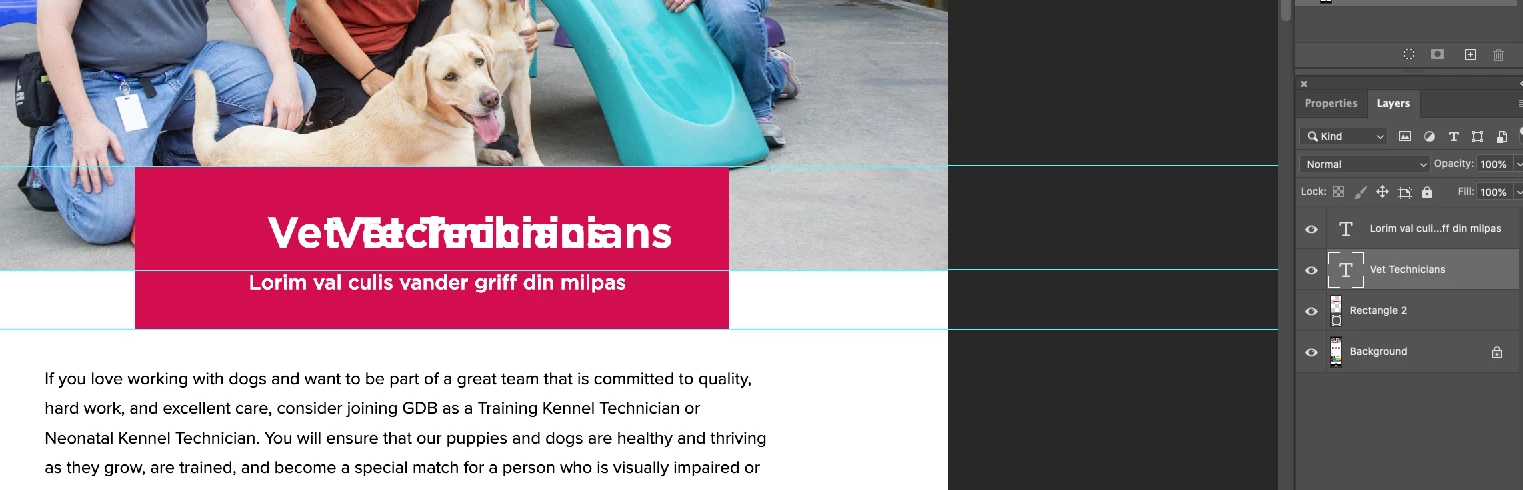
When moving a layered image or text it will duplcate itself (see attached). If I click on another layer it will revert back to normal. Happens every time, very annoying and time consuming. Other times the entire screen will completely gray out. Any thoughts on a fix?

Thanks

This topic has been closed for replies.
Correct answer Akash Sharma

We are happy to announce the release of Photoshop 21.2.1 that should resolve this issue.


This update includes fixes to some of the top customer reported issues among other bug fixes. See Bug fixes and security updates


To update Photoshop to 21.2.1, click "Update" in the Creative Cloud desktop app next to Photoshop. 

More detailed instructions for updating


Let us know how it goes.


Thanks,

Akash

2 replies

Akash Sharma
Akash SharmaCorrect answer
Legend
July 22, 2020

We are happy to announce the release of Photoshop 21.2.1 that should resolve this issue.


This update includes fixes to some of the top customer reported issues among other bug fixes. See Bug fixes and security updates


To update Photoshop to 21.2.1, click "Update" in the Creative Cloud desktop app next to Photoshop. 

More detailed instructions for updating


Let us know how it goes.


Thanks,

Akash

melissapiccone
Community Expert
Community Expert
July 17, 2020

Is it a scren redraw issue? Try using legacy compositing. 

Melissa Piccone | Adobe Trainer | Online Courses Author | Fine Artist
johncarreon
Participant
July 17, 2020

Melissa,


Thanks! Worked when I unchecked Legacy Compositing.


John