

Lazy Nezumi Pro: My curves are just straight lines! And pressure sensitivity is terrible!
Background: I have a MacBook Pro 2015, a Monoprice tablet, and I use Photoshop with Lazy Nezumi Pro plugin.
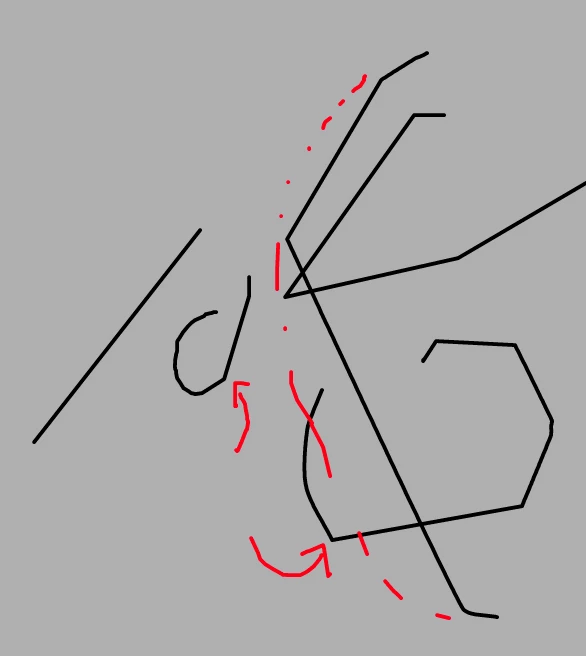
Problem: I recently reinstalled Windows Machine on my computer (increasing the storage and updating my computer so I can use my AirPods). Unfortunately, I suspect this messed up my settings. When I try to draw a curved line, it makes sharp angles instead. The red dotted line shows the line I drew, and the black was the result. It's like the sensor is lagging behind the feedback I'm giving. This is the exact reason why I use Nezumi Pro; to smooth my lines, but now it's not working.
Not only that, but my pressure sensitivity is way off. I have to press down extremely hard with my pen tablet to even get a response. Before, I could do it with a light touch with my pen. Now I have to press down so hard I fear I'll scratch up my tablet at this rate.
Any suggestions?
[Subject renamed by moderator to include "Lazy Nezumi Pro"]
.
 AdChoices