Participating Frequently
December 28, 2022
Answered

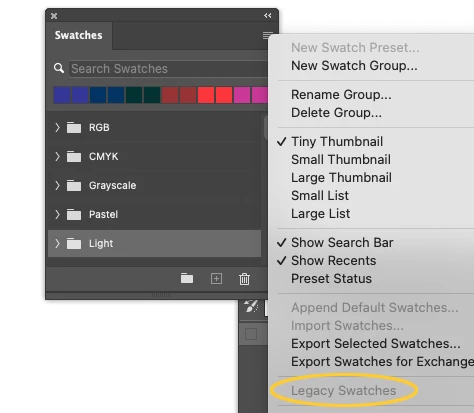
"legacy swatches" is grayed out in Photoshop 2023 – can't load legacy swatches
  • December 28, 2022
  • 11 replies
  • 1567 views

This topic has been closed for replies.
Correct answer Jeff Arola

Before doing the uninstall/reinstall of photoshop go to Apple>System Settings>Privacy & Security and under Full Disk Access see if Adobe Photoshop 2023 is enabled.

11 replies

Participating Frequently
December 30, 2022

Thanks for all the replies.


I both turned on full disk asccess for PS 2023 in Mac privacy and security setting, then did an unsintall and reinstall of PS 2023. Everything looks good now. I was able to use the Swatch options panel to turn on the Legacy swatches. 🙂

J E L
Community Expert
Community Expert
December 30, 2022

Great, glad to hear it, @peggyc94963541. Thanks for coming back to let us know what steps you took!

Jeff Arola
Community Expert
Jeff ArolaCommunity ExpertCorrect answer
Community Expert
December 30, 2022

Before doing the uninstall/reinstall of photoshop go to Apple>System Settings>Privacy & Security and under Full Disk Access see if Adobe Photoshop 2023 is enabled.

Jeff Arola
Community Expert
Community Expert
December 30, 2022

Having two or more versions of photoshop should not be a problem.

Many users including myself have multiple photoshop versions installed on the same computer

without them interfering with one another

Participating Frequently
December 29, 2022

Hi, I added the Legacy swatches and restarted Photosop.

When I went to my Swatch panel, I see I have duplicates listed! (screenshot below). I'm wondering if having Photoshop 2020 also installed on my Mac is a problem. Tomorrow I will try uninstalling and reinstalling Photoshop 2023.

Thanks, G

TheDigitalDog
Inspiring
December 29, 2022

Same OS, version etc, they do show up for me. 

I imported them, then exported them (again, no issue). Why not try downloading them from here:

https://www.dropbox.com/s/nzwtexpzzdv2ci3/Legacy%20Swatches.aco?dl=0

Then attempt to load them. The path you may wish to save this document is here:

Did that work, are they back? 

Author “Color Management for Photographers" & "Photoshop CC Color Management/pluralsight"
Participating Frequently
December 29, 2022

I will try the uninsntall/reinstall. Do you think it's a problem to have more than one version installed? I also have Photoshop 2020 on my Mac.

Jeff Arola
Community Expert
Community Expert
December 29, 2022

It looks like a reinstall of photoshop might be in order.

You can uninstall/reinstall photoshop using the Creative Cloud Desktop Application.

J E L
Community Expert
Community Expert
December 29, 2022

Hi @peggyc94963541, did you check to see if you have only one Legacy Swatches ACO file installed in the “Required” folder directory? This is the Windows path: C:\Program Files\Adobe\Adobe Photoshop 2023\Required. I'm not sure of the path for macOS but someone here will know if you can't find it.


jane-e
Community Expert
Community Expert
December 29, 2022


@peggyc94963541 wrote:

I'm having trouble replying directly in the thread, so I'm replying through the email.


Unfortunately, the forum software removes images when you reply by email.


I'll move this thread to Discussions to see if you can reply in the forums instead of email, then we can move it back to Bugs for you. Let us know if this works.


Jane


Participating Frequently
December 29, 2022

Hi Jane,

See if you can see the image below.

Let me know if you need any more computer or monitor details.

The screen shot shows the Swatch Panel options after resetting the
preferences and restarting.

Thanks for your help.

Ginger

[image: Screenshot 2022-12-29 at 8.25.21 AM.png]

[image: Accurate Logo]


Ginger Gebka | Marketing Specialist


[personal information removed for your protection — please omit when replying by email]


jane-e
Community Expert
Community Expert
December 29, 2022


@peggyc94963541 wrote:
Hi Jane,
See if you can see the image below.
[image: Screenshot 2022-12-29 at 8.25.21 AM.png]
[image: Accurate Logo]


No — the forum software will always strip out attachments.


Go to the thread in the forums and click Reply to use a Reply window, then use the Insert Image button (mountain and sun) in the toolbar of the Reply window to add your images.

https://community.adobe.com/t5/photoshop-ecosystem-discussions/quot-legacy-swatches-quot-is-grayed-out-in-photoshop-2023-can-t-load-legacy-swatches/m-p/13451068


I'll remove your personal information again from your email reply for your protection. This is a public forum so anyone (including spammers) can access it.


Jane


Participating Frequently
December 29, 2022

Hi,

I'm having trouble replying directly in the thread, so I'm replying through
the email.

My Photoshop version is 24.0.1. My Mac OS is Ventura 13.0.

I did the "Reset Preferences on Quit," restarted, and now more Swatch
options are grayed out. (see screenshot)

[image: Screenshot 2022-12-29 at 8.25.21 AM.png]

[image: Accurate Logo]


Ginger Gebka | Marketing Specialist


[personal information removed for your protection — please omit when replying by email]
