


davids02011959
Inspiring
January 17, 2026
Question

levels ok button

  • January 17, 2026
  • 1 reply
  • 112 views

i am a bit rusty with my photoshop

the ok button to apply my changes seems to have disappeared

i am asked to calculate a more accurate histogram

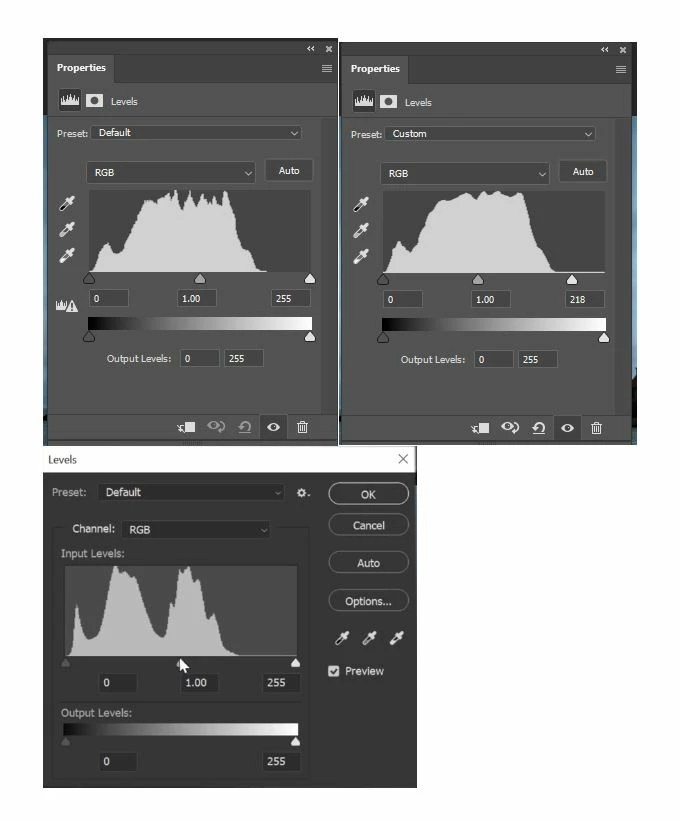
the snapshot shows

  • the original image asking to calculate a more accurate histogram
  • the next image is after the new histogram and adjustments
  • the last shows levels as i remember it with the ok button etc down the rh side

possibly now do you just press the cross in the top rh corner replacing the ok button

thanks

Davelevels.JPG


[Topic changed from Phone to Windows]


1 reply

jane-e
Community Expert
Community Expert
January 17, 2026

@davids02011959 


The first two images are Adjustment Layers (non-destructive) and do not have an Okay button.

The third image is a dialog from Image menu > Adjustments > Levels (destructive) and has an Okay button.


Adjustment layer came out a decade or so ago and are preferred by many because they are non-destructive and can be edited.

https://helpx.adobe.com/photoshop/desktop/create-manage-layers/color-adjustment-fill-layers/work-with-adjustment-and-fill-layers.html


Jane


jane-e
Community Expert
Community Expert
January 17, 2026

@davids02011959 


I just noticed that you are using Photoshop for iPhone, which would not have the Image menu or the dialog box. If it has Levels at all, then it would be as an adjustment layer. Can you show a larger screenshot that shows your iPhone interface so we can better assist?

janee_0-1768665791233.png

Jane