

Lighroom to Photoshop slow
My current workflow for photo editing is as follows:
- basic adjustments in Lighroom -- “Edit In Photoshop 2026” (COMMAND+E) to open in Photoshop -- “Edit with Lighroom Adjustments” -- do full edit in Photoshop 2026 -- “Save” (COMMAND+S) to save the TIF -- finish in Lightroom for export.
“Moving” the files back and forth (COMMAND+E and COMMAND+S) used to be immediate. Lately though, the communication between Lightroom and Photoshop has gotten SO slow. I’m talking a full minute to open a photo in Photoshop from Lightroom. I’m getting the pinwheel and Lightroom completely freezes (says not responding but eventually does) before the photo will open in Photoshop. The “reading TIFF format” dialogue box is on the screen for a while as well.
Nothing has changed on my computer or applications, updates, etc but all of a sudden, one day it was just slow.
As you can imagine, this adds an absurd amount of time to my professional editing workflow.
*Note: Same results with Edit in Photoshop Beta so this must be a Lightroom issue but I’m so confused what changed from a week ago when everything was tickety-boo.
I have found and tried the following recommendations with no change.
- update Photoshop & Lightroom
- restart Photoshop & Lightroom
- Adjust Camera Raw Cache Settings in Lighroom to 30GB (Max size)
- Allow Photoshop 85% Memory Usage
- Lightroom Preferences Graphics Processor and GPU set to Auto
I have my working files on an SSD (USB-C direct to computer), and this was fine up until this week. My Macbook Pro is brand new with tons of available RAM and HD (and it up to date).
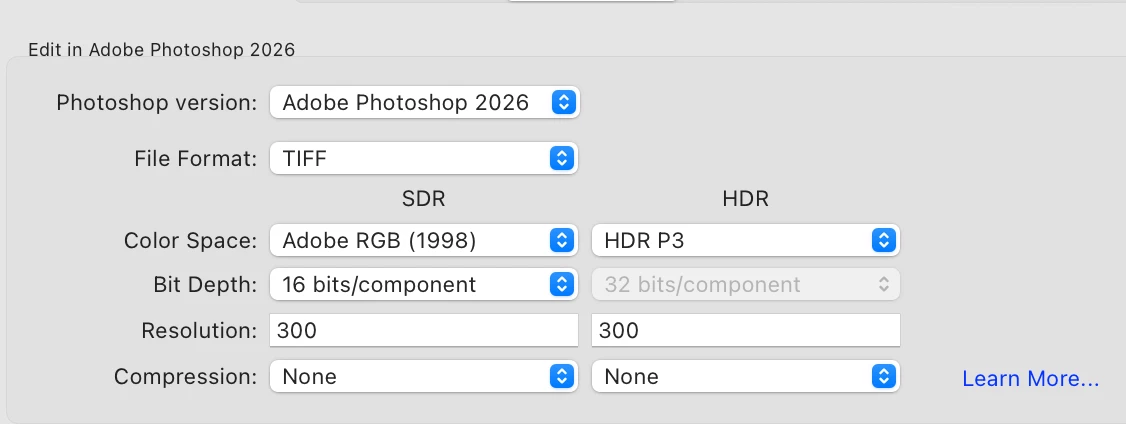
I’m attaching a screenshot of my Preferences dialogue box for Edit in Adobe Photoshop 2026
Any recommendations would be greatly appreciated!


 AdChoices