
Participant
May 14, 2025
Answered

Limiting generative fill to selection

  • May 14, 2025
  • 1 reply
  • 381 views

When generative fill was introduced, I remember it only filling the selected area.

Right now, generative fill goes beyond my selection and sometimes "destroys" areas that I didn't select.


Is there a way to limit generative fill to only fill my selected area and nothing else?
Correct answer Trevor.Dennis

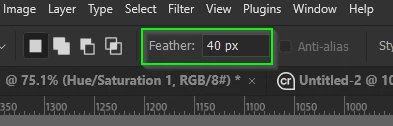
Unless you have a Feather set in the Options bar...

...it is probable due to changes they made according to the first reply in this thread

Re: Changes to Generative Fill - Adobe Community - 15002292


I have no idea if this is still the case.


1 reply

Trevor.Dennis
Community Expert
Trevor.DennisCommunity ExpertCorrect answer
Community Expert
May 14, 2025

Unless you have a Feather set in the Options bar...

...it is probable due to changes they made according to the first reply in this thread

Re: Changes to Generative Fill - Adobe Community - 15002292


I have no idea if this is still the case.


Participant
May 14, 2025

Thank you for the reply. 

At least I know I have to switch back to version 26.0 to use this feature. I guess I'm stuck with this version now since it appears that Adobe doesn't care about a fix. Too bad.