
Participant
September 25, 2018
Answered

Liquify Tool Black pixels after MOJAVE OS

  • September 25, 2018
  • 66 replies
  • 40915 views

Just updated my Mac to Mojave today.

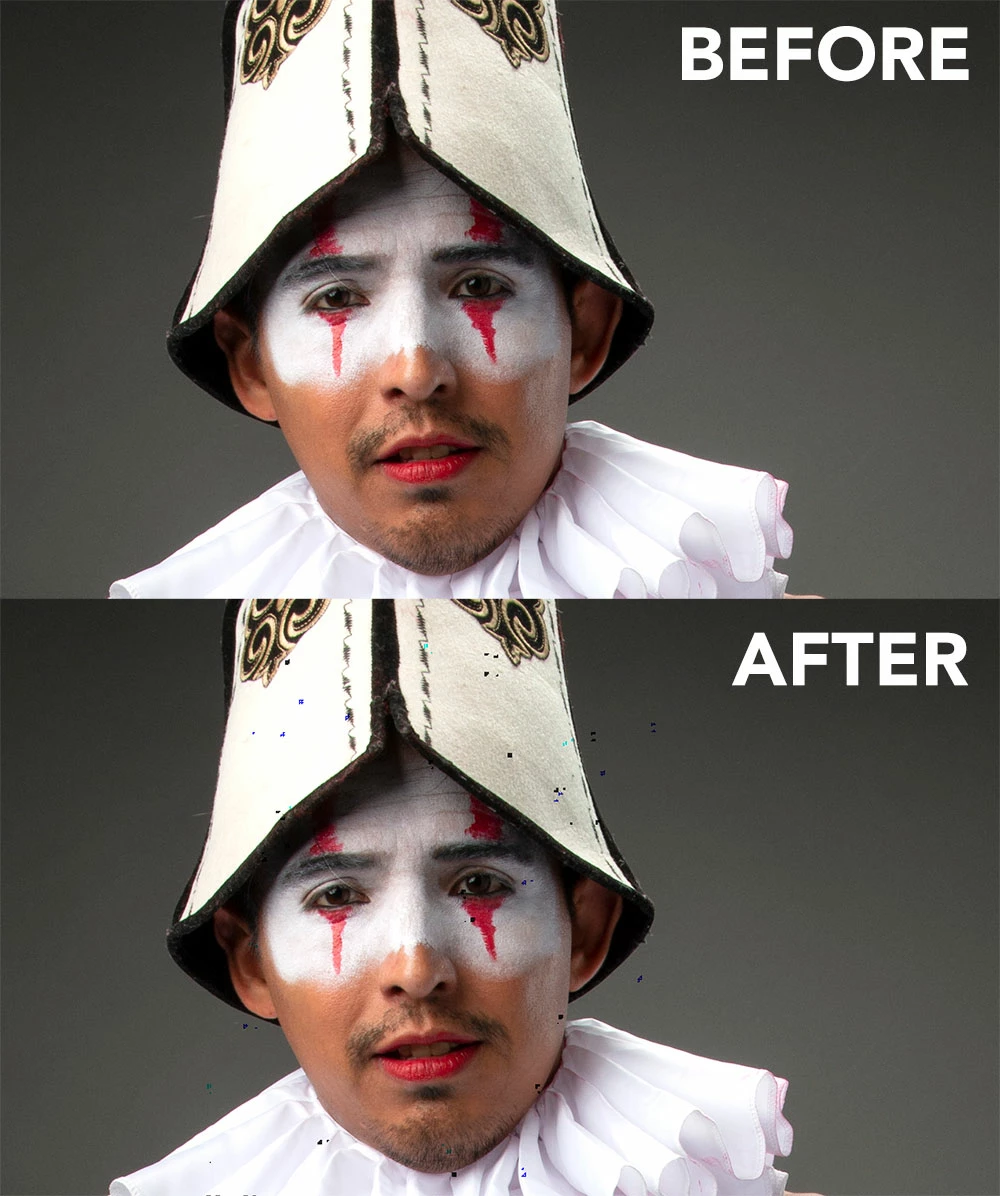
Liquify is creating black pixels when used.

I have tried to optimize performance but I still get the same error.

I have a super fast machine, so is not a RAM error. Liquify was working normally before Mojave OS.

In the image below, I have slightly adjusted the smile of the subject.
This topic has been closed for replies.
Correct answer Jeff Arola

This doesnt work for me.


Apple has just released the 10.14.1 Mojave update so install that and see if the Liquify issue is solved.

66 replies

Participating Frequently
April 3, 2019

I just updated Mojave to 10.14.4 and everything is working again

erics8690213
Participant
March 26, 2019

Just updated to 10.14.4 and everything is working again!!

Miti Abulaiti
Participant
March 26, 2019

Really!????

jacqulynh
Participating Frequently
March 26, 2019

Yep its all good now... time to delete the 2015 version  

Participating Frequently
March 25, 2019

Apple just released Mojave 10.14.4

This seems to have fixed the liquify bug for now.

March 26, 2019

I can confirm that, too!

One would hope that such a thing never happens again.

ruthbphoto
Participant
March 22, 2019

Still not working - this is so frustrating!

Mojave 10.14.3

Photoshop CC 2019

brianp96507273
Participant
March 12, 2019

Just updated Photoshop and Mojave. The problem still persists!

davescm
Community Expert
Community Expert
March 12, 2019

The fix is with Apple so todays Photoshop update does not fix it. Those using the Apple Mojave beta suggest it will be fixed in next Mojave update if the beta changes makes it to public release

Dave

dannielsendk
Participating Frequently
March 11, 2019

Sweet, Thank you!

dannielsendk
Participating Frequently
March 11, 2019

Aha good idea, but where did you find CC2015 ?

Thank!

gener7
Community Expert
Community Expert
March 11, 2019

Under here in the CC App

dannielsendk
Participating Frequently
March 11, 2019

Anything new on the Liquify problem?.....I am getting a bit tired of that I cant use it!

/Dan

jacqulynh
Participating Frequently
March 11, 2019

Hi Dan,

i am currently having to use 2 versions on my Mac- a CC 2015 is the newest that Liquify works with without the spots. You can install it and run it separately to the latest version. I have them both in my dock! It’s annoying having to use the old version for just liquify & then edit everything else in the other, but at least it works! Albeit with out all the facial recognition stuff...

(disabling the graphics card was just not happening, even tho that’s what Adobe recommended - they also told me that the 2017 Photoshop would work, but it doesn’t:(

hope that helps & best of luck

jacqulynh
Participating Frequently
March 6, 2019

Hi-

After a conversation with Adobe,I have had to roll back Photoshop to a 2015 version - it doesn't have the black spot effect any more after liquify. I am (of course) insisting on a refund for my financial outlay for a non working product. Its complete b******t

Good luck everyone

D Fosse
Community Expert
Community Expert
March 6, 2019

Have you considered complaining to Apple? Let me remind you that it does work in Windows (all versions), it does work in High Sierra and Sierra. And it did work in Mojave 10.14.1 - and then it broke again in 10.14.2.

What does that tell you?

Deprecation of OpenGL and OpenCL

As of macOS Mojave, OpenGL and OpenCL are deprecated. They are still supported by the operating system, but will no longer be maintained; developers are encouraged to use Apple's Metal library instead.[14]

(wikipedia)

jacqulynh
Participating Frequently
March 6, 2019

Hiya,

It didn't work for me in Mojave 10.14.1 (Mac) and its really bad for me using .2 with current 2019 photoshop ... some people's images seem less affected (no idea why) When I zoom they look like markers or visible code. Black, dark blue and cyan, its so weird. This image took at least 20 minutes to clean up, sometimes the spots are randomly over really crucial information like the eyes and completely ruin the image . It looks like a swarm of flies

jacqulynh
Participating Frequently
March 6, 2019

No it doesnt