
Participant
September 25, 2018
Answered

Liquify Tool Black pixels after MOJAVE OS

  • September 25, 2018
  • 66 replies
  • 40915 views

Just updated my Mac to Mojave today.

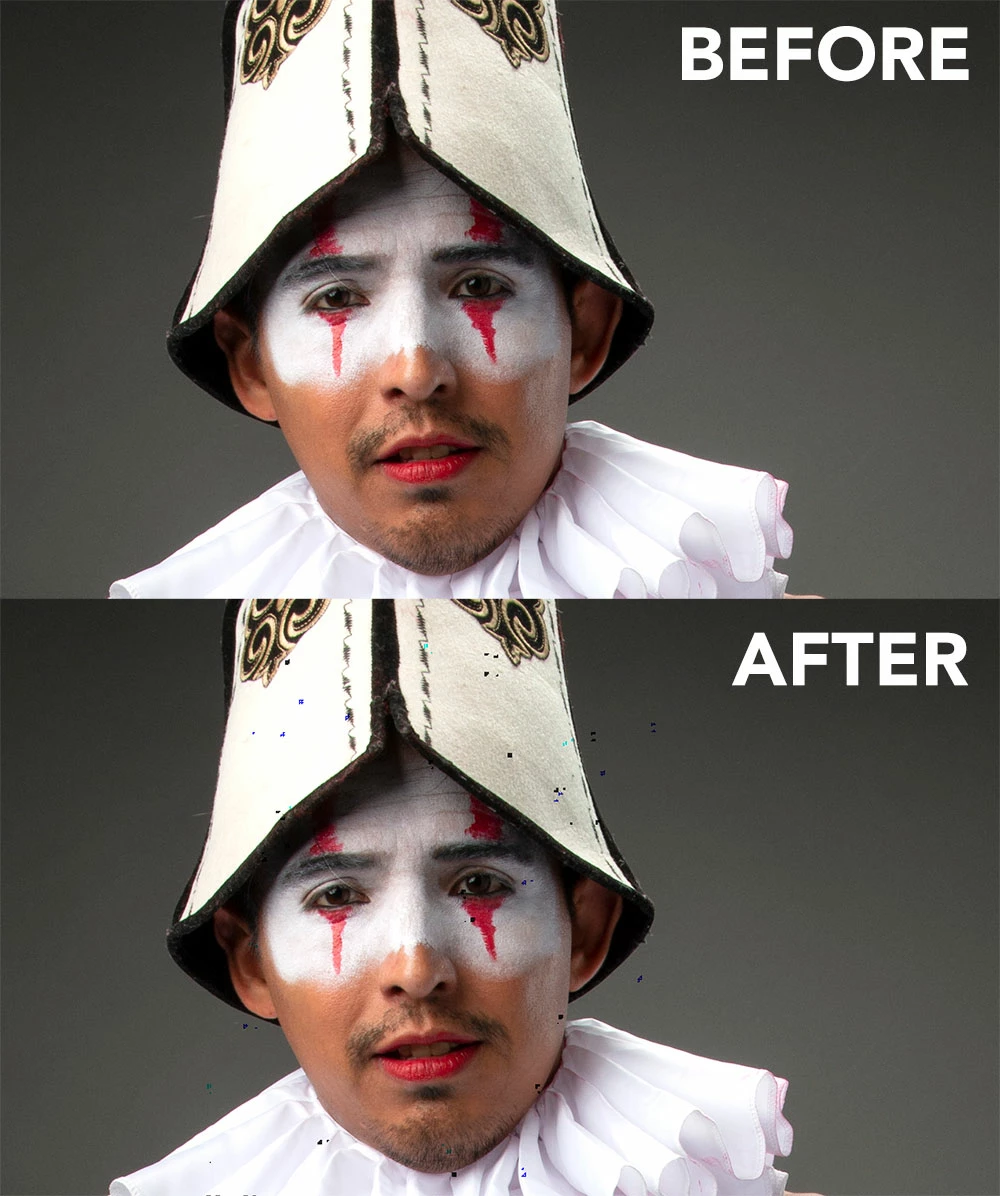
Liquify is creating black pixels when used.

I have tried to optimize performance but I still get the same error.

I have a super fast machine, so is not a RAM error. Liquify was working normally before Mojave OS.

In the image below, I have slightly adjusted the smile of the subject.
This topic has been closed for replies.
Correct answer Jeff Arola

This doesnt work for me.


Apple has just released the 10.14.1 Mojave update so install that and see if the Liquify issue is solved.

66 replies

D Fosse
Community Expert
Community Expert
March 2, 2019

What shocks me in all this, is how many people actually use Liquify, for the explicit purpose of "improving" the model. This is what gives Photoshop a bad name.

The other day there was even a baby, liquified. I couldn't believe it. Yeah, that's the problem with babies, they're not perfect, are they...

Just had to get that off my chest. No wonder kids get into trouble with anorexia, depression, anxiety and even suicides.

Participant
March 2, 2019

i hate the "over do" on photos and the abuse of the liquify tool, however, most photographers and editors use liquify for the explicit purpose of improving the photo indeed.  the model or the background, really helps a lot with hair, and with clothes.

Participant
March 2, 2019

March 2019 - the Liquify STILL doesn’t work correctly with Mojave’s update: BUT I have found a way around it !

okay, so apple tells you to disable the graphic processor when using liquify (which removes the dots, but is SO SLOW and IMPOSSIBLE to work with)

SO, what I have been doing is liquify my image normally, then before I confirm it, I go to FILE - Save mesh (and then save it)

THEN, I close liquify, reopen it without the graphic processor (hold the ALT key when you press liquify- you’ll see a x in the center of your brush if you have successfully launched it witjout the GP.

THEN I just go file - load mesh - and volla!

This has has been the ONLY way I can work because eliminating the GP all together in preferences messes up the ZOOM shortcut with the space bar and cmd and dragging my pen. Plus liquefying w/o the GP is literally IMPOSSIBLE.

hoor this helps someone !

Participant
March 2, 2019

someone posted this:

You can use a free program called Kext Beast best to use version 2.0.1 to install all the Mojave 10.14.1 AMD kexts from System/Library/Extensions copied from a Mac with 10.14.1 to repair the damage 10.14.2 redid!

Adobe decided to remove my post from the forum probably because I mentioned another program? But this works! You just use the program to put 10.14.1 AMD drivers that worked back into your 10.14.2 system so you dont need to roll back the entire system but just the drivers.

This really did the job for me...

All necessary steps can be downloaded here:

Dropbox - Leonard van Vliet Liquify artifact 10.14.2 solution - Simplify your life

Miti Abulaiti
Participant
March 1, 2019

I am having a hard time working on my photography projects!!! it is so irritating! Just fix it!         

Participant
February 20, 2019

Already updated my OS (today) and it still happens...

Participant
February 20, 2019

it worked with the AMD FirePro D500 3 GB

Participant
February 20, 2019

Its fixed in The apple bata update!! 10.14.4 Beta

Participating Frequently
February 18, 2019

This problem has been going on for months. Only a company that doesn't have any competitors can get away with this. I hate adobe.

Participant
February 18, 2019

The problem has still not been solved, and how are the people who need to work with photoshop, who pays the damage? I do not understand that nothing happens, this problem has existed for more than 2 months and nobody is mobilized? What a shame apple and adobe, time to rethink in changing brand.

Participant
February 17, 2019

UGH! this problem is still not fixed. has anyone heard when apple will fix this?

Participant
February 12, 2019

This is just short of insane!!  This problem has been going on for months with different versions and updates.  I am starting to look for other non-Adobe solutions.  Adobe doesn't seem to want to work on this issue.   Someone at Adobe needs to wake up and fix this black spot issue!!

davescm
Community Expert
Community Expert
February 12, 2019

As has been posted many times, the issue was "resolved" in a previous Mojave dot release then re-appeared after the next Mojave dot release. This would suggest that Apple have a big part to play in this and that Adobe cannot just fix it in Photoshop.

Dave

Participant
February 12, 2019

agree. its not a photoshop problem, since many different softwares who use graphic acceleration have similar problems. (games, final cut, etc)  I read the 10.14.4 beta solve the problem so far.  I have the iso of high Sierra and, Mac OS 10.14.1, the only version so far without the problem.

Participating Frequently
February 6, 2019

It still doesn't worklI honeslty hate apple and adobe. Adobe is a manoply and the goverment should investigate. 

Participating Frequently
February 12, 2019

Yeah, a big update for photoshop, so hope is up.

But, ..., nothing, again no fix for this problem.

I wonder if i should update my subscription with the same bugs.