
dydygrl
Participant
June 14, 2017
Answered

Load Files into Stack not working

  • June 14, 2017
  • 8 replies
  • 37139 views

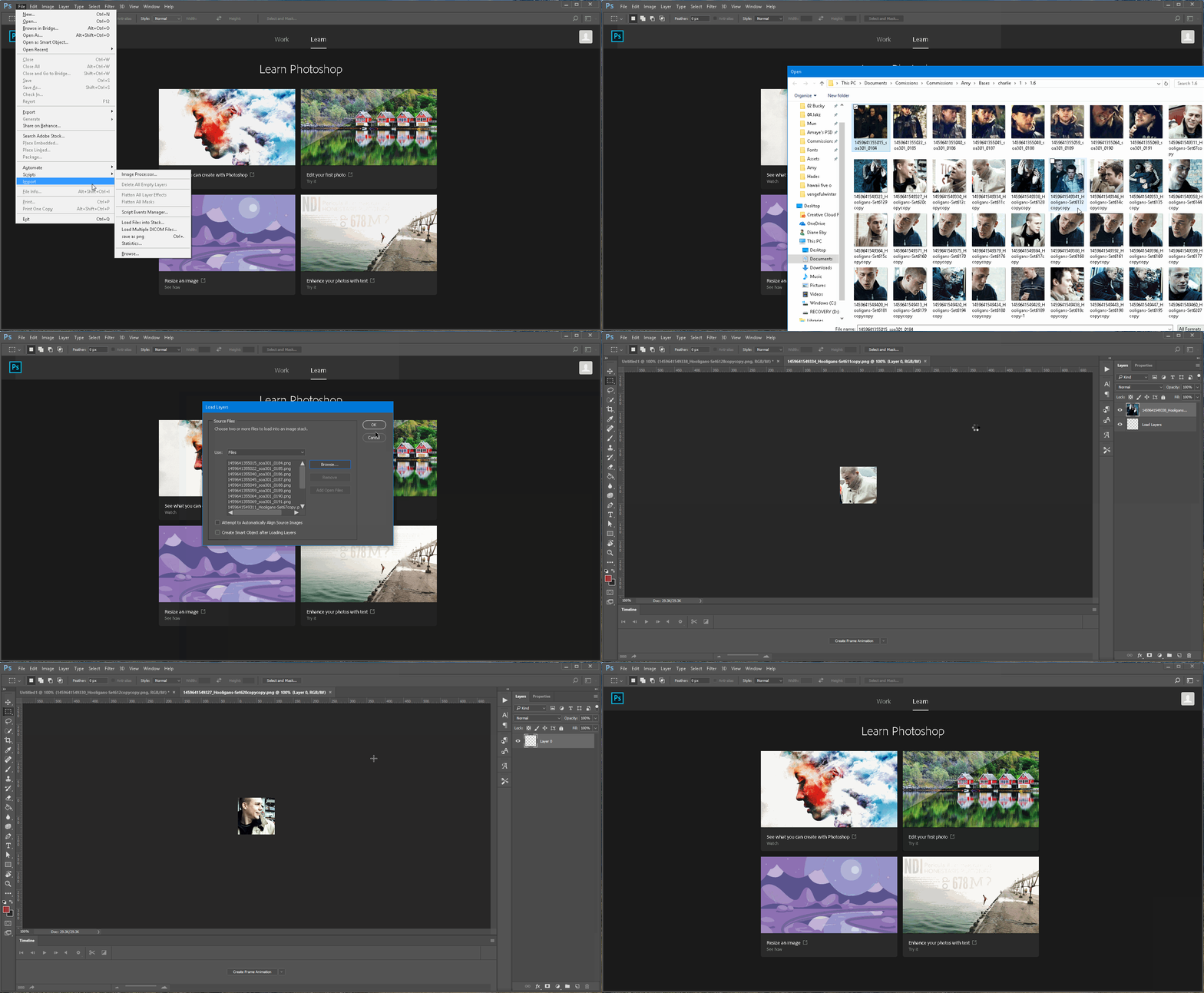
It doesn't matter how many images I am trying to load into a stack, when it starts you can see it start to load them as separate layers but then it reverts back to the start screen. Every single time. I have no idea what is going on. This is a function that I use regularly. My PS and Creative Cloud and my computer are all up to date. Any answers to whatever is causing this would be super helpful!
This topic has been closed for replies.
Correct answer cgrimley

I had similar issues and it ended up being a jpg with internal corruption.

In your video clip it appears to proceed until it gets to some particular image and then crashes.

For me, Photoshop would crash with load into stack as well as fail to open the corrupted image directly, with the message:

Could not complete your request because of a program error.

In my case, I did a screen capture to create an alternate image file, and Photoshop was happy with that.

So I think probably Photoshop is fine, and sometimes you just have bad jpg file.

8 replies

Participant
October 20, 2021

I had the same problem and converted my images from .psd to .jpg and it worked great.

Participant
July 6, 2021

I have a set of TIF files that all open well individually, but when trying to go to Script to load into stack, the load stalls at the 3rd files. Any suggestions?


Participant
July 7, 2021

This began happening to me yesterday.  At least that is when I first noticed it.  Exactly as mentioned above, two images load into the stack and then it stops.  It doesn't matter how many images there are in the queue, where they are located or what condition the files are in, it always does the same thing.  It is 100% absolutely undoubtedly Photoshop and not my computer or the condition of the images that I am trying to load.

Participant
August 27, 2020

Just Change File Location

Participant
August 27, 2020

not sure how this is helpful?

cgrimleyCorrect answer
Participant
July 15, 2017

I had similar issues and it ended up being a jpg with internal corruption.

In your video clip it appears to proceed until it gets to some particular image and then crashes.

For me, Photoshop would crash with load into stack as well as fail to open the corrupted image directly, with the message:

Could not complete your request because of a program error.

In my case, I did a screen capture to create an alternate image file, and Photoshop was happy with that.

So I think probably Photoshop is fine, and sometimes you just have bad jpg file.

Doc_Pit
Inspiring
February 8, 2019

Thanks very much for the feedback.  I'm using  PS 2019 on Windows 10.  I would never in a million years have consider "a bad jpg" as the cause of the problem, but I believe that's it.  If I go to any of the folders I have used before and try to load stack, they load with no problem.  I also discovered that f I go to the problem folder and specify the folder instead of the files, it will work.  If I select a few files in that folder, again, it will work.  Apparently, there are one or several files that are causing the problem.  This forum is an incredible resource.  Thanks, again, for the solution.  Much appreciated.

Participant
April 22, 2020

This helped me.

And I know exactly why I have a bad jpg.

using interval timer on long exposures I turned camera off mid exposure. That file that was being processed at the time is now a 'bad' jpg

Many thanks!

JJMack
Community Expert
Community Expert
June 14, 2017

Adobe's load files into stack script use at least three other scripts in the stack scripts only folder.  Bridge will use Photoshop and Photoshop will use Load Files into Stack script.

// BEGIN__HARVEST_EXCEPTION_ZSTRING

<javascriptresource>

<name>$$$/JavaScripts/LoadFilesintoStack/Menu=Load Files into Stack...</name>

<eventid>6F17BFA7-EFC8-40EA-B850-7B95ED8EA713</eventid>

</javascriptresource>

// END__HARVEST_EXCEPTION_ZSTRING

*/

// debug level: 0-2 (0:disable, 1:break on error, 2:break at beginning)

//$.level = (Window.version.search("d") != -1) ? 1 : 0; // This chokes bridge

$.level = 0;

// debugger; // launch debugger on next line

// on localized builds we pull the $$$/Strings from a .dat file

$.localize = true;

// Put header files in a "Stack Scripts Only" folder.  The "...Only" tells

// PS not to place it in the menu.  For that reason, we do -not- localize that

// portion of the folder name.

var g_StackScriptFolderPath = app.path + "/"+ localize("$$$/ScriptingSupport/InstalledScripts=Presets/Scripts") + "/"

  + localize("$$$/private/LoadStack/StackScriptOnly=Stack Scripts Only/");

$.evalFile(g_StackScriptFolderPath + "LatteUI.jsx");

$.evalFile(g_StackScriptFolderPath + "StackSupport.jsx");

$.evalFile(g_StackScriptFolderPath + "CreateImageStack.jsx");

JJMack
Trevor.Dennis
Community Expert
Community Expert
June 14, 2017

Functions like that are scripts that join up other smaller functions.  Photomerge is a good example.  Where the photomerge tool doesn't work, you can still load the files into layers, and use Align layers followed by blend layers to get to the same end result.  When scripts get broken, a reinstall should fix it, but you could try coming at it from a different direction like Bridge.

JJMack
Community Expert
Community Expert
June 14, 2017

What are you using?  What OS which creative cloud version of Photoshop?

I just tried loading 223 file into a stack Windows 10 Photoshop CC 2017.1.1 many different size and aspect rario image files no proble here.

JJMack
jbm007
Community Expert
Community Expert
June 14, 2017

can you try resetting your preferences?

FAQ: How do I reset my preferences?