lanea34140838
Participating Frequently
April 12, 2019
Answered

Lock not working on first open photo

  • April 12, 2019
  • 2 replies
  • 2565 views

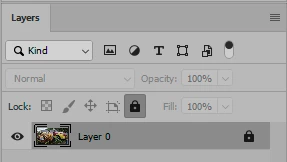
I am not sure if this was on purpose or not, but when I open a photo, the first one always has a lock on it when you first start. That lock is not working as I can do anything to the photo.

If i remove the lock and add it right back then it works. This is the far right lock that I am talking about.

I have the latest version for 2019 as it was updated just a few days ago and everything was reset as there was other things not working and after reset those things started working again with no issues. Afterwards is when I realized that the lock when open first photo was not working correctly.

    This topic has been closed for replies.
    Correct answer D Fosse

    Hi Lane,

    Though PS5 (not CS5), the Background layer could not be deleted. It is a formerly-required layer that is locked for reordering, transparency, opacity, and blending modes but can now be converted to a regular layer or deleted altogether.

    In the early days of converting it to a regular layer (starting with PS5.5), the method was to rename it. While you can still do that, the more popular method is to remove the lock to convert it. This should automatically rename it to “Layer 1”.

    Once you convert a Background layer — either by clicking the lock icon or by renaming it — do not call it Background. Give it a new name. That will help you avoid the confusion of this unique layer which is called Background.

    The thing for you to know it there are zero reasons to have a Background layer in a PSD these days. So make converting it your first step. Make renaming it your second step.

    Think of it this way:

    • The lock on the Background layer does one thing: it converts the Backgound layer to a regular layer that can have transparency, be reordered, have opacity.
      After clicking it once, its job is done.

    Jane


    jane-e  wrote

    The thing for you to know it there are zero reasons to have a Background layer in a PSD these days.

    Not functionally, but you get a much lighter file. A floating layer supports a wide variety of properties, and even without anything extra there's a lot of overhead.

    This file weighs in at 289 MB:

    This one, without doing anything else, is 674 MB. (I locked it to show that the lock icons are slightly different):

    2 replies

    jane-e
    Community Expert
    Community Expert
    April 12, 2019

    The lock you are seeing is for the Background layer. Unlocking it turns it into a regular layer.

    The locked background layer cannot be transparent or reordered. It’s a holdover from PS5. In PS5.5, transparency was introduced. 

    Community Expert
    April 12, 2019

    That’s why I asked if she’s talking about the layer panel.

    Sent from my iPad

    lanea34140838
    Participating Frequently
    April 12, 2019

    I am talking about the layer panel. That is why i said when you open the first photo the background layer that opens with the lock already on does not seem to work. If you unlock and turn into reg layer and then add the lock again then the rules apply to the lock.

    Community Expert
    April 12, 2019

    Are you talking about the lock in the layer panel?