
Participant
Apr 11, 2022 8:49 PM UTC
Answered

Logo is not uploading without white background on our site?

Hi, dear adobe community. As I am not a professional designer. But I have designed a simple logo for my website while watching different photoshop tutorials on youtube. Now the issue is when I upload that logo on my website so it has a white background. Which I want to be without any background. How it will be possible?

This topic is closed to new replies. Start a new post to keep the conversation going.
Bojan Živković11378569
Community Expert
Apr 12, 2022 4:29 AM UTC

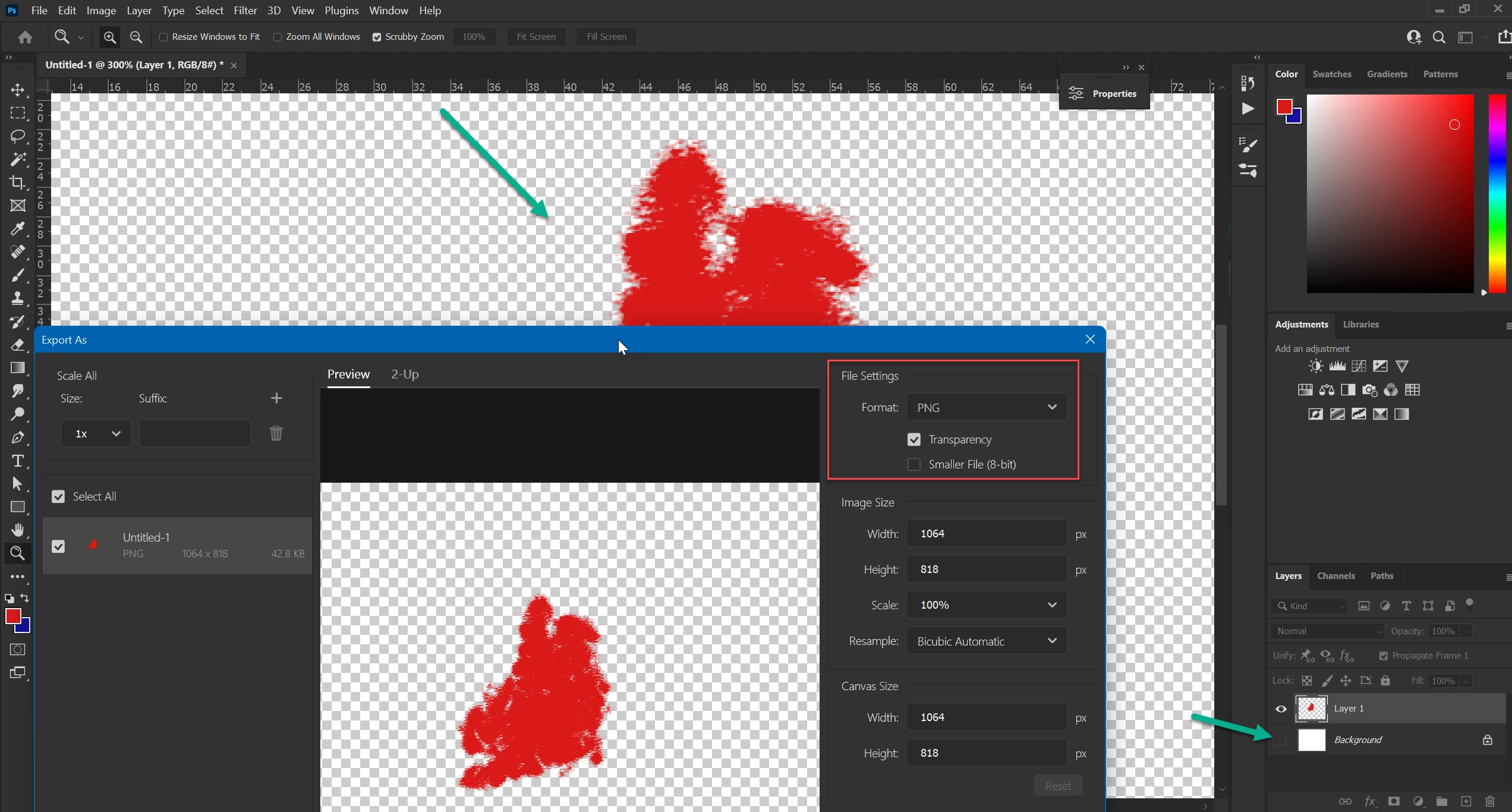
Ensure that logo in Photoshop does not have white background (turn off or delete Background layer). You should have transparency checkerboard around logo.


  • Go to File > Export > Export As 
  • Choose PNG from Format drop down list
  • Turn on Transparency
  • Turn on Smaller File if you have low color logo (only few colors)
  • Save logo as PNGand upload to your site


3 replies

Bojan Živković11378569
Community Expert
Community Expert
Apr 12, 2022 4:29 AM UTC

Ensure that logo in Photoshop does not have white background (turn off or delete Background layer). You should have transparency checkerboard around logo.


  • Go to File > Export > Export As 
  • Choose PNG from Format drop down list
  • Turn on Transparency
  • Turn on Smaller File if you have low color logo (only few colors)
  • Save logo as PNGand upload to your site


Translate
Participant
Apr 13, 2022 4:41 PM UTC

Thanks for sharing the details and complete guidance with screenshoot. Now I have designed and exported logo for [weblink removed by moderator]  in png formate and its working fine. 


Translate
jane-e
Community Expert
Community Expert
Apr 11, 2022 9:05 PM UTC

Hi @Santana23998455eixp 

You didn't say what file format you are using for the web graphic.

  • The JPEG format does not support transparency and will fill in with a white background.
  • The PNG format will support transparency if it is in the original file.

Does that answer your question? If not, please clarify.


Jane


Translate