
danielw82568843
Participating Frequently
January 18, 2018
Answered

Lost all my square brushes

  • January 18, 2018
  • 3 replies
  • 16959 views

I uninstalled 2017 and reinstalled 2018 and all the square brushes are gone. It's hard to even find load brushes because they changed the terminology to Import Brushes. I even imported a 'megapack' but it doesn't have any squares in it.

Thank You
    This topic has been closed for replies.
    Correct answer Jeff Arola

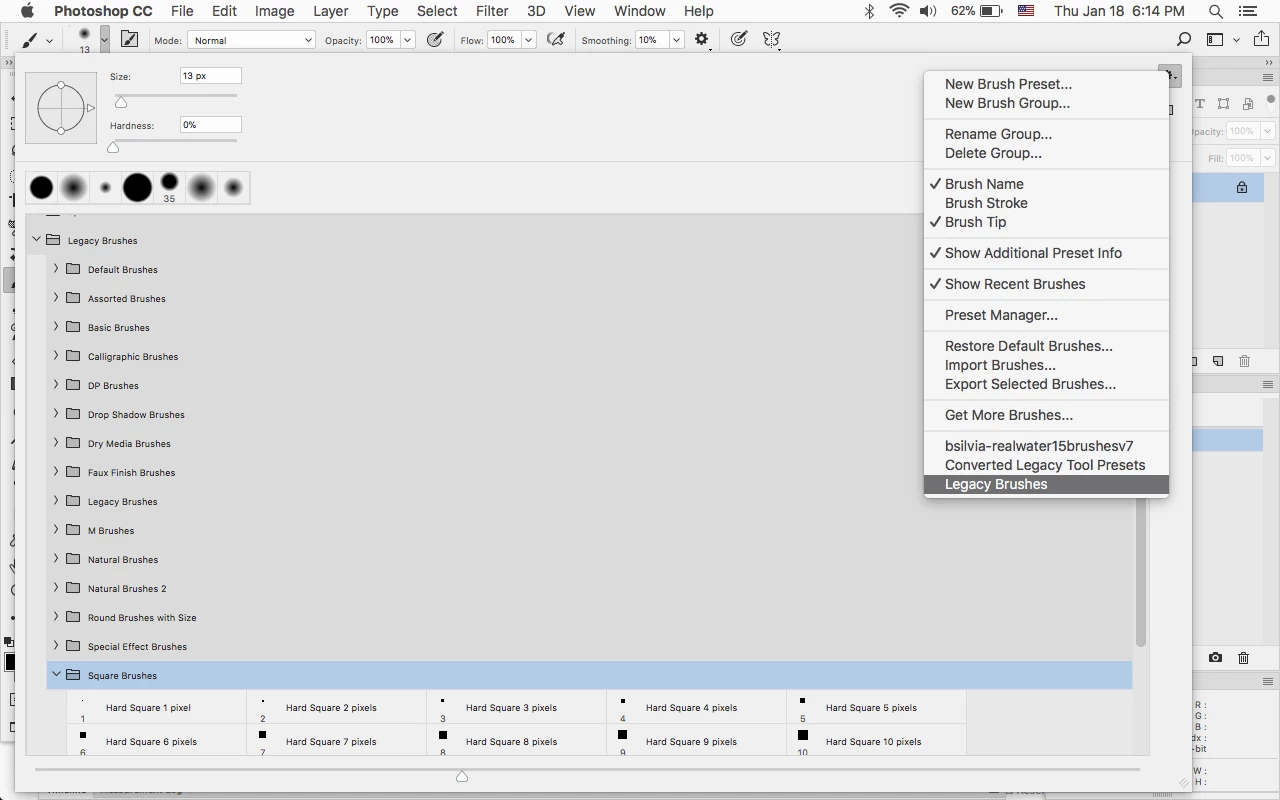
    Load the Legacy Brushes, which has the Square Brushes set.

    3 replies

    Participant
    January 28, 2019

    THANK YOU

    October 11, 2018

    This still didn't work for me. I hit Legacy Brush and Restore the Converted Legacy Tool Presets Brush Set to the list of Brush Presets? and still couldn't find square brushes.

    jane-e
    Community Expert
    Community Expert
    October 11, 2018

    When you load the Legacy Brushes, it will create a folder in your Brushes panel called "Legacy Brushes". If necessary, collapse the other panels until you see it. Then expand the folder for Legacy Brushes. Look toward the bottom, as they will be in alphabetical order.

    If you still don't see them, show a screen shot of your Brushes panel with the folders collapsed.

    Does this work?

    Jeff Arola
    Community Expert
    Jeff ArolaCommunity ExpertCorrect answer
    Community Expert
    January 18, 2018

    Load the Legacy Brushes, which has the Square Brushes set.

    SandNotOil
    Participant
    June 19, 2019

    Thank you, this had been driving me bonkers.