

Zebra Jamie
Known Participant
March 29, 2020
Question

M: Marquee and Hand tool snapping to corners.

  • March 29, 2020
  • 19 replies
  • 7587 views

Hi Everyone.


Just to get this out of the way: I'm running Windows 10 (everything up to date), Photoshop CC 21.1.1, and an Ugee tablet (think poor-man's Cintiq).


When I launch photoshop to draw, things work fine for a while, but after about 20 mintes, when I use the hand tool (space, H, or by clicking on the tool) to move to another portion of the artwork, it starts snapping to the upper left. I could try dragging down, and it's even more up and left. If I keep trying to use the hand tool to move my view of the canvas, it ends up looking like this:
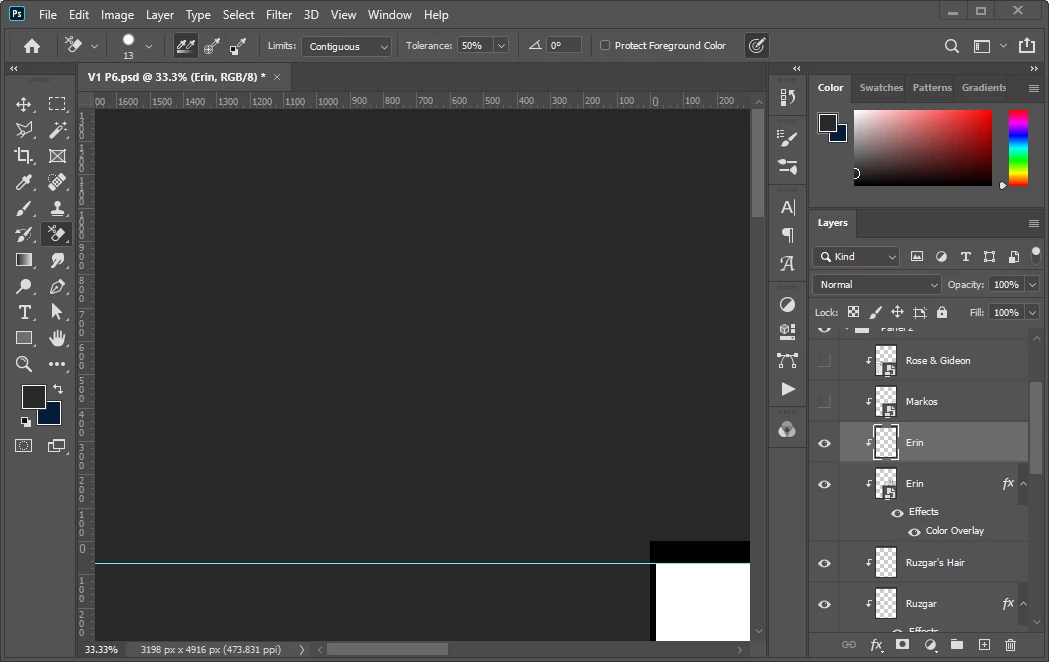
 

I've already tried turning on-and-off various swiping, scrolling, and overscrolling settings.


If I re-start the program, it works fine...for about 20 minutes, and then we're back to funky snapping. 


I noticed other hand-tool errors were solved with the update, but like I said, this version of Photoshop is as up-to-date as possible. I've updated pretty much everything on my computer.


Is there something I'm missing? Anyone else struggling with this glitch?


[Moderator note: PS-49375]

19 replies

Participant
May 31, 2020

I get the same thing. PS CC is updated to latest version and does it even when Wacom not plugged. So annoying, hard to work without panning. 

PECourtejoie
Community Expert
Community Expert
May 23, 2020

Hi, I see several mentions of 21.1.1, please update to the latest version, as fixes for tablet have been added, in 21.1.2 and 21.1.3: https://helpx.adobe.com/photoshop/kb/known-issues.html#painting-brush


See also this help document if you use a wacom: https://helpx.adobe.com/photoshop/kb/tablet-support-faq-photoshop.html

xavierl97647946
Participating Frequently
May 23, 2020

I'm having this exact problem too. I have Windows 10, latest version of PS. When I open a file, I'll be able to move around the canvas just fine but randomly I'll move around and it'll snap to off to the side of the canvas and not let me move from there. The navigator box lets me move around but I'd rather figure out how to fix this bug than have to move the canvas only with that box. 

PECourtejoie
Community Expert
Community Expert
May 23, 2020

Hi, is it on  21.1.3? using wintab, or windows ink? which tablet and driver version?

Oshiekuro
Participant
May 16, 2020

Did anyone solve this yet? 

I'm having the same problems and I have to restart PS every now and then. My photoshop is up to date and I'm using wacom intuos art pen and touch tablet (been using this for 3 years almost), and I'm working on my laptop (Lenovo Legion Y530-81FV008VFR). Hope this can be fix soon.

Inspiring
May 20, 2020

I am having the same problem with Photoshop version 21.1.3 and Windows 10 pro 64 bit.  I have to exit and come back in to solve the problem.

PECourtejoie
Community Expert
Community Expert
May 23, 2020

Hello, using which tablet? and which tablet version? this issue is supposed to be fixed in 21.1.2: 

https://helpx.adobe.com/photoshop/kb/known-issues.html#painting-brush


If you still experience it, please post a thread that mentions top left and 21.1.3 in its title on the https://feedback.photoshop.com site, watched by Adobe staff. Make sure to provide as many relevant details as possible.

Participant
May 11, 2020

Experiencing the same issue: Hand tool causes the whole canvas to snap up into the corner (mines the upper-righthand corner). It happens when I use spacebar, h, manually select the tool, use the hotkeys programed into my wacom EK controller,  and in every photoshop screen mode. Just noticed it in the last week or so. Restarting PS or my computer temporarily fixes it.

PS version 21.1.1 20200312.r.121

Windows 10 pro v.1909 update 18363.815

Cintiq Pro 24 (non touch) as primary

Geforce Game Reay Driver 445.87

blah blah blah really beefy computer with a ton of perf overhead 

PECourtejoie
Community Expert
Community Expert
May 23, 2020

Hello, did you update to 21.1.3? which tablet driver version?

Participant
May 27, 2020

Heyo, Ive updated all my Adobe products to the latest and also updated my wacom drivers to 6.3.39-1

Havent seen the issue pop up again, but it was pretty random when it did. I will pop back to this thread if I notice it again.

Battlefight
Participant
May 9, 2020

Having the same issue with a similar set-up (cintiq, photoshop 21.1.2).  Has anyone figured anything out?

Known Participant
April 20, 2020

I am having the same issue. Started about a month ago, fwiw. Current version is 21.1.2, Windows 10 Enterprise, version 1903, using a Cintiq Pro 24 inch (though bug seems screen agnostic). Similar conditions to OP, with the issue starting after about 30 mins of working (maybe related to number of history states?), and reverting to proper function on restart.

Known Participant
April 21, 2020

Added behavior: The marquee tool will snap from the point of origin to the lower right corner of the document, regardless of the actual dragged selection.

Video of bug in action here:

https://vimeo.com/410006137

Participant
April 18, 2020

I am having the same exact issue, also when I use the eye dropper tool in aonther PS window, it selects the color and then gives me the same tone in grey. Very Frustrating. 

PECourtejoie
Community Expert
Community Expert
May 23, 2020

Hello, did you update to 21.1.3? which tablet and brand, using windows ink or Wintab?

mglush
Community Expert
Community Expert
March 29, 2020

Hi!

Since I work on a Mac, I am not sure how to solve this issue on Windows. There have been similar problems with the Mac OS and this issue too and it has been an incompatibility with the latest version of PS and Catalina. Have you upgraded your system software lately? Do you have an older version of PS installed that you can test and see if you are having the same issue?

Michelle