schafsmann
Participating Frequently
November 28, 2019
Répondu

macOS Catalina: Helvetica Regular is missing

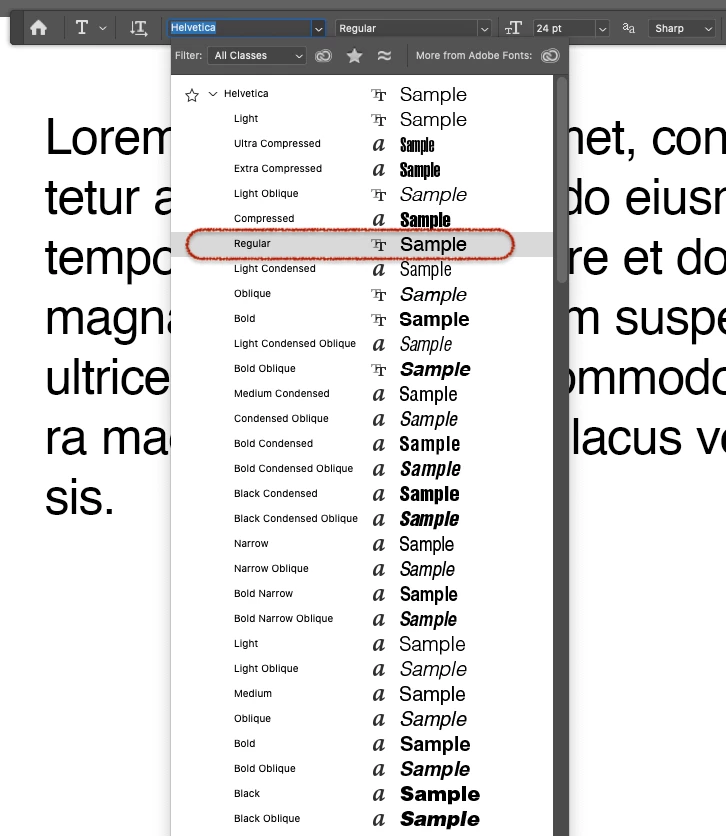
In Photoshop Helvetica Regular is missing, and cannot be selected from drop down menus. The font is there and works in any other application. In Adobe Illustrator, too!

Any ideas?

Ce sujet a été fermé aux réponses.
Meilleure réponse par silk-m

Hi,

The following methods are irregular and I will not be responsible for any troubles.


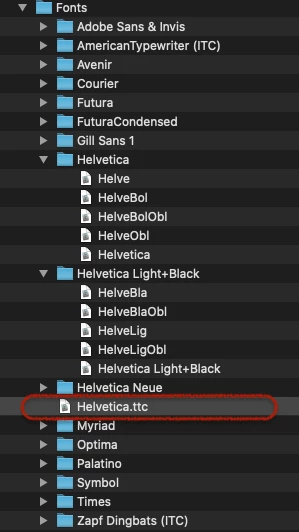
Copy "Helvetica.ttc" from the system font folder to the following location.

/Library/Application Support/Adobe/Fonts/Helvetica.ttc 

You can use Helvetica Regular with macOS Catalina 10.15.1 + Photoshop 21.0.1.

If the problem is corrected by updating macOS Catalina, please remove Helvetica.ttc.


2 commentaires

silk-m
Community Expert
silk-mCommunity ExpertRéponse
Community Expert
November 29, 2019

Hi,

The following methods are irregular and I will not be responsible for any troubles.


Copy "Helvetica.ttc" from the system font folder to the following location.

/Library/Application Support/Adobe/Fonts/Helvetica.ttc 

You can use Helvetica Regular with macOS Catalina 10.15.1 + Photoshop 21.0.1.

If the problem is corrected by updating macOS Catalina, please remove Helvetica.ttc.


--Susumu Iwasaki
schafsmann
Participating Frequently
November 29, 2019

I'll give that a try. Hower there is no /Library/Application Support/Adobe/Fonts/ folder...

silk-m
Community Expert
Community Expert
November 29, 2019

You should create a Fonts folder.


--Susumu Iwasaki
gener7
Community Expert
Community Expert
November 29, 2019

Have you upgraded to 10.15.1 yet? Yes it's a documented bug, was supposed to have been fixed:

https://feedback.photoshop.com/photoshop_family/topics/ps-20-0-7-on-macos-10-15-helvetica-regular-doesnt-appear-in-text-tool

Also be sure Photoshop is updated as well.

If not, try CC 2019 and by all means join the above discussion, this is where the developers listen in.


Gene

schafsmann
Participating Frequently
November 29, 2019

Thank you Gene, I'm on a recent system and just did a fresh PS install yesterday. All up-to-date. Problem persits on my iMac as well as my Macbook-Pro.

Thanks for pointing me to the bug-report where I posted this issue as well. Seems like I am not alone here...