
MahaB82A
Legend
October 1, 2025
Answered

Make multiple image from one image

  • October 1, 2025
  • 2 replies
  • 245 views

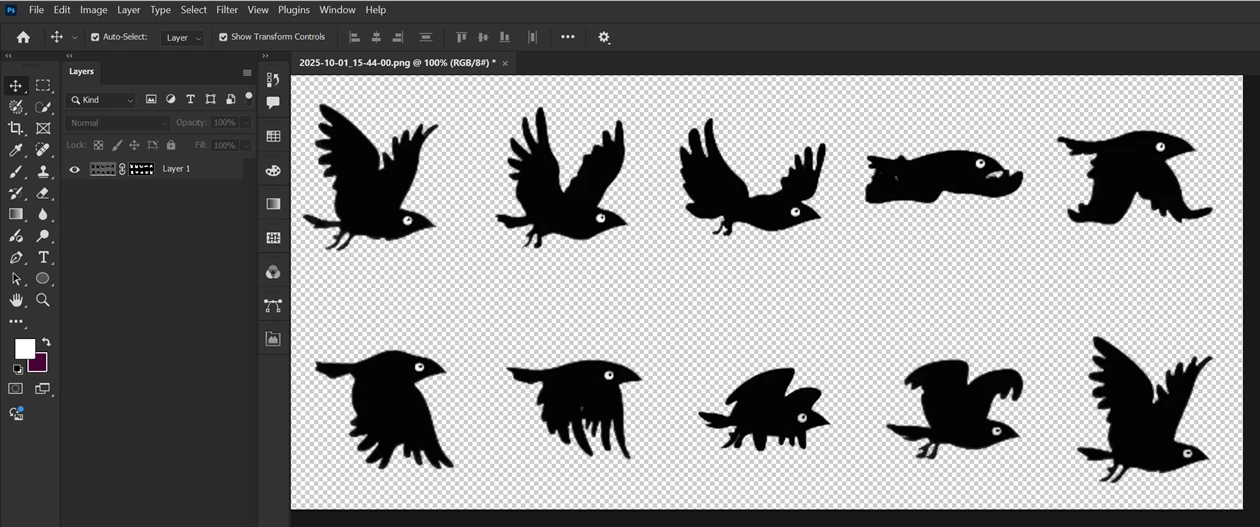
I have a PNG file with 10 bird images gradually chaging it poses. This PNG file is masked to hide it's background. All 10 birds are in one image. Is it possible to make it 10 separate images.? That means 10 individual imges. 
 

Correct answer Stephen Marsh

I'd use a script to separate each isolated element to a new layer, then select all layers and Export As.


https://photoshopscripts.wordpress.com/2012/12/09/split-to-layers/


2 replies

Stephen Marsh
Community Expert
Stephen MarshCommunity ExpertCorrect answer
Community Expert
October 1, 2025

I'd use a script to separate each isolated element to a new layer, then select all layers and Export As.


https://photoshopscripts.wordpress.com/2012/12/09/split-to-layers/


MahaB82A
MahaB82AAuthor
Legend
October 1, 2025

@Stephen Marsh

Thanks for the help. To save each layer separately in PNG form, I used crop tool. Is there any simple method to do same in a one go? 

Stephen Marsh
Community Expert
Community Expert
October 2, 2025
quote

@Stephen Marsh

Thanks for the help. To save each layer separately in PNG form, I used crop tool. Is there any simple method to do same in a one go? 


By @MahaB82A


Unless I'm missing something, as I said,  I would select all layers and Export As.

Community Manager
October 1, 2025

Hi @MahaB82A, thanks for reaching out.

There are probably a few ways to go about this, but one idea that comes to mind is creating a document with artboards, and placing a cropped version of each bird on its own artboard. That way, you can keep everything organized and easily export each one if needed.
Here’s a helpful link to get started: https://adobe.ly/4o3sCab
Let me know if that works for you or if you'd like to explore other options!
Alek

*(If you mention me with an @, like @Aleke, I’ll get a notification and can respond faster.)*
