Doug.S
Inspiring
Jun 28, 2025 2:42 PM UTC
Answered

make seamless

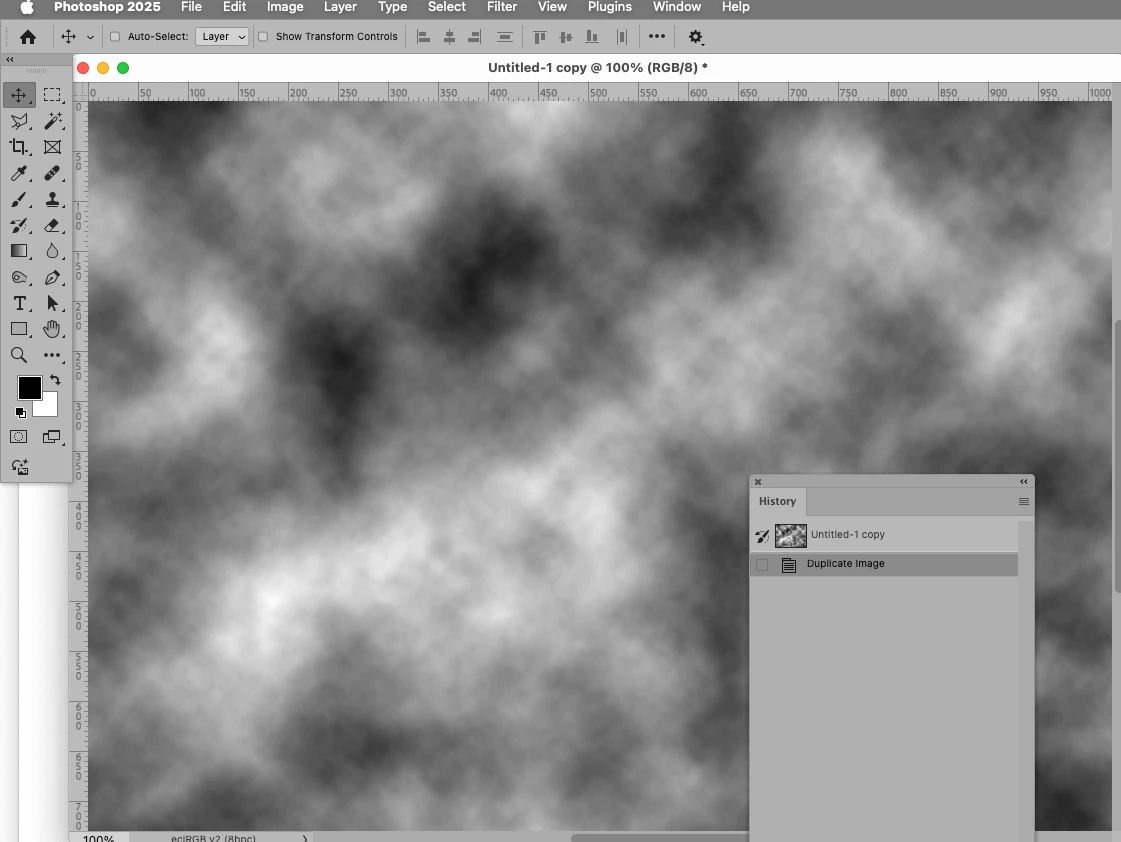
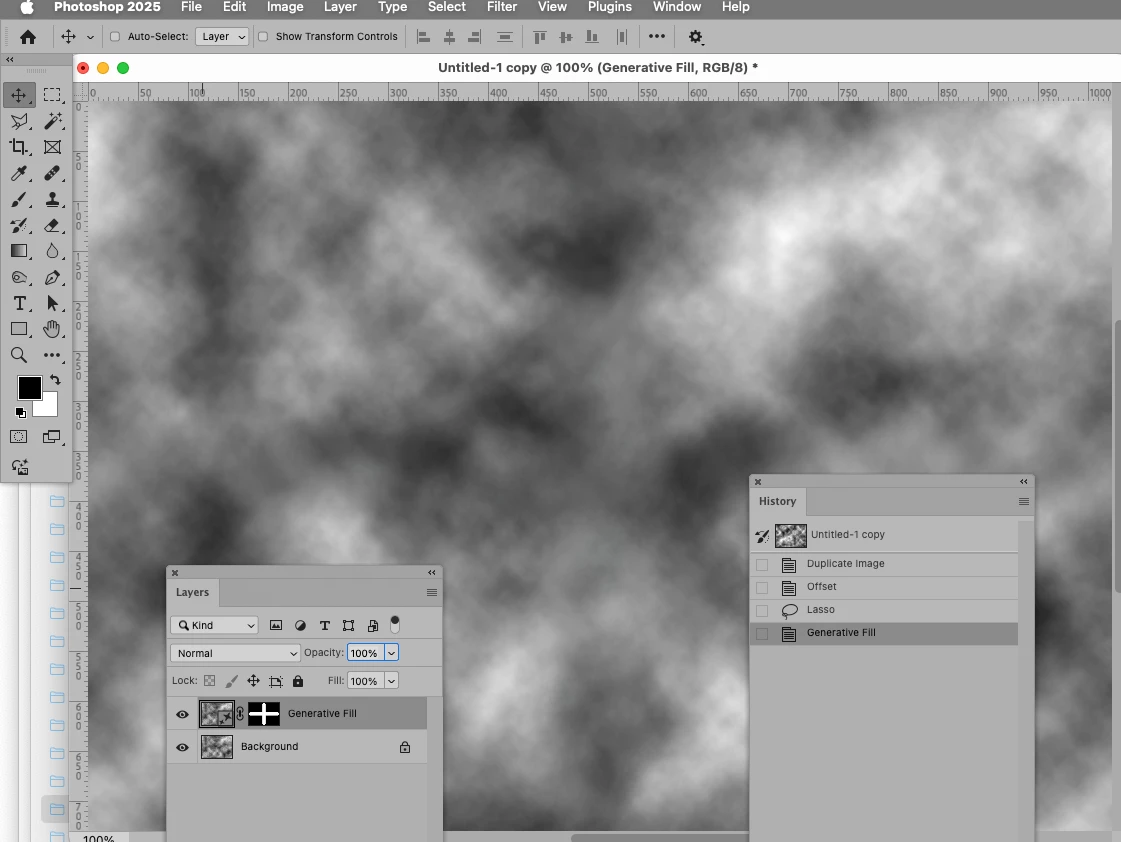
Suggest add a simple one button click to convert a selected image into a seamless image/texture. Probably can use existing but add some AI to finish the cleanup to produce a fast easy final result.

c.pfaffenbichler
c.pfaffenbichlerCorrect answer
Community Expert
Jul 2, 2025 3:07 PM UTC

// 2025, use it at your own risk;
if (app.documents.length > 0) {
var theOffset = 40;
var myDocument = app.activeDocument;
var originalRulerUnits = app.preferences.rulerUnits;
if (myDocument.width <= 1024 && myDocument.height <= 1024) {
if (myDocument.width > theOffset*4 && myDocument.height > theOffset*4) {
app.preferences.rulerUnits = Units.PIXELS;
var theW = myDocument.width/2;
var theH = myDocument.height/2;
// offset;
myDocument.activeLayer.applyOffset(theW, theH, OffsetUndefinedAreas.WRAPAROUND);
// selection;
var theArray = [[theW, 0], [theW+theOffset, theOffset], [theW+theOffset, theH-theOffset], [theW*2-theOffset, theH-theOffset], [theW*2, theH], [theW*2-theOffset, theH+theOffset], [theW+theOffset, theH+theOffset], [theW+theOffset, theH*2-theOffset], [theW, theH*2], [theW-theOffset, theH*2-theOffset], 
[theW-theOffset, theH+theOffset], [theOffset, theH+theOffset], [0, theH], [theOffset, theH-theOffset], [theW-theOffset, theH-theOffset], [theW-theOffset, theOffset]];
polygonalLassoTool (theArray, false, false);
// generative fill;
generativeFill("");
} else {alert ("too small")}
} else {alert ("too big")}
// reset;
app.preferences.rulerUnits = originalRulerUnits;
};
////// polygonal lasso tool //////
function polygonalLassoTool (theArray, theSubtract, theAdd) {
if (theSubtract == false || theSubtract == undefined) {var idset = stringIDToTypeID( "set" )}
else {var idset = stringIDToTypeID( "subtractFrom" )};
if (theAdd == true) {var idset = stringIDToTypeID( "addTo" )};
var desc15 = new ActionDescriptor();
var ref2 = new ActionReference();
ref2.putProperty( stringIDToTypeID( "channel" ), stringIDToTypeID( "selection" ) );
desc15.putReference( stringIDToTypeID( "null" ), ref2 );
var desc16 = new ActionDescriptor();
var list2 = new ActionList();
for (var m = 0; m < theArray.length; m++) {
var desc17 = new ActionDescriptor();
var idpixelsUnit = stringIDToTypeID( "pixelsUnit" );
desc17.putUnitDouble( stringIDToTypeID( "horizontal" ), idpixelsUnit, theArray[m][0] );
desc17.putUnitDouble( stringIDToTypeID( "vertical" ), idpixelsUnit, theArray[m][1] );
list2.putObject( stringIDToTypeID( "paint" ), desc17 );
};
desc16.putList( stringIDToTypeID( "points" ), list2 );
desc15.putObject( stringIDToTypeID( "to" ), stringIDToTypeID( "polygon" ), desc16 );
var idantiAlias = stringIDToTypeID( "antiAlias" );
desc15.putBoolean( idantiAlias, false );
executeAction( idset, desc15, DialogModes.NO );
};
////// generative fill //////
function generativeFill (theString) {
var idnull = stringIDToTypeID( "null" );
var idclio = stringIDToTypeID( "clio" );
var desc8 = new ActionDescriptor();
var ref2 = new ActionReference();
ref2.putEnumerated( stringIDToTypeID( "document" ), stringIDToTypeID( "ordinal" ), stringIDToTypeID( "targetEnum" ) );
desc8.putReference( idnull, ref2 );
desc8.putString( stringIDToTypeID( "prompt" ), "" );
desc8.putString( stringIDToTypeID( "serviceID" ), "clio" );
var idmode = stringIDToTypeID( "mode" );
var idsyntheticFillMode = stringIDToTypeID( "syntheticFillMode" );
var idinpaint = stringIDToTypeID( "inpaint" );
desc8.putEnumerated( idmode, idsyntheticFillMode, idinpaint );
var desc9 = new ActionDescriptor();
var desc10 = new ActionDescriptor();
desc10.putString( stringIDToTypeID( "gi_PROMPT" ), theString );
desc10.putString( stringIDToTypeID( "gi_MODE" ), "ginp" );
desc10.putInteger( stringIDToTypeID( "gi_SEED" ), -1 );
desc10.putInteger( stringIDToTypeID( "gi_NUM_STEPS" ), -1 );
desc10.putInteger( stringIDToTypeID( "gi_GUIDANCE" ), 6 );
desc10.putInteger( stringIDToTypeID( "gi_SIMILARITY" ), 0 );
desc10.putBoolean( stringIDToTypeID( "gi_CROP" ), false );
desc10.putBoolean( stringIDToTypeID( "gi_DILATE" ), false );
desc10.putInteger( stringIDToTypeID( "gi_CONTENT_PRESERVE" ), 0 );
desc10.putBoolean( stringIDToTypeID( "gi_ENABLE_PROMPT_FILTER" ), true );
desc10.putBoolean( stringIDToTypeID( "dualCrop" ), true );
desc10.putString( stringIDToTypeID( "gi_ADVANCED" ), "{\"enable_mts\":true}" );
desc9.putObject( idclio, idclio, desc10 );
desc8.putObject( stringIDToTypeID( "serviceOptionsList" ), idnull, desc9 );
executeAction( stringIDToTypeID( "syntheticFill" ), desc8, DialogModes.NO );
};

14 replies

davescm
Community Expert
Community Expert
Jul 4, 2025 9:26 AM UTC

As an aside, Adobe Sampler has the tools (including AI driven tools) to make seamless patterns and full materials from 2D images.

Dave

Translate
c.pfaffenbichler
Community Expert
Community Expert
Jul 4, 2025 6:02 AM UTC

Save the code as a txt-file, change the extension to .jsx and copy it into Photoshop’s Presets/Scripts-Folder; after restarting Photoshop it should be available under File > Scripts and can be assigned a Shortcut or used in an Action. 

Translate
Participating Frequently
Jul 4, 2025 5:45 PM UTC

Thanks for the coding work.  Will give it a try per your help. Much appreciated and I hope others will use too.

Translate
Participating Frequently
Jul 3, 2025 10:03 PM UTC

I copied the text and see it would be a script not a .atn.

What is best way to create a Ps script using the copied text strings?

Translate
c.pfaffenbichler
Community Expert
c.pfaffenbichlerCommunity ExpertCorrect answer
Community Expert
Jul 2, 2025 3:07 PM UTC

// 2025, use it at your own risk;
if (app.documents.length > 0) {
var theOffset = 40;
var myDocument = app.activeDocument;
var originalRulerUnits = app.preferences.rulerUnits;
if (myDocument.width <= 1024 && myDocument.height <= 1024) {
if (myDocument.width > theOffset*4 && myDocument.height > theOffset*4) {
app.preferences.rulerUnits = Units.PIXELS;
var theW = myDocument.width/2;
var theH = myDocument.height/2;
// offset;
myDocument.activeLayer.applyOffset(theW, theH, OffsetUndefinedAreas.WRAPAROUND);
// selection;
var theArray = [[theW, 0], [theW+theOffset, theOffset], [theW+theOffset, theH-theOffset], [theW*2-theOffset, theH-theOffset], [theW*2, theH], [theW*2-theOffset, theH+theOffset], [theW+theOffset, theH+theOffset], [theW+theOffset, theH*2-theOffset], [theW, theH*2], [theW-theOffset, theH*2-theOffset], 
[theW-theOffset, theH+theOffset], [theOffset, theH+theOffset], [0, theH], [theOffset, theH-theOffset], [theW-theOffset, theH-theOffset], [theW-theOffset, theOffset]];
polygonalLassoTool (theArray, false, false);
// generative fill;
generativeFill("");
} else {alert ("too small")}
} else {alert ("too big")}
// reset;
app.preferences.rulerUnits = originalRulerUnits;
};
////// polygonal lasso tool //////
function polygonalLassoTool (theArray, theSubtract, theAdd) {
if (theSubtract == false || theSubtract == undefined) {var idset = stringIDToTypeID( "set" )}
else {var idset = stringIDToTypeID( "subtractFrom" )};
if (theAdd == true) {var idset = stringIDToTypeID( "addTo" )};
var desc15 = new ActionDescriptor();
var ref2 = new ActionReference();
ref2.putProperty( stringIDToTypeID( "channel" ), stringIDToTypeID( "selection" ) );
desc15.putReference( stringIDToTypeID( "null" ), ref2 );
var desc16 = new ActionDescriptor();
var list2 = new ActionList();
for (var m = 0; m < theArray.length; m++) {
var desc17 = new ActionDescriptor();
var idpixelsUnit = stringIDToTypeID( "pixelsUnit" );
desc17.putUnitDouble( stringIDToTypeID( "horizontal" ), idpixelsUnit, theArray[m][0] );
desc17.putUnitDouble( stringIDToTypeID( "vertical" ), idpixelsUnit, theArray[m][1] );
list2.putObject( stringIDToTypeID( "paint" ), desc17 );
};
desc16.putList( stringIDToTypeID( "points" ), list2 );
desc15.putObject( stringIDToTypeID( "to" ), stringIDToTypeID( "polygon" ), desc16 );
var idantiAlias = stringIDToTypeID( "antiAlias" );
desc15.putBoolean( idantiAlias, false );
executeAction( idset, desc15, DialogModes.NO );
};
////// generative fill //////
function generativeFill (theString) {
var idnull = stringIDToTypeID( "null" );
var idclio = stringIDToTypeID( "clio" );
var desc8 = new ActionDescriptor();
var ref2 = new ActionReference();
ref2.putEnumerated( stringIDToTypeID( "document" ), stringIDToTypeID( "ordinal" ), stringIDToTypeID( "targetEnum" ) );
desc8.putReference( idnull, ref2 );
desc8.putString( stringIDToTypeID( "prompt" ), "" );
desc8.putString( stringIDToTypeID( "serviceID" ), "clio" );
var idmode = stringIDToTypeID( "mode" );
var idsyntheticFillMode = stringIDToTypeID( "syntheticFillMode" );
var idinpaint = stringIDToTypeID( "inpaint" );
desc8.putEnumerated( idmode, idsyntheticFillMode, idinpaint );
var desc9 = new ActionDescriptor();
var desc10 = new ActionDescriptor();
desc10.putString( stringIDToTypeID( "gi_PROMPT" ), theString );
desc10.putString( stringIDToTypeID( "gi_MODE" ), "ginp" );
desc10.putInteger( stringIDToTypeID( "gi_SEED" ), -1 );
desc10.putInteger( stringIDToTypeID( "gi_NUM_STEPS" ), -1 );
desc10.putInteger( stringIDToTypeID( "gi_GUIDANCE" ), 6 );
desc10.putInteger( stringIDToTypeID( "gi_SIMILARITY" ), 0 );
desc10.putBoolean( stringIDToTypeID( "gi_CROP" ), false );
desc10.putBoolean( stringIDToTypeID( "gi_DILATE" ), false );
desc10.putInteger( stringIDToTypeID( "gi_CONTENT_PRESERVE" ), 0 );
desc10.putBoolean( stringIDToTypeID( "gi_ENABLE_PROMPT_FILTER" ), true );
desc10.putBoolean( stringIDToTypeID( "dualCrop" ), true );
desc10.putString( stringIDToTypeID( "gi_ADVANCED" ), "{\"enable_mts\":true}" );
desc9.putObject( idclio, idclio, desc10 );
desc8.putObject( stringIDToTypeID( "serviceOptionsList" ), idnull, desc9 );
executeAction( stringIDToTypeID( "syntheticFill" ), desc8, DialogModes.NO );
};

Translate
Participating Frequently
Jul 1, 2025 4:06 PM UTC

I'll give it a try.

Translate
c.pfaffenbichler
Community Expert
Community Expert
Jul 1, 2025 2:48 PM UTC

How about those screenshots? 


If you usually work at 1024x1024 you could (as a work-around) create an Action or a Script to create a Selection along the offset-borders (with »pointy ends« at the Canvas edges) and apply Generative Fill. 

Translate
Participating Frequently
Jun 30, 2025 12:50 PM UTC

typical 1024 x 1024

sometimes smaller like 256 x 256, occasionally 2x bigger

depends on use and image size

Usually as paper or texture for painting or fill object

Sometimes for 3D

Both color and/or grayscale

Usually RGB 8 bit but often 16 bit if being adjusted/modified

Translate
c.pfaffenbichler
Community Expert
Community Expert
Jun 30, 2025 9:07 AM UTC

What pixel dimensions are your Patterns usually? 

Translate
c.pfaffenbichler
Community Expert
Community Expert
Jun 30, 2025 5:59 AM UTC

Please explain and post screenshots/mock-ups to illustrate. 

Translate
Participating Frequently
Jun 29, 2025 5:03 PM UTC

Illustrator can create seamless stuff well, but not easily convert bitmaps.

Translate