Participating Frequently
April 25, 2020
Answered

Making a 3 x 3 Grid

Salutations, 

I am a new user and well I'm doing my best to get accustomed to this and the learning curve. I'm currently trying to make a 3x3 grid with the black boarders. This is the project I'm currently working on, I have tried using the single row marquee tool and have been watching videos and nothing has been working. Still I must be paitent and well if anyone can give me the proiper insturctions it would be greatly appreciated.


[Images removed by moderator, as unsuitable for all ages.]



Nancy OShea
Nancy OSheaCorrect answer
Community Expert
April 25, 2020

In latest version of Photoshop CC,

1. Go to to File > New.  Create a new canvas that is 3000px X 3000px and 300 ppi.

2. Go to View > Show > Grid.

3. Go to View > Snap to > Grid.

4. Go to Edit > Preferences > Guides, Grid & Slices.

5. Change the Grid settings to a Grid Line every 1000 pixels and subdivisions 1.  Hit OK.


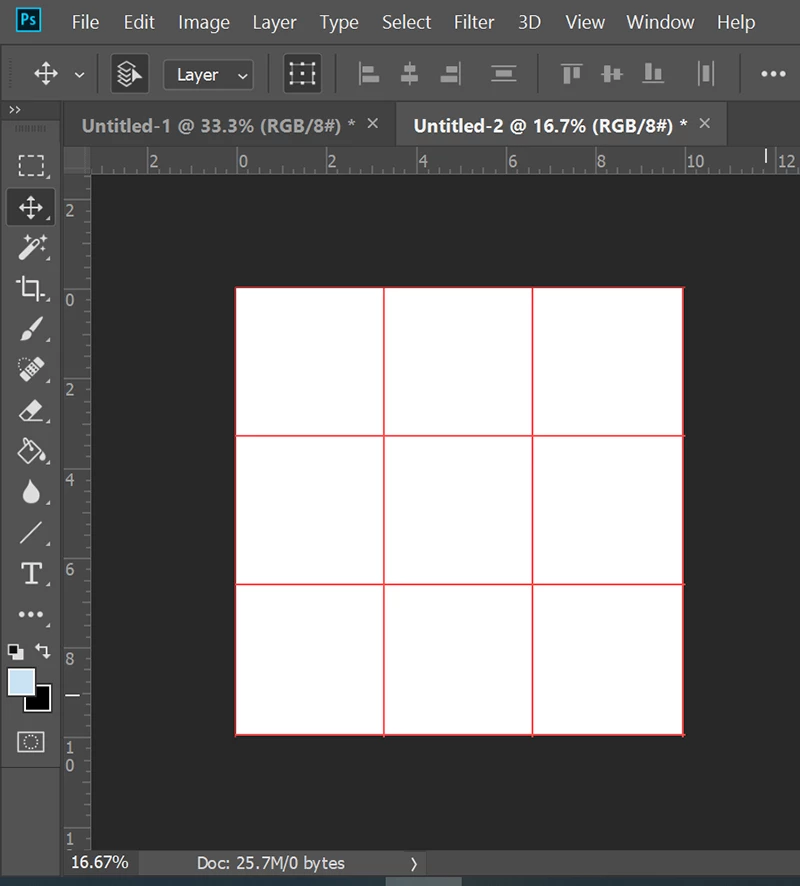
You should end up with something that looks like this.  To remove the appearance of Grid lines, hit Ctrl/Cmd + H.


Nancy O'Shea— Product User & Community Expert

3 replies

Conrad_C
Community Expert
Community Expert
April 26, 2020

This can be done in as few as two steps:

  1. Choose View > New Guide Layout, and set it to 3 columns by 3 rows.


  2. With the Line tool and/or Rectangle tool (the shape tools, not the marquee selection tools) set to a black stroke, draw along the guides. 
Translate
Nancy OShea
Community Expert
Nancy OSheaCommunity ExpertCorrect answer
Community Expert
April 25, 2020

In latest version of Photoshop CC,

1. Go to to File > New.  Create a new canvas that is 3000px X 3000px and 300 ppi.

2. Go to View > Show > Grid.

3. Go to View > Snap to > Grid.

4. Go to Edit > Preferences > Guides, Grid & Slices.

5. Change the Grid settings to a Grid Line every 1000 pixels and subdivisions 1.  Hit OK.


You should end up with something that looks like this.  To remove the appearance of Grid lines, hit Ctrl/Cmd + H.


Translate
Nancy O'Shea— Product User & Community Expert
Nancy OShea
Community Expert
Community Expert
April 25, 2020

This is a family-oriented, public forum.


I assume this is a Photoshop question.  Which version of Photoshop do you have?

What size is your canvas?


Translate
Nancy O'Shea— Product User & Community Expert