
Known Participant
January 15, 2020
Answered

Making Photoshop the default for opening RAW files

  • January 15, 2020
  • 2 replies
  • 2602 views

This isn't critical, but it's a pain. I have this other software I use from time to time called On1. Since I installed it my RAW open in this software instead of Photoshop as the default. Does anyone know how to set things so that Photoshop will be the default for opening my RAW files?

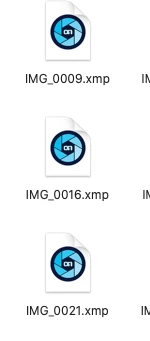
I've attached a shot of what my RAW files look in a folder these days. I know these say .xmp files. That's just because I've worked them. When I first open RAW files they have the same On1 logo on them. Not a big deal, but annoying. In order to open these in Photoshop I have right click and choose Photoshop.

Thanks...
This topic has been closed for replies.
Correct answer priyankas62935545

Kindly follow the below link 

https://www.photoshopessentials.com/basics/default-image-editor-in-windows/

2 replies

priyankas62935545Correct answer
Adobe Employee
January 15, 2020
Known Participant
January 15, 2020

That did it! Thanks!

lambiloon
Community Expert
Community Expert
January 15, 2020

Hi right click on file then choose open with choose photoshop then you see a option there use this as default application....Regards

Ali Sajjad / Graphic Design Trainer / Freelancer / Adobe Certified Professional
Known Participant
January 15, 2020

Hi, thanks for getting back to me so quickly. I think I'm doing something wrong. I've attached a short video of the process I'm doing. I"m not seeing the "make default" option.

Thanks...

Adobe Employee
January 15, 2020

Right-click on a file that uses the file type you'd like to change the default for.

Click on Get Info in the pop-up.

Click Open With if the section isn't already expanded.

Click the dropdown and choose an app.

Click Change All...

Click Continue when the Finder asks you if you're sure.