
Rivor
Participating Frequently
January 1, 2020
Answered

Making the Brush Tool more obvious in the work-space in Photoshop

  • January 1, 2020
  • 1 reply
  • 345 views

I have difficulty being able to see the brush tool in the workspace. Irrespective of the size of the brush, I lose easy visibility of the fine outline circle for the location of the brush on the workspace. Is there something that I can do to make the position of the brush more obvious?


{Thread renamed by moderator}
This topic has been closed for replies.
Correct answer Sahil.Chawla

Hi there,


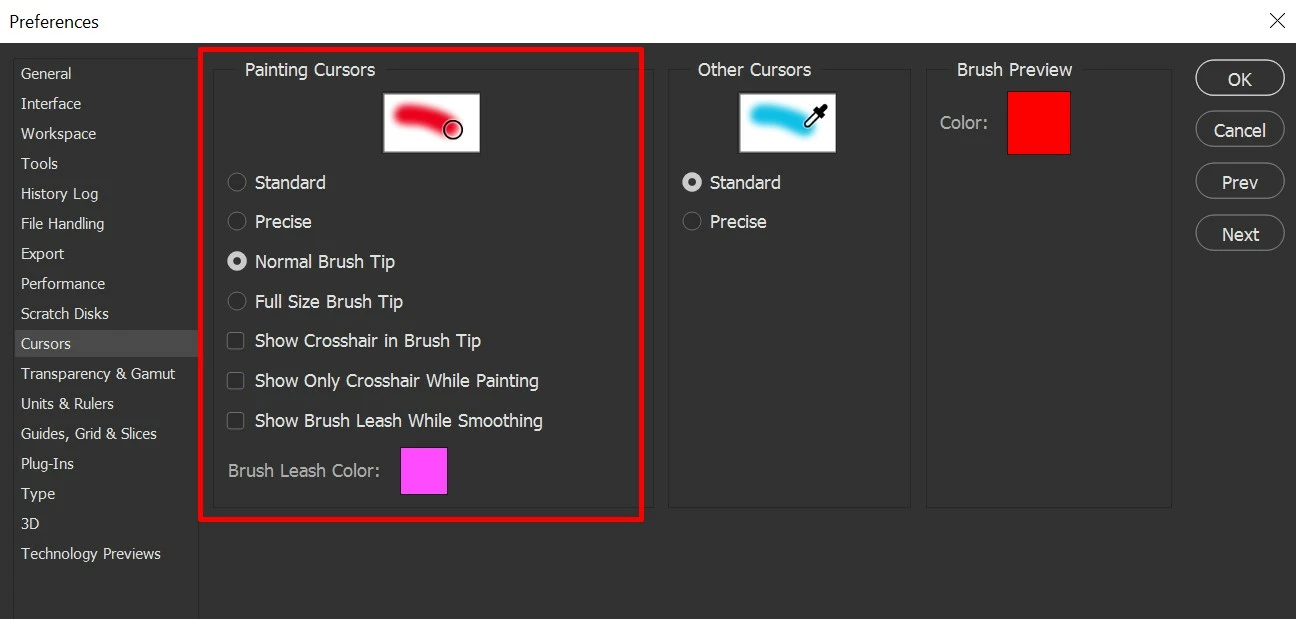
You can change the brush tool tip by going into Photoshop's Preferences > Cursors as shown in the image below:


You can check the option to show Crosshair and try different tip settings like Full, Precise or Standard.

Let us know if it helps.
Regards,
Sahil


1 reply

Sahil.Chawla
Adobe Employee
Sahil.ChawlaCorrect answer
Adobe Employee
January 1, 2020

Hi there,


You can change the brush tool tip by going into Photoshop's Preferences > Cursors as shown in the image below:


You can check the option to show Crosshair and try different tip settings like Full, Precise or Standard.

Let us know if it helps.
Regards,
Sahil


Rivor
RivorAuthor
Participating Frequently
January 3, 2020

Hi Sahil,


Following your guidance I changed the settings to show the crosshair and for a full sized tip. With those changes it has made it easier for me to see the brush in the workspace. Thank you. 


Regards,

Robert