

Trevor.Dennis
Community Expert
Community Expert
October 15, 2018
Question

MAX 2018 & Photoshop CC 2019

  • October 15, 2018
  • 5 replies
  • 4819 views

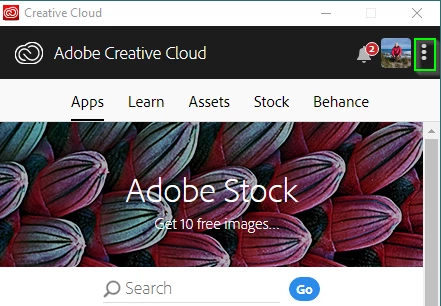
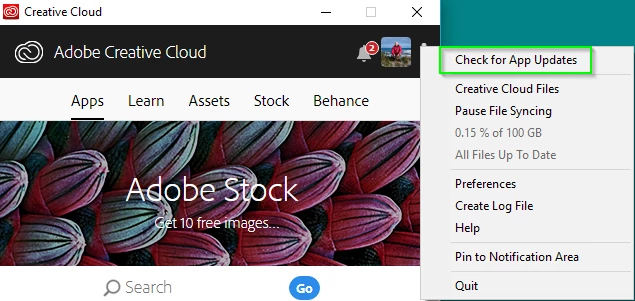
Adobe Max is underway, and the next major update of the CC apps is imminent, so I thought I'd start a thread to keep all the information together in one place.  I 'think' the updates start rolling out on the day that the Sneak Peeks are presented, and that is 5:30pm on Tuesday LA time.  The updates are rolled out by region to reduce load on the server, but you can force the update by signing out, and back in again to the CC Desktop Application Manager. Or, I imagine, just clicking on the Check for Updates link.  Note: I know that the sign out and in method works, but I am only guessing that the check for updates overrides the regional roll out.
You can get a heads up on what is happening at the MAX website and, by installing the Adobe MAX 2018 apps for IOS and Android.  You seem to be able to access the information without needing to sign  in with a MAX registration ID.

Check out MAX online  Adobe MAX—The Creativity Conference.  Which I am hoping means we can watch the keynotes streamed as they happen.  If you read this after MAX finishes on the 17th October, in previous years Jim at ProDesignTools has done an amazing job of  cataloging the sessions and putting up a table of direct links.  I think the easiest way to find the old information is via this thread that Janet Stoppee started last year.  I have the links in answer #5.  I'll post this years information as it becomes available.

________________________________________________________________________________________

If you use Premiere Pro, which uses CUDA for graphics acceleration, then you should  take a look at this link from the MAX > Blog > News page 

Important information on GPU-acceleration with CUDA and Apple Metal | Adobe Blog

The important thing is that Mac users will need OSX 10.13 or 10.14.  and CUDA 9.2 drivers, and Windows will need Windows 10, and NVIDIA 411.63 driver.  I don't think this is relevant to Photoshop, which AFAIK still use OpenGL and OpenCL, but I don't obsess over stuff like this, so those that do might know better.

________________________________________________________________________________________

Please put up  any relevant info  or comments you come across.  I'd like to post the Sneak Peeks here, and from what I hear, there are going to be a few comments after CC2019 goes out.  Perhaps we'll let folk do their moaning in another thread.   I know that Jane is in LA, and I think Chuck probably is, so if you are there and have any news, please share.

    This topic has been closed for replies.

    5 replies

    Community Expert
    October 15, 2018

    A lot of great announcements today.  I am anxious to get my hands on Photoshop for the iPad and Gemini to test them out and see what they're capable and if there's any lag with larger files

    Trevor.Dennis
    Community Expert
    Community Expert
    October 15, 2018

    DaveJCummings  wrote

    A lot of great announcements today.  I am anxious to get my hands on Photoshop for the iPad and Gemini to test them out and see what they're capable and if there's any lag with larger files

    I like the sound and idea of Gemini, but I'll wait  til I have had  hands on before getting too excited.  It looks too course from  the quick look I've had so far.

    Having said that, we know what can be achieved by finger painting on an iPad from that incredible Morgan Freeman painting Kyle Lambert did using Procreate.

    More information on the Photoshop 'What's New pagehttps://theblog.adobe.com/introducing-project-gemini/?red=a

    New and enhanced features | Latest release of Photoshop CC

    Timing can be a bitch sometimes.  I have to go to work, and two parcels that I have been waiting for weeks for, arrived from Amazon today.  I'll  be able to browse  at my work if it is quiet, and I'll be taking my Amazon parcels  with me to look at, and life goes on.

    Community Expert
    October 16, 2018

    I know. I’m anxious to get my hands on it and see if there’s any limitations in terms of file size and layers. It’s what kept me from really using Sketch until recently because of the file size limitations which they finally addressed this past year

    D Fosse
    Community Expert
    Community Expert
    October 15, 2018

    And as always, people are having major issues with file associations. The old version took them down with it, and they can't be restored to the new version.

    The whole problem is that the CC app installs the new version, and then removes the old ones. It needs to be the other way round.

    This first happened to me going from CS3 to 4. So it's not exactly a new problem. I know about it and know how to avoid it (always follow strict version sequence in, and reverse version sequence out) - but why does the CC app still do this by default?

    Community Expert
    October 15, 2018

    All the apps are updated already via CC.  Though I couldn't make it to MAX,  I can't wait to stream the keynotes.  I saw the Adobe twitter and various sites officially announce Photoshop for iOS and something called Gemini,  I can't wait to see these and more importantly I can't wait to try these out

    KShinabery212
    Community Expert
    Community Expert
    October 15, 2018

    Cheers!  I think this is quite an interesting post! 

    Let's connect on LinkedIn. https://www.linkedin.com/in/kshinabery/
    davescm
    Community Expert
    Community Expert
    October 15, 2018

    Good post Trevor

    A couple of reminders I would add:

    1. As with any update, operating system or application, don't update in the middle of a major project.

    2. When updating via the CC desktop app, you can select advanced options and then choose to keep the older version installed. That way you can run both alongside until you are happy that the new version is working correctly on your system.

    Dave

    Trevor.Dennis
    Community Expert
    Community Expert
    October 15, 2018

    Yes, that reminds me of a couple of points, and thanks for unmarking the thread as a question Dave.  

    If you have a lot of brush presets, you'll need to move or copy to the relevant CC 2019 folder — assuming the next release will be so called.

    Note:  If you don't choose to keep the old version, you will still have the Presets folders and contents.

    Mac

    Users/[user name]/Library/Preferences/Adobe Photoshop CC 2018 Settings/Brushes

    Windows

    Users/[user name]/AppData/Roaming/Adobe/Adobe Photoshop CC 2018/Adobe Photoshop CC 2018 Settings/Presets/Brushes

    The same applies to any other custom settings you have in the Presets folder hierarchy:

    ________________________________________________________________________

    If you have Windows and a tablet, and use the WinTab API, you'll need to copy 

    PSUSerConfig.txt

    From

    C:\Users\[User Name]\AppData\Roaming\Adobe\Adobe Photoshop CC 2018\Adobe Photoshop CC 2018 Settings\

    To

    C:\Users\[User Name]\AppData\Roaming\Adobe\Adobe Photoshop CC 2019\Adobe Photoshop CC 2019 Settings\

    _________________________________________________________________

    I am not sure if custom workspaces get copied across automatically, but if not, they live in the same folder  as the PSUserConfig.txt file.  I'm guessing that  the workspaces will include custom shortcuts and Toolbars, if they were saved with the workspace.

    Windows

    C:\Users\[User Name]\AppData\Roaming\Adobe\Adobe Photoshop CC 2018\Adobe Photoshop CC 2018 Settings\Workspaces\

    Mac

    Users/[user name]/Library/Preferences/Adobe Photoshop CS6 Settings/WorkSpacesUsers/[user name]/Library/Preferences/Adobe Photoshop CS6 Settings/WorkSpaces (Modified)

    All file locations.  It says CS6, but applies to all CC versions

    Photoshop CS6 preference file functions, names, locations

    Tablet support for Windows

    Tablet support for Photoshop on Windows 8

    Trevor.Dennis
    Community Expert
    Community Expert
    October 15, 2018

    For  what it is worth, I  don't routinely update my video card driver, because I don't play the games that the updates seem to focus  on a lot of the time,  but I have just updated from an aging 388.?? to  416.34 and  all the Graphics  Processor settings available  and working OK.

    Note:  I still have the old GTX970 in my i9-7900X  system because I didn't want to invest in a  1000 series card with the new generation NVIDIA cards on the horizon.  I'm hoping  to get an RTX 2080 when they become more generally available, although I don't intend paying  this sort of money for one!!!