

Mr-Mikes.com
Inspiring
August 20, 2018
Answered

Maximize Compatibily

  • August 20, 2018
  • 4 replies
  • 3053 views

What kind of error is this? What do I do to stop getting this type of error?
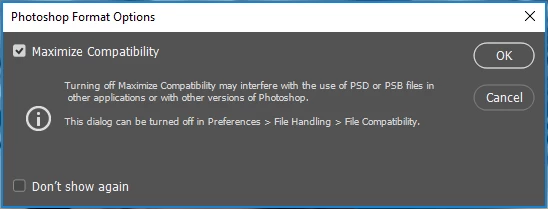
Only get this error on either closing photoshop CC or maybe saving a project. I don't know I save the current project only when I close photoshop

    This topic has been closed for replies.
    Correct answer davescm

    Hi

    In Preferences > File Handling you can choose whether to Maximise compatibilty with other versions when saving PSD/PSB files. If you are using PSB files with Lightroom, for example, then this must be set to on.

    The settings in Preferences are "Never" , "Always" or "Ask". It looks like you have it set to "Ask".

    Personally, I just set it to "Always"

    Dave

    4 replies

    Jeff Arola
    Community Expert
    Community Expert
    August 21, 2018

    One big disadvantage to Saving with Maximize Compatibility is the file size can be doubled at times.

    Maximize Compatibility saves a composite (flattened) image along with the layers of your document.

    Trevor.Dennis
    Community Expert
    Community Expert
    August 20, 2018

    My advise is to keep it set to Always in Preferences.  It  might save you frustration and wasted time in the future when something just doesn't work, and there is no obvious reason why not.  I once spent several hours tracking down such an  issue with Displacement Maps, for instance.  They will not work unless  Maximise Compatibility is turned on.

    Legend
    August 20, 2018

    It's not an error. An error would stop things from working. It's a warning, and (it seems to me) pretty self explanatory. Can you let us know which parts of the words are not clear to you, so we can help you understand the reason for the warning...?

    Legend
    August 20, 2018

    On reflection it isn't even a warning. It's a perfectly normal CHOICE box. In the choice there is one option, and a warning that applies if you turn it off. What makes you feel it is an error?

    davescm
    Community Expert
    davescmCommunity ExpertCorrect answer
    Community Expert
    August 20, 2018

    Hi

    In Preferences > File Handling you can choose whether to Maximise compatibilty with other versions when saving PSD/PSB files. If you are using PSB files with Lightroom, for example, then this must be set to on.

    The settings in Preferences are "Never" , "Always" or "Ask". It looks like you have it set to "Ask".

    Personally, I just set it to "Always"

    Dave