Participant
July 31, 2025
Answered

mes photos sont jaunes dans photoshop, Bridge etc.

  • July 31, 2025
  • 1 reply
  • 189 views

mes photos (et l'interface) sont jaunes dans photoshop, Bridge etc. contairement aux visionneuses de photos disponibles avec Windows 10 pro

Ci-joint une capture d'écran de la même photo ouverte avec la visionneuse Firefox et une autre avec photoshop , j'ai regardé partour sur internet et je n'y arrive pas! pour les réglages c'est l'enfer!

Merci pour votre aide


Correct answer Per Berntsen
quote

My photos (and the interface) are yellow in photoshop, Bridge etc. compared to photo viewers available with Windows 10 pro

Attached is a screenshot of the same photo opened with the Firefox viewer and another one with photoshop, I looked on the internet and I can't do it! for the settings it's hell!

Thank you for your help


By @APRH35898774xsov


This is most likely caused by a defective monitor profile.

Try setting it to sRGB (use Adobe RGB if your monitor is wide gamut).

If this fixes the issue, you should ideally calibrate your monitor with a hardware calibrator.

This will also create and install a custom monitor profile that will be more accurate than sRGB.


Close all Adobe software.

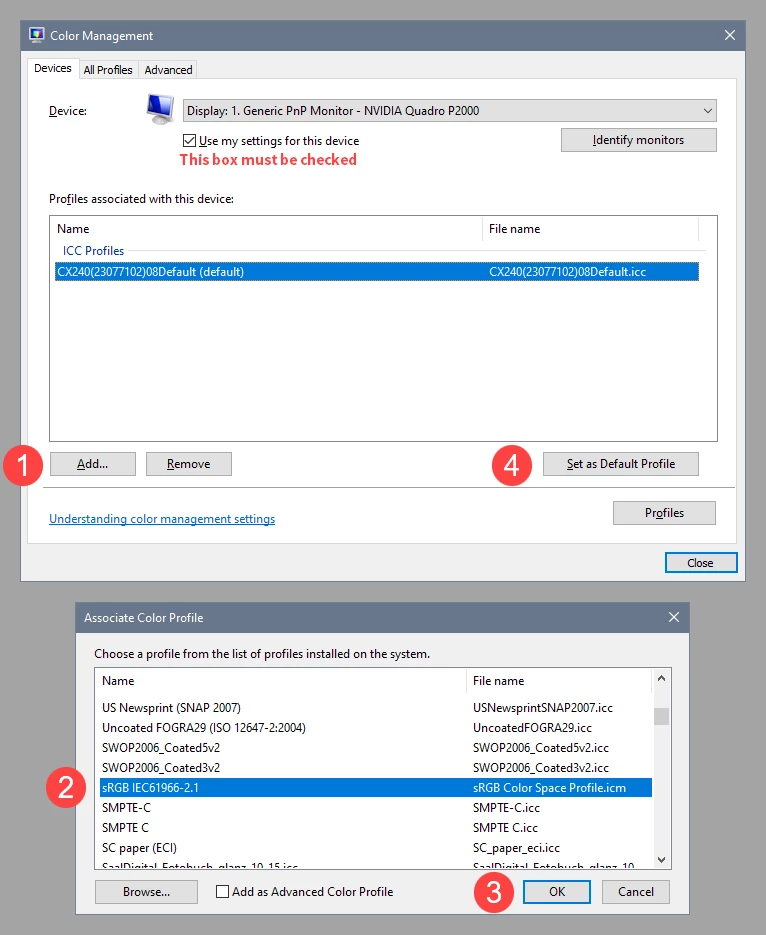
Go to Control panel > Color management, add the sRGB profile, and set it as default.


1 reply

Per Berntsen
Community Expert
Per BerntsenCommunity ExpertCorrect answer
Community Expert
July 31, 2025
quote

My photos (and the interface) are yellow in photoshop, Bridge etc. compared to photo viewers available with Windows 10 pro

Attached is a screenshot of the same photo opened with the Firefox viewer and another one with photoshop, I looked on the internet and I can't do it! for the settings it's hell!

Thank you for your help


By @APRH35898774xsov


This is most likely caused by a defective monitor profile.

Try setting it to sRGB (use Adobe RGB if your monitor is wide gamut).

If this fixes the issue, you should ideally calibrate your monitor with a hardware calibrator.

This will also create and install a custom monitor profile that will be more accurate than sRGB.


Close all Adobe software.

Go to Control panel > Color management, add the sRGB profile, and set it as default.


Participant
July 31, 2025

It works! Thank you so much! I've tried so many things without success!