Inspiring
September 10, 2021
Answered

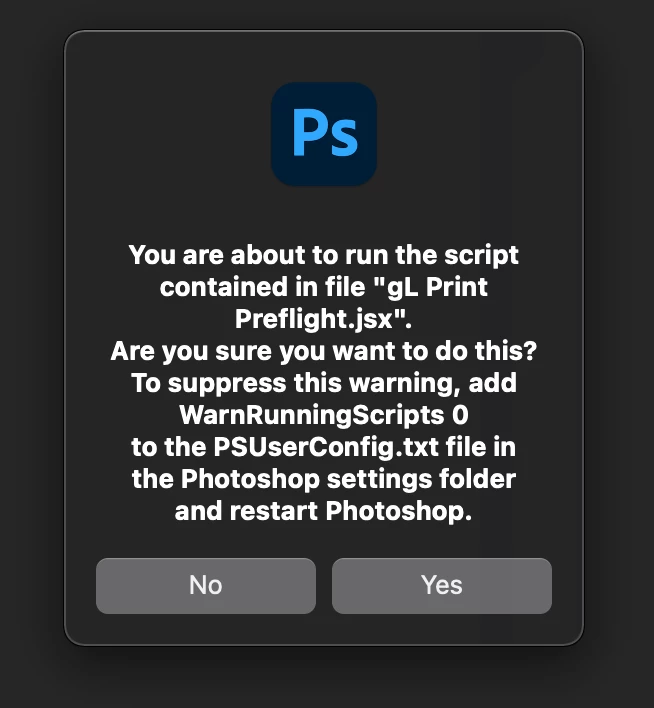
message WarnRunningScripts 0 when running javascript

  • September 10, 2021
  • 2 replies
  • 5213 views

New to running javascript in Photoshop and I get this message... 

.... add ... in the Photoshop settings folder


Which "settings" folder? and where?

I am using photoshop CC 2021 version 22.5.0

mac Big Sur version 11.5.2


TIA

This topic has been closed for replies.
Correct answer contactzero

Glad you got there, I personally never run scripts this way.


With the apparent lack of support for app.load when running Action scripts - Running JavaScript is the only way I am aware of loading and unloading Action sets with a simple (double) click.


My commercial photo business relies on quit a number of scripts that must be loaded or unloaded often based on the client or job to save ink, paper, time, maintain quality, keep consistency, archival etc. 
I can easily manage these scripts in Finder folders (double click, boom! Client specific or job specific Action scripts) - but I shouldn't have to search outside Photoshop for a solution.

If you've got a solution - I'd love to hear!

2 replies

Stephen Marsh
Community Expert
Community Expert
September 10, 2021

You double clicked on the script file in the Finder?


If you install into Photoshop or browse the script file from Photoshop you shouldn't trigger this message.

Downloading and Installing Adobe Scripts


The "PSUserConfig.txt" may not currently exist by default, so you may need to create a new text document with that name in the folder suggested by jazz-y with the value from the screenshot:


WarnRunningScripts 0


/Users/username/Library/Preferences/Adobe Photoshop 2021 Settings


You can use the Finder's Go menu, you may see Library listed or you may need to hold down option to get Library to show... Otherwise you can use Go > Go to Folder... and use the path as above, changing username for your account name.

Inspiring
September 10, 2021

I did this.


Tried 1.; There is no "Settings" folder as suggested by the aler box, So I created a Settings folder inside Photoshop. - doesn't work.

Tried 2.; "Configuration" folder is close enough, So I put PSUserConfig.txt inside there too. Restarted photoshop. - doesn't work.

Tried 3.; Don't put in any settings folder, just leave in Adobe Photoshop 2021 folder. Restarted photoshop. - does'n't work.


I still get the alert messege .


Stephen Marsh
Community Expert
Community Expert
September 10, 2021

Thats right, making up your own stuff does not work, please re-read my updated previous post.

Legend
September 10, 2021

Users/[user name]/Library/Preferences/Adobe Photoshop [version] Settings


Preference file functions, names, locations | Photoshop

Inspiring
September 10, 2021

Thank you but the link seems to be out of date or doesn't explain the location concerning PSUserConfig.txt file location according to the alert box I recieve in Adobe Ps 2021 on Mac Big Sur.