
Daniel Lewitt
Participating Frequently
January 8, 2017
Answered

Middle East Type Issues

  • January 8, 2017
  • 2 replies
  • 1486 views

I cant get Hebrew to work on cc 2017,

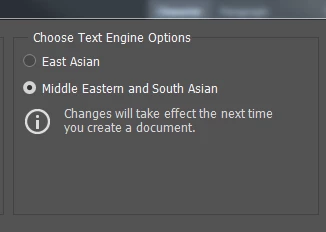
I have the text engine set on Middle eastern and south Asian, re-opened the app, but it still wont work.
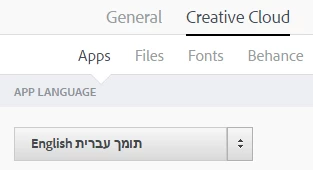
In the general account preferences it's also defined on Hebrew
Can anybody Help?

This topic has been closed for replies.
Correct answer gener7

Tried it, did not work.


Sorry to hear that. I'm out of ideas. Customer Care may be better at this if no one in the forums steps in. They should be open for chat now. Contact Customer Care

I hope you can get this better taken care of.

Gene

2 replies

gener7
Community Expert
Community Expert
January 8, 2017

You still have to go into Preferences and select your installed language and restart Ps

Daniel Lewitt
Participating Frequently
January 9, 2017

Done that still doesn't work....

gener7
Community Expert
Community Expert
January 9, 2017

So were you able to input Hebrew in earlier versions of Photoshop on the same Windows system? 2015.5 for example?

January 8, 2017

Copied from here: https://helpx.adobe.com/creative-cloud/help/change-install-language.html

Change the language setting of your Creative Cloud apps :

Note: If you want to apply the language change to an app that you have already installed on your computer, change the language preference, and then uninstall and reinstall the app. You can do this easily in the Creative Cloud desktop app.

Fenja

Daniel Lewitt
Participating Frequently
January 8, 2017

thanks, tried that still doesn't work...