Sparkerman1711
Inspiring
November 14, 2019
Answered

Missing Old Photoshop Shapes

  • November 14, 2019
  • 8 replies
  • 83841 views

On my Mac, how do I restore my legacy shapes in Photoshop 2020? I'm missing the basics shapes such as arrows, bubbles, etc

I deleted my older version of Photoshop assuming the new version would already include them.

Correct answer Conrad_C

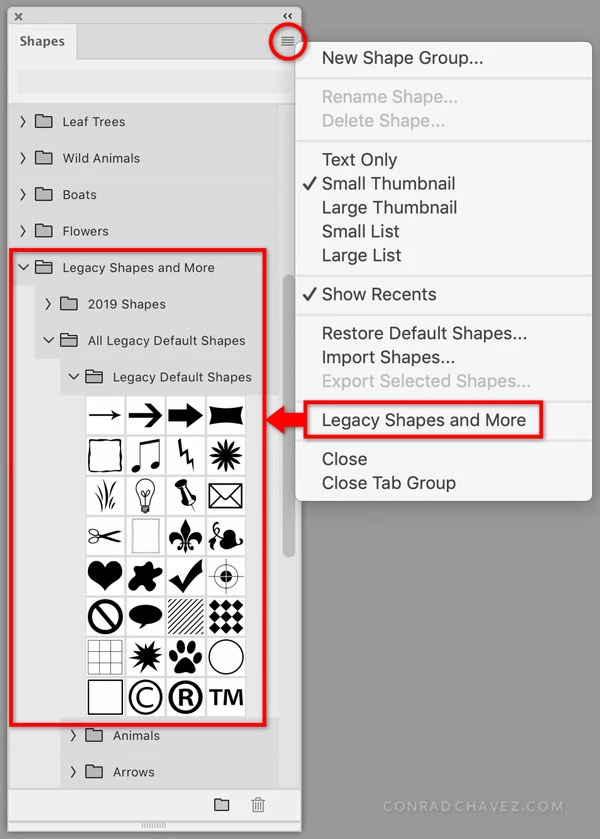
Click to open the Shapes panel menu, and choose Legacy Shapes and More. That will add preset groups to the Shapes panel. Then expand or reorganize the preset groups so that you can get to the shapes you want in a way that's most efficient for you. For example, you might choose to move your favorite shapes into a group that you keep at the top of the panel list.


UPDATE: If you can’t open the Shapes panel menu because it is not there, that menu appears only in the Shapes panel (choose Window > Shapes), not when you see the list of shapes provided in other parts of Photoshop such as the options bar. This is consistent with Gradients, Patterns, Swatches, etc. in Photoshop: You manage the list in its panel, which you open by choosing its name from the Window menu.

 

8 replies

Trevor.Dennis
Community Expert
Community Expert
May 26, 2021

I can't actually see who ha awoken this old thread, but seeing as someone has, I'd like to give a shout out to the Search Bar.  If it is not turned on then do so, because it really is a useful tool for finding your way through possibly hundreds of shapes.

Participant
June 28, 2021

Hi,

I'm new to the forum but not Photoshop which is probably a handicap as I have a well trodden workflow. Is everyone saying then that selecting shapes has an extra step now by searching through loads of folders unless you create your own folder and put shapes in if you think you are going to use them at some point? It sounds like I can't just select shapes from the top and select the shape any more which may sound like a small task but does add up after a few years? Not sure why this is better now if this is the case.


brandonl20147714
Participant
June 28, 2021

Hey Dom!


Yeah, that's pretty much the size of it. BUT you can build your own set of quick access shapes by not putting them into a folder, but just dragging them into the open space below the folders - that's in the Shapes panel.

Participant
May 26, 2021

Oh my god! You saved my day or even week! I`ve searched for this for ages! Thank you so much!! 

Participant
February 11, 2021

Why mine either doesn't  have "Legacy shapes... " option? I have been trying to figure that out for hours and still don't know how to get all the shapes. Please help 

February 11, 2021

Hi

Can you post a screenshot of the Shapes Panel, are you going to Window > Shapes and accessing the panel from there

henryryder
Participant
March 23, 2020

Again Photoshop shipped with live bugs and relied on the community to be the bug testers.
Sort it out Photoshop team!! 

Jenel_VA
Participant
January 31, 2020

Thank you! This is very helpful. I wish the shapes were visible instead of the list of folders, but at least they're accessible now.

brandonl8911795
Inspiring
January 31, 2020

Good news to you then! You can drag them out of the folders or make new folders. Customize it as you like.

Jenel_VA
Participant
January 31, 2020

Sweet! Thank you! You brightened my day. 🙂

medard27
Participant
January 17, 2020

Hi Adobe Team,


Can you please keep it simple, why do you need to remove it in the normal/default menu/panel and put all in a folder under a folder and another folder!

KEEP IT SIMPLE!

brandonl8911795
Inspiring
January 17, 2020

WHY does Adobe do these things????

I use a grid shape all the time to set up warps on smart objects, but no! I need a folder full of flowers and boats! That's what the world really needs!


I should bill them every time they wreck my workflow, change default buttons, and take away features that have been consistent for the last decade with no way to revert. /rant

Participant
January 30, 2020

I don't have the option in the window panel, either.  Just this big old empty window. Please help!

 
Sparkerman1711
Inspiring
November 14, 2019

Wow, I completly missed that, thanks!

Conrad_C
Community Expert
Conrad_CCommunity ExpertCorrect answer
Community Expert
November 14, 2019

Click to open the Shapes panel menu, and choose Legacy Shapes and More. That will add preset groups to the Shapes panel. Then expand or reorganize the preset groups so that you can get to the shapes you want in a way that's most efficient for you. For example, you might choose to move your favorite shapes into a group that you keep at the top of the panel list.


UPDATE: If you can’t open the Shapes panel menu because it is not there, that menu appears only in the Shapes panel (choose Window > Shapes), not when you see the list of shapes provided in other parts of Photoshop such as the options bar. This is consistent with Gradients, Patterns, Swatches, etc. in Photoshop: You manage the list in its panel, which you open by choosing its name from the Window menu.

 

TammyLynn
Participant
November 23, 2019

I'm having the same problem but this solution doesn't help me. I'm using Windows 10. I don't have a choice for 'Legacy Shapes and More'. (see screengrab) and I clicked 'Restore Default Shapes' several times which just repeated the files that were there. Any help? 

November 23, 2019

Hi

You need to access it from the Window menu

