
Participant
June 18, 2018
Answered

Missing Red-Eye (and all extra) Tool PS CC 19.1.4

  • June 18, 2018
  • 4 replies
  • 10203 views

I am missing the red-eye tool in Photoshop CC 19.1.4. In fact, I cannot right click the spot healing tool to get any of the extra tools. I have uninstalled and reinstalled and still have the same issue.

Did Adobe remove the red-eye and other tools from the spot healing tool sub-menu?

Thanks
    This topic has been closed for replies.
    Correct answer Bojan Živković11378569

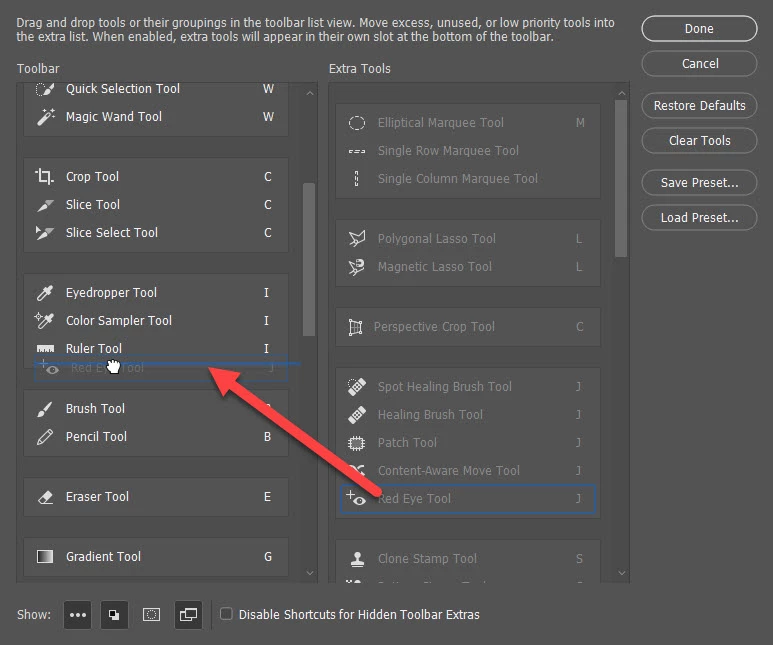
    You can also go to Edit > Toolbar then from the right side column (Extra Tools) click and drag any tool to the left column (Toolbar). Confirm on Done and dragged tool(s) will be available in the toolbar. Another option is to click on Restore Defaults button what will make all tools available in the Toolbar.

    4 replies

    Participant
    December 13, 2020

    Omg THANK YOU! This has been driving me nuts!

    Participant
    January 4, 2020

    Thank you.  This was driving me crazy after updating to PS 2020.  I don't remember other versions doing this. 

    Bojan Živković11378569
    Community Expert
    Community Expert
    June 18, 2018

    You can also go to Edit > Toolbar then from the right side column (Extra Tools) click and drag any tool to the left column (Toolbar). Confirm on Done and dragged tool(s) will be available in the toolbar. Another option is to click on Restore Defaults button what will make all tools available in the Toolbar.

    Participant
    December 30, 2024

    thanks, did the trick!


    gener7
    Community Expert
    Community Expert
    June 18, 2018

    No, it all depends on the Workspace you choose. Try the "Essentials" workspace and it will show up under the Spot Healing Brush.

    Window menu > Workspace > Essentials (Default)