Participant
October 21, 2018
Answered

Missing Reference point in photoshop

  • October 21, 2018
  • 6 replies
  • 10866 views

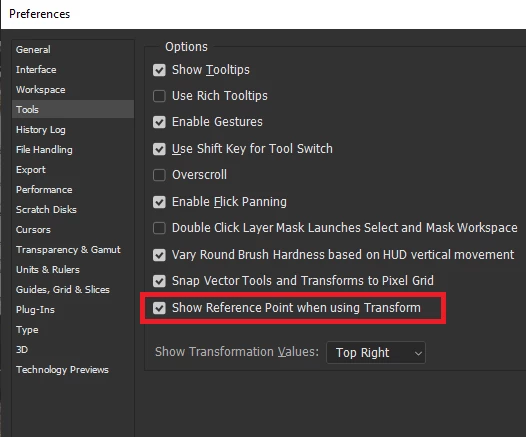
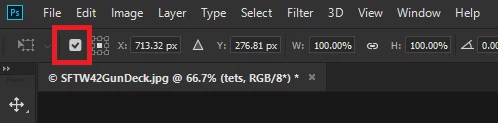
when I try and transform the reference point is missing. How do i get it back again?

    This topic has been closed for replies.
    Correct answer

    Hi

    You can enable it from here

    or here
    6 replies

    Esfuerso
    Participant
    January 23, 2023

    Is there also a way to have it return to the properties tab? 
    When just moving, the transform bar doesn't open and usually when I use the reference point I use it from the properties tab.

    viktorc92663764
    Inspiring
    June 17, 2020

    I've noted each new version of PS  bringing new headache. What was a reason to hide the reference point?

    sseelliss
    Participating Frequently
    November 6, 2020

    EXACTLY!! ans as for the 2021 apps--- we've chucked them back out and reverted to 2020 which had been a lot more stable. 

    Participant
    November 29, 2021

    As an experienced graphic designer of over 20 years, I can honestly say that this new feature may throw a curve ball, but it's a good thing. I do agree sometimes things change and it's annoying; but it's not hard to see the value in being able to turn this feature on & off. I myself have dragged the reference point repeatedly and it has annoyed me. Yeah, it's a tiny tiny learning curve. Just deal with it

    Participant
    October 30, 2018

    Thank you for this, it was driving me crazy.

    I understand the reason behind the change, but it's still infuriating for seasoned users to suddenly have well-established functionality removed (or hidden).

    Barb Binder
    Community Expert
    Community Expert
    October 30, 2018

    Hi Tomm:

    it's still infuriating for seasoned users to suddenly have well-established functionality removed (or hidden)

    The best way I have found to avoid feeling frustrated after an upgrade is to scan the What's New page or watch a short video. Then I am up speed on the changes, and I can hit the ground running.

    From the thread above:

    1.) Watch

    Terry White's Photoshop and Dimension Demo During the Adobe MAX 2018 Keynote - YouTube

    Top 20 NEW Features & Updates EXPLAINED! - Photoshop CC 2019 - YouTube

    2.) Or read:

    New and enhanced features | Latest release of Photoshop CC

    ~Barb

    ~Barb at Rocky Mountain Training
    KShinabery212
    Community Expert
    Community Expert
    October 21, 2018

    This changed in the new version. 

    This guy's video will explain it..... as well as everything relating to the new update.

    Top 20 NEW Features & Updates EXPLAINED! - Photoshop CC 2019 - YouTube

    Let's connect on LinkedIn. https://www.linkedin.com/in/kshinabery/
    Barb Binder
    Community Expert
    Community Expert
    October 21, 2018

    To provide context for this behavior, Kathryn: new users were constantly dragging the reference point when they wanted to move the object. Hiding the reference point as a new default allows seasoned users like you to  access the reference point but will stop tormenting the newest users.

    After an upgrade, I always take a few minutes to either read the "what's new" or watch a quick video, because it's the little things that get me.

    Terry White's Photoshop and Dimension Demo During the Adobe MAX 2018 Keynote - YouTube

    New and enhanced features | Latest release of Photoshop CC

    ~Barb

    ~Barb at Rocky Mountain Training
    Correct answer
    October 21, 2018

    Hi

    You can enable it from here

    or here