Answered
Mixer Brush (Convert)
Hello.
I have a brush that is set up as mixer brush tool. How do I convert it it to a regular brush tool?

Hello.
I have a brush that is set up as mixer brush tool. How do I convert it it to a regular brush tool?
Hi @dashamoony
When the person creates a brush, they have an option of assigning it to tool — or not. If they assigned it to a tool, you will see the tool in the upper right corner, and Photoshop will go to that tool when you choose the brush.

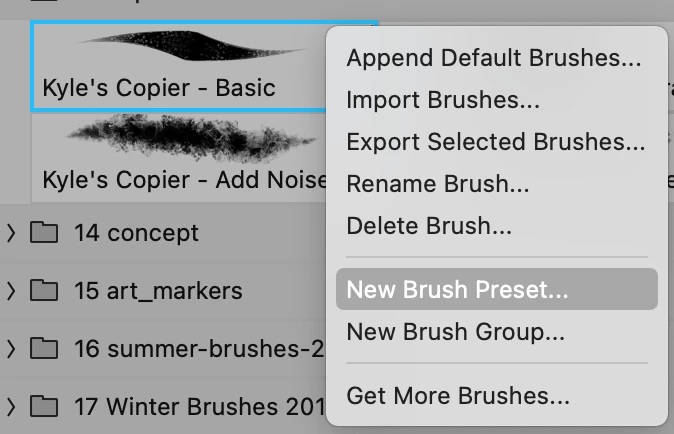
To disassociate it, right-click the brush and choose New Brush Preset
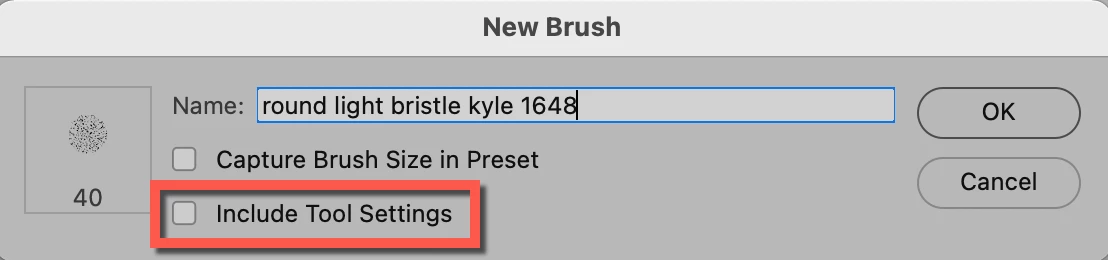
Uncheck Include tool settings > give the brush a new name > choose OK
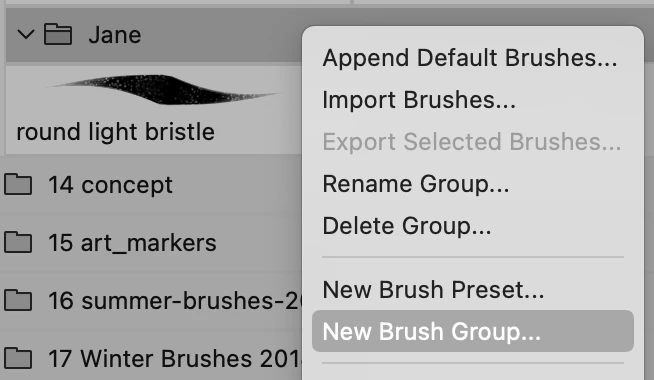
This brush is not assigned to a tool

You can then create a new brush group or drag-and-drop the new brush into an existing group.
Jane
Already have an account? Login
Enter your E-mail address. We'll send you an e-mail with instructions to reset your password.
 AdChoices