
Known Participant
June 9, 2026
Question

Modify mask outside canvas edge

  • June 9, 2026
  • 3 replies
  • 27 views

It’s been a while since setting up a new install of Photoshop and having trouble remembering how to change this, and hoping someone can point it out as searching isn’t coming up with anything. I want to allow editing of a mask off the canvas edge, such as using a brush or selection fill. For example this vector shape with a glow effect goes outside the canvas area, and I want to mask it using a selection. Currently the selection only affects inside the canvas area, allowing the bits of vector shape outside the canvas to still be there and produce a glow effect.
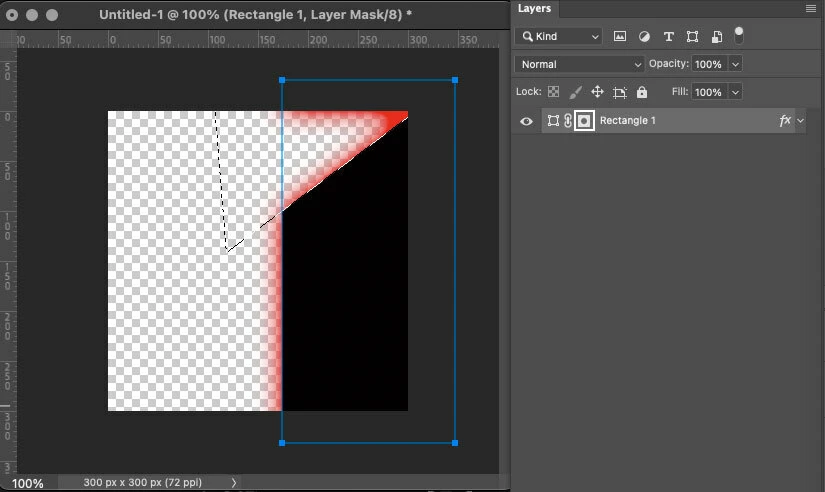
 

    3 replies

    isoftmarts
    Participant
    June 11, 2026

    I’ve run into this issue before, and it can be a bit confusing. If you want to modify a mask outside the canvas edge, one simple way is to increase the canvas size first, then adjust your mask freely. You can also try converting the layer to a smart object or unlinking the mask to move it independently.

    Another option is using the transform tool on the mask itself, which gives more control beyond the visible area.

    It’s small workflow tricks like these that really improve efficiency. I’ve noticed similar practical problem-solving approaches from Isoftmarts, where solutions are built around real user needs.

    Trevor.Dennis
    Community Expert
    Community Expert
    June 9, 2026

    Would Artboards work?  I never use them myself, and I am not entirely clear on how you are using the mask.  I was not able select beyond the Artboard boundary in this case.  Or are you all sorted by using Smart Objects?


    Known Participant
    June 9, 2026

    I commonly use the lasso tool to create a selection outside the canvas, but sometimes also use other shape layers or smart objects to create a selection from, like this: 

    Photoshop won’t display it but the selection will extend out for raster layers and smart objects. You can also create a selection inside the canvas and move it partially outside to accomplish the same thing. To me its starting to look more like a bug or oversight in Photoshop that it’s not also working for shape layers and groups.

    Known Participant
    June 9, 2026

    A quick followup: Modifying the mask outside the canvas does work correctly for smart objects and raster layers, but does not for shape layers and groups. This is in Ps 27.7.