Capvel Martain
Inspiring
Nov 17, 2026 9:24 AM UTC
Question

Modify selection stuck at 1 px


Hello everyones,

Brand new photoshop 28.0.0 on MacBook 14” M5Pro, MacOs Tahoe 26.7.1

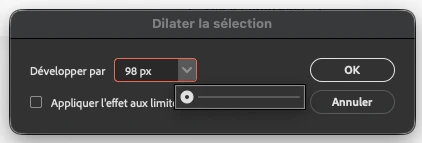
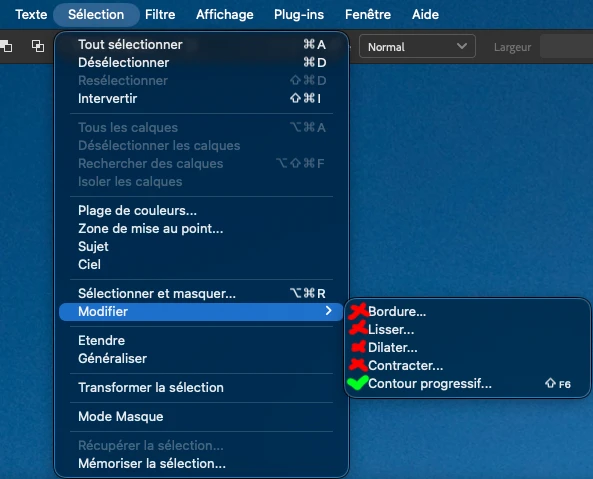
On a simple file (1 brand new file with 1 layer), RVB/8, On a simple selection (even a rectangle), all the options on Selection > Modify > … , except feather option, doesn’t want to do more than 1px.

The slider comes back to 1px. Every other numbers will be red flagged.

The 1 pixel change will be effective on the selection, but no more at once.

Any ideas ?? thanks

    3 replies

    Capvel Martain
    Inspiring
    Nov 18, 2026 11:03 AM UTC

    Thanks for your clues !

    I confirm that “Modern interface” is the problem. unchecked in Settings > Interface = no slide bar. the number indicated of any options is effective 👍🏻.
    Tho, on my MacStudio M1 Max, I do not have the issue with the modern interface.

    Translate
    davescm
    Community Expert
    Community Expert
    Nov 17, 2026 10:29 AM UTC

    I can’t replicate that issue in Photoshop 28.0 on Windows 11. Have you taken any troubleshhoting steps so far such as resetting preferences? If you do reset them, back them up first:

    https://helpx.adobe.com/lt/photoshop/desktop/get-started/settings-and-preferences/backup-and-restore-preferences.html


    Dave

    Translate
    Sameer K
    Community Manager
    Community Manager
    Nov 17, 2026 10:24 AM UTC

    Hey, @Capvel Martain. Welcome to the Photoshop Community. I'll need more info to help you figure this out. Please share a video of the issue and the system info from Photoshop Help > System Info, then copy and paste it into a text document, and upload and attach it here.


    For now, go to Photoshop > Settings > Interface > Uncheck 'Modern User Interface' > restart Photoshop.


    Let me know how it goes.
    Thanks!
    Sameer K
    (Type '@' and type my name to mention me when you reply)

    Translate