
Participant
July 31, 2020
Answered

Motion Blur artifacts macOS 10.15.6
  • July 31, 2020
  • 1 reply
  • 506 views


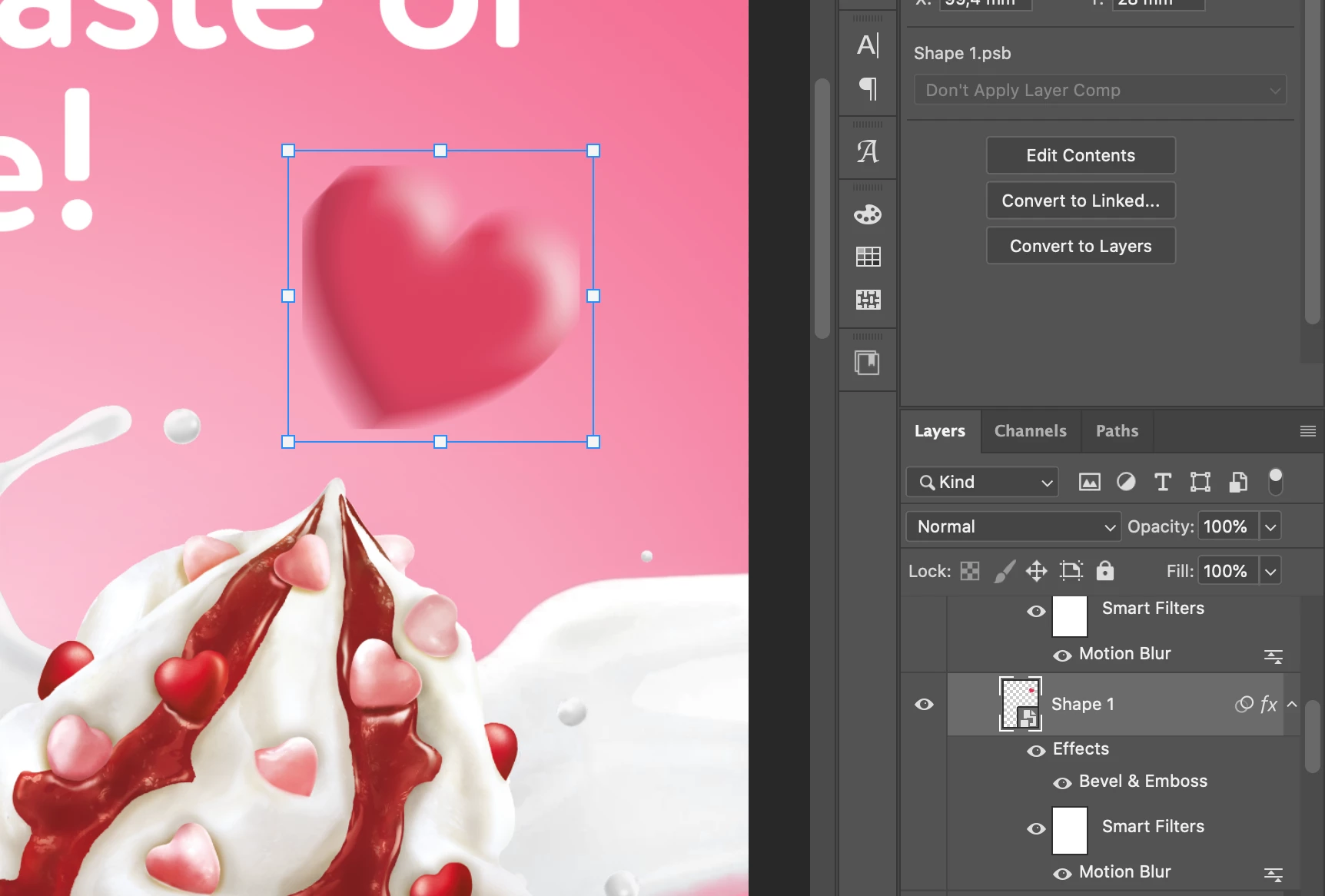
Greetings to community. I have a problem with layer style effects. After creating a heart shape in AI i moved it to PS. Then made a smart object of it and applied the following effects (layer styles and then motion blur). As you can see shape edges (left one) get box style crop. Have anyone experienced this issue?

P.s no crop was added by me. Tried restarting and there's no performance issues. Mac OS 10.15.6


{Thread renamed by moderator}

This topic has been closed for replies.
Correct answer Sahil.Chawla

Hi there,

Sorry to hear about this, could you please try disabling "Legacy compositing" located in Photoshop's Preferences > Performance, then relaunch Photoshop and let us know if it helps?


Regards,
Sahil

1 reply

Sahil.Chawla
Adobe Employee
Sahil.ChawlaCorrect answer
Adobe Employee
July 31, 2020

Hi there,

Sorry to hear about this, could you please try disabling "Legacy compositing" located in Photoshop's Preferences > Performance, then relaunch Photoshop and let us know if it helps?


Regards,
Sahil

Participant
August 1, 2020

Dear Sahil,


Actually enabling this feature helped to solve the problem. I hope that if will not affect future works) thank you