Kar209
Known Participant
Oct 9, 2012 5:29 AM UTC
Answered

Move/Nudge 1/2 a pixel?

Hey there                                                                                                              Level: Newbie   OS: Windows 7 64bit     Ps: Cs6

Is there a way I can move an object 1/2 pixel? Is there a modify key that I can use along with the arrow keys or something like that?

Thanx for your time!!

This topic is closed to new replies. Start a new post to keep the conversation going.
sudarshan.t
sudarshan.tCorrect answer
Inspiring
Oct 9, 2012 5:55 AM UTC

A good question that is!

Earlier versions of Photoshop used to do this depending on zoom level. If you're zoomed in at 100% on canvas, one nudge will be 1pixel relative to your current object position. 200% will be 0.5 pixel and so on all the way till 3200% which nudges 0.03125px.

In Photoshop CS6, there is a handy little option that is (usually unnoticed) present in General Preferences.

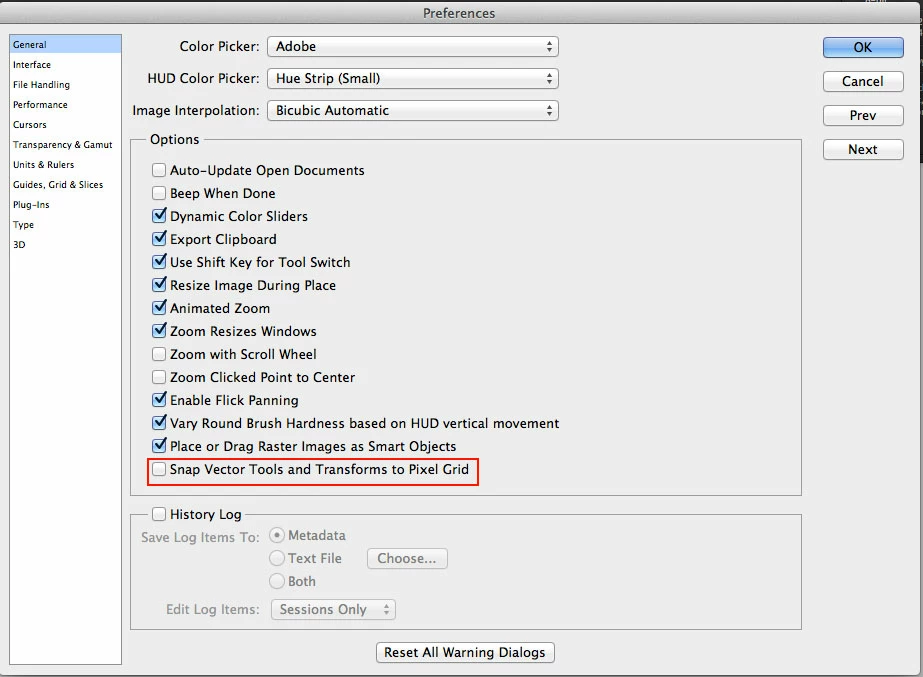
Go to Photoshop Preferences > General > Snap Vector Tools and Transforms to Pixel Grid - uncheck this option as shown in screenshot below:

Once unchecked, Photoshop will behave like it did in earlier versions. Zoom level controls the nudge. 100% zoom is 1pixel nudge and 200% is 0.5pixel nudge.

Note that this behavior will work only with 'Free Transform' (Cmd + T) or (Ctrl + T) on your object. A normal nudge with Move tool (V) will not nudge 0.5pixel.

Trust this helps.

-ST

Message was edited by: Sudarshan Thiagarajan to add 'Free Transform' note

23 replies

Stephen Marsh
Community Expert
Community Expert
Feb 22, 2022 9:24 PM UTC

Although a 10 year old topic, it still deserves a reply. Obviously 1px is the smallest "true" unit. That being said, with anti-aliasing one can fake a sub-pixel shift.


There are examples using Photoshop's custom filter in this action set:


https://www.dropbox.com/s/yvzlr1fuznyf8iw/Custom%20Convolution%20Kernels.atn?dl=0


Translate
Participant
Aug 16, 2021 1:29 AM UTC

Bumping this for 2021. The pref for do not snap to grid no longer exists in the pref panel. Is there a new location for it?


Translate
Participant
Feb 22, 2022 8:10 PM UTC

Translate
Participating Frequently
Dec 4, 2022 1:13 AM UTC

Ive been trying to figure this out still. I have the snap vector tool unchecked, yet I still cant move anything by sub pixels, its still always full pixels and it is driving me nuts. I am using the free transfarm tool, and while I can set .1, or .5 or .6 or whatever in the X anf Y fields up top it makes no difference, the fractions dont do anything, 200.1, 200.3, etc, give the exact same result as just 200. 200.5 will round up to 2001. What am I missing and why is thisstill  not possible in 2022?

Translate
PECourtejoie
Community Expert
Community Expert
Oct 9, 2012 11:01 AM UTC

For Vector shapes, if you add one to their size, they will grow by half a pixel on either way (you might need to uncheck the snap, too)

For pixel layers, another way is to double the size of your documents (from 300 to 600PPI), nudge, then downsample. You will get dithering, though.

Translate
sudarshan.t
sudarshan.tCorrect answer
Inspiring
Oct 9, 2012 5:55 AM UTC

A good question that is!

Earlier versions of Photoshop used to do this depending on zoom level. If you're zoomed in at 100% on canvas, one nudge will be 1pixel relative to your current object position. 200% will be 0.5 pixel and so on all the way till 3200% which nudges 0.03125px.

In Photoshop CS6, there is a handy little option that is (usually unnoticed) present in General Preferences.

Go to Photoshop Preferences > General > Snap Vector Tools and Transforms to Pixel Grid - uncheck this option as shown in screenshot below:

Once unchecked, Photoshop will behave like it did in earlier versions. Zoom level controls the nudge. 100% zoom is 1pixel nudge and 200% is 0.5pixel nudge.

Note that this behavior will work only with 'Free Transform' (Cmd + T) or (Ctrl + T) on your object. A normal nudge with Move tool (V) will not nudge 0.5pixel.

Trust this helps.

-ST

Message was edited by: Sudarshan Thiagarajan to add 'Free Transform' note

Translate
c.pfaffenbichler
Community Expert
Community Expert
Oct 9, 2012 6:23 AM UTC

Are you sure the OP is talking about Paths/Pathpoints? (It would not make a lot of sense otherwise, but still …)

Translate
sudarshan.t
Inspiring
Oct 9, 2012 6:26 AM UTC

Paths as well as raster elements will nudge 0.5pixel if 'Snap Vector Tools..' is unchecked under General Preferences.

Translate