Debob.
Participant
January 22, 2021
Answered

Move Tool keeps auto selecting layers in Photoshop

  • January 22, 2021
  • 4 replies
  • 52893 views

On Photoshop I have three different layers right now. I selected part of my drawing on the third layer and tried to adjust it with the move tool, but it keeps changing to my first layer! How do I only move the things in the layer I want without it switching the another layer?


{Thread renamed by moderator}

Correct answer Sahil.Chawla

Hi there,

Welcome to the community!


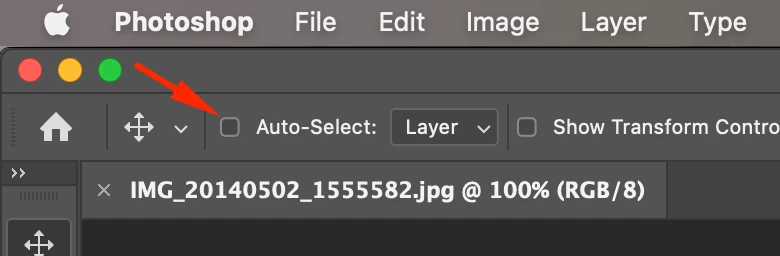
As the Move tool keeps selecting the first layer. This usually happens when the "Auto Select" feature is active.

You can turn it off by unchecking the box near Auto Select on the top options bar.


Let us know how it goes.
Regards,
Sahil

4 replies

Participating Frequently
May 29, 2024

i have the check box for Auto Select turned OFF and yet it's still auto selecting layers. VERY annoying. i have selected the layer i want to move with move tool selected and when i go to move it, it auto selects a layer on top of it!

c.pfaffenbichler
Community Expert
Community Expert
May 30, 2024

Could you please post screenshots twith the pertinent Panels (Toolbar, Layers, Options Bar, …) visible? 

Have you tried using another keyboard and mouse? (In case any of the keys might be stuck or otherwise affected.)

Participating Frequently
February 21, 2024

I turned my auto-select off but when I use the move tool it does the same thing. I'm having to go to the Select drop down menu and deselect the layer.  But again everytime I choose a layer it does the same thing.

This issue only started rescently.


c.pfaffenbichler
Community Expert
Community Expert
February 21, 2024

Could you please post screenshots with the pertinent Panels (Toolbar, Layers, Options Bar, …) visible? 

Could you try using another keyboard to make sure there is no stuck modifier-key? 

Participating Frequently
February 22, 2024

Thank you for your help. I changed my keyboard and now everything is great!

Participant
August 17, 2022

Hi- Please help. Not sure what this is but it is not good that i cannot switch off auto selct. Only allow layers and groups, it is an INSANE update. Please advise how to switch this off as i no longer have an option to switch off. Thanks

Participant
December 7, 2023

Click on SAMPLE ALL LAYERS

Sahil.Chawla
Adobe Employee
Sahil.ChawlaCorrect answer
Adobe Employee
January 22, 2021

Hi there,

Welcome to the community!


As the Move tool keeps selecting the first layer. This usually happens when the "Auto Select" feature is active.

You can turn it off by unchecking the box near Auto Select on the top options bar.


Let us know how it goes.
Regards,
Sahil

Noyster2
Inspiring
May 1, 2021

Thank you, Sahil, for your answer, BUT I cannot find the 'auto select' option on my toolbar. Do you know why?

Dan Rodney
Community Expert
Community Expert
May 1, 2021

Not sure why yours is an icon, but look in the same place as where @Sahil.Chawla pointed and try clicking your icon that's there.

— Adobe Certified Expert & Instructor at Noble Desktop | Web Developer, Designer, InDesign Scriptor