
Participant
July 26, 2024
Answered

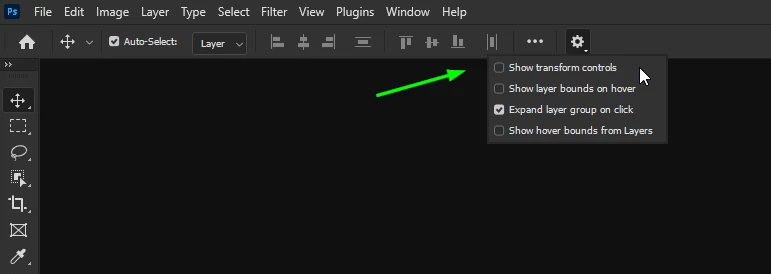
Move Tool: "Show Transform Controls" option

  • July 26, 2024
  • 2 replies
  • 1190 views

I just updated to the latest version of Photoshop (25.11.0). Suddenly the Move tool now outlines the selection and adds handles, which are Transform Controls.  In the little video I can open on the tool, I'm told that using the Move tool I can also rotate, skew, and scale the selection if I make sure that the "Show Transform Controls" option is selected in the Options bar. In most cases I prefer to NOT show those Transform Controls. BUT THAT OPTION DOES NOT EXIST in my Options bar! So I can't turn it off.
This topic has been closed for replies.
Correct answer Ged_Traynor

@Mark S Siegel Adobe decided to hide that option for some unknown reason

2 replies

Ged_Traynor
Community Expert
Community Expert
September 11, 2024

With Photoshop version 25.12 update, the "Show Transform Controls" is back to the original location


Ged_Traynor
Community Expert
Ged_TraynorCommunity ExpertCorrect answer
Community Expert
July 26, 2024

@Mark S Siegel Adobe decided to hide that option for some unknown reason

Participant
July 26, 2024

Brilliant. Thank you. (The Tools video should be updated so it's not misleading!)