
Participating Frequently
April 6, 2026
Question

Multiple Broken Features But Only On One User Account

  • April 6, 2026
  • 2 replies
  • 46 views

For almost a year now I've had some strange issues with Photoshop, and no updates to it or Windows have fixed it. These included:

  • Unable to export any other way than the "Export for Web (Legacy)" option.
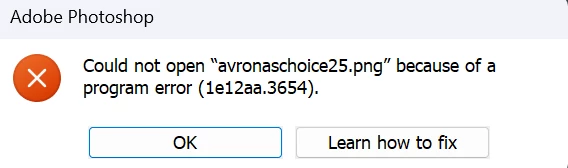
    839792i5B17FDA7B038D7F0.png
  • The whole program crashing when trying to access neural filters (no error message, just crash).
  • Just a blank page with no notifications, or create new document options in the middle of the screen when first launch the app.

To test I created a new Windows account on the PC, and there Photoshop ran without any issue, however on my main account, also an admin account, I have all those issues. Any idea on what's going on? I am running the latest version of both Photoshop and Windows 11, and none of the updates to either have fixed anything in almost a year. Reinstalling Photoshop and the whole Creative Cloud Suite didn't help either.

    2 replies

    D Fosse
    Community Expert
    Community Expert
    April 6, 2026

    @Aleksander221297001b8d 

    This is corrupt preferences. Preferences are specific to the Windows user account - that’s where they’re stored. A reset will fix it.


    Preferences contain a lot more than your own user settings. It’s the whole application configuration, including lots of hidden and system-dependent parameters. Corrupt preferences usually look like application bugs and are often mistaken for that.


    Preferences are vulnerable to corruption because they are rewritten on every application exit. An irregular shutdown can easily corrupt them.

    Myra Ferguson
    Community Expert
    Community Expert
    April 6, 2026

    If you’ve updated and uninstalled/reinstalled and even reinstalled Creative Cloud, have you tried using the Creative Cloud Cleaner tool? https://helpx.adobe.com/creative-cloud/apps/troubleshoot/diagnostics-repair-tools/run-creative-cloud-cleaner-tool.html

    Participating Frequently
    April 6, 2026

    Yes I have tried it, didn’t solve it either.

    nik.m
    Community Manager
    Community Manager
    April 7, 2026

    Hi, I’m sorry that you’re still experiencing the behavior. 

    Please go to the Help menu in Photoshop, then System Info, and copy the text. You can share the info with us by either pasting it as a reply here or in a text file and sharing the file with us. 

    Did you try resetting the preferences of Photoshop as suggested by D Fosse? If not, try that and let us know if it makes a difference. Also, are you experiencing this behavior with all files or some specific files? 


    Thanks, 

    Nikunj