

Moohessen
Participant
March 9, 2026
Answered

Multiple Issues with Canvas Size in Photoshop 27.4

  • March 9, 2026
  • 3 replies
  • 154 views

I would like to report several usability issues with the Canvas Size feature in Photoshop version 27.4.

When Canvas Size is used inside an action, the action runs correctly, but the Canvas Size dialog keeps the exact values recorded in the action and does not allow easy modification before applying. This makes it difficult to reuse the same action with different canvas values.

In previous versions, it was easier to adjust the values when running actions that included Canvas Size.

Additionally, the new Canvas Size interface feels less efficient compared to previous versions and slows down the workflow when frequent canvas adjustments are required.

Another issue is that the unit settings in the Canvas Size dialog do not stay consistent. The units always reset to pixels, and I have to manually change them every time instead of keeping my preferred unit.

These issues affect productivity, especially for workflows that depend on actions and repeated canvas adjustments.

I hope these problems can be reviewed and improved in a future update.

Thank you.
    Correct answer Ged_Traynor

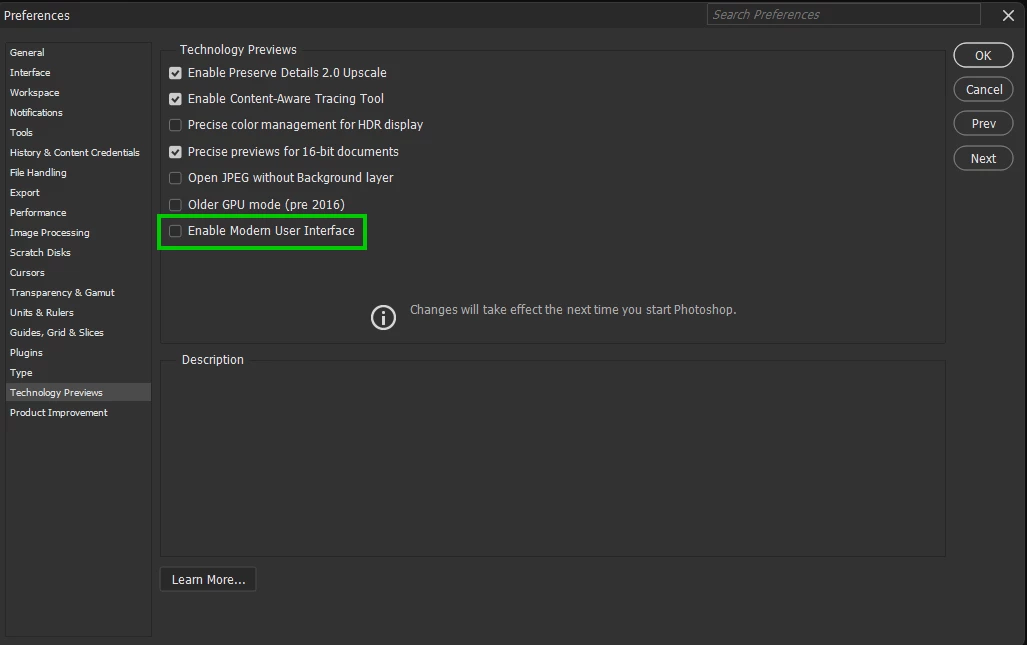
    @Moohessen try disabling this option in the preferences and restarting Photoshop to see if it helps


    3 replies

    Sameer K
    Community Manager
    Community Manager
    March 9, 2026

    Hey, ​@Moohessen. Welcome to the Photoshop Community. Thanks for bringing this up. We’re aware of the issues you’ve pointed out. Please add your vote to these threads:


    As suggested by ​@jocstone_me & ​@Ged_Traynor, unchecking ‘Modern User Interface’ should help.

    Thanks!
    Sameer K

    jocstone_me
    Inspiring
    March 9, 2026

    disable the “Enable Modern User Interface” reverts the canvas size dialog back to the usable previous version.
    In this new version, it was even impossible to use a comma, it had to be a point.

     
    Ged_Traynor
    Community Expert
    Ged_TraynorCommunity ExpertCorrect answer
    Community Expert
    March 9, 2026

    @Moohessen try disabling this option in the preferences and restarting Photoshop to see if it helps


    Upsetti Spaghetti
    Participant
    March 12, 2026

    Thank you so much for this, I’m constantly adjusting the canvas size so having to change the units to inches every time has been driving me up the wall.

    Not to mention the new window is just ugly.