


Participating Frequently
August 1, 2025
Question

Multiple Issues With Photoshop But Only On One User Account

  • August 1, 2025
  • 2 replies
  • 309 views

For the past several months I've had some strange issues with Photoshop, and no updates to it or Windows have fixed it. These included:

  • Unable to export any other way than the "Export for Web (Legacy)" option.
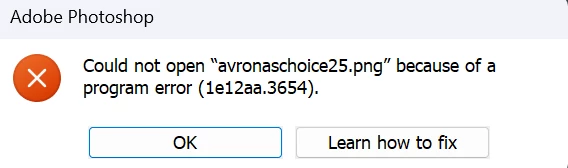
  • The whole program crashing when trying to access neural filters (no error message, just crash).
  • Just a blank page with no notifications, or create new document options in the middle of the screen when first launch the app.

To test I created a new Windows account on the PC, and there Photoshp ran without any issue, however on my main account, also an admin account, I have all those issues. Any idea on what's going on? I am running the latest version of both Photoshp 26.9 and Windows 11. Reinstalling Photoshop and the whole Creative Cloud Suite didn't help either.


2 replies

Participating Frequently
August 1, 2025

Just tried this, still the exact same things happening. 

Claire H.
Community Manager
Community Manager
August 27, 2025

Hi @Aleksander221297001b8d, welcome to the Photoshop Community forum! To better help you with this issue, we would like a few more details. Can you send your system info, a screen recording of your issue, and a numbered list of the exact steps needed to replicate the issue? You can find your system info by going to Help > System Info, copying and pasting it into a text file, and attaching it here. Thanks! ^CH

Participating Frequently
September 16, 2025

The issue happens whenever I go to either export anything (other than the save for web option) where I get the program error, or whenever I click on neural filters, which makes the program crash.

Here's the system info page:

D Fosse
Community Expert
Community Expert
August 1, 2025
quote

To test I created a new Windows account on the PC, and there Photoshp ran without any issue, however on my main account, also an admin account, I have all those issues.


By @Aleksander221297001b8d


This confirms corrupt preferences. Do a complete reset by going to your user account and move the entire Photoshop 2025 Settings folder to your desktop. Photoshop should then open in clean factory state.


Make sure to back up (save out) any custom brushes, actions etc first. Save them out from the fly-out menu in the corresponding panel.


Preferences are rewritten on every application exit, and so are vulnerable to corruption by irregular shutdowns. Errors will accumulate. The preferences contain a lot more than just your own user settings - it's the entire application configuration.


Corrupt preferences usually look like application bugs, and are frequently mistaken for that.