
Participating Frequently
March 30, 2024
Answered

Não consigo abrir arquivos de Ações e Pincéis

  • March 30, 2024
  • 1 reply
  • 195 views

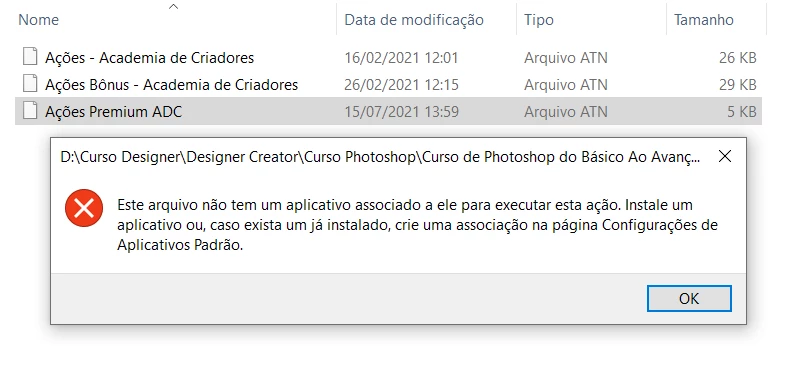
Primeira vez que acontece esse erro comigo. Fui tentar instalar Ações no Photoshop 22.2 que baixei recentemente e não consegui. O arquivo aparece como indefinido também coisa que não acontecia antes, não sei porque. Atualmente tenho 2 Photoshops instalados, o mais atualizado, e o 22.2 pra usar as funções 3D. Alguém pode me ajudar e me dizer porque meu computador não reconhece mais os arquivos nesse formato? Também não reconhece arquivos de Pincéis como reconhecia antes. 


This topic has been closed for replies.
Correct answer Jeff Arola

What version of Windows are you using?


A reinstall of the most recent Photoshop 25.6 using the Adobe Creative Cloud Application should fix the file associations.


Then right clicking on the ATN (action) or ABR (brush) files and clicking Open with should list Photoshop 2021 (ps ver 22.2).


You can also install Actions by going to the Actions panel in Photoshop 22.2 and from the fly-out menu click Load Actions

From the Brush picker fly-out menu click Import Brushes


1 reply

Jeff Arola
Community Expert
Jeff ArolaCommunity ExpertCorrect answer
Community Expert
March 31, 2024

What version of Windows are you using?


A reinstall of the most recent Photoshop 25.6 using the Adobe Creative Cloud Application should fix the file associations.


Then right clicking on the ATN (action) or ABR (brush) files and clicking Open with should list Photoshop 2021 (ps ver 22.2).


You can also install Actions by going to the Actions panel in Photoshop 22.2 and from the fly-out menu click Load Actions

From the Brush picker fly-out menu click Import Brushes