Participant
January 8, 2025
Answered

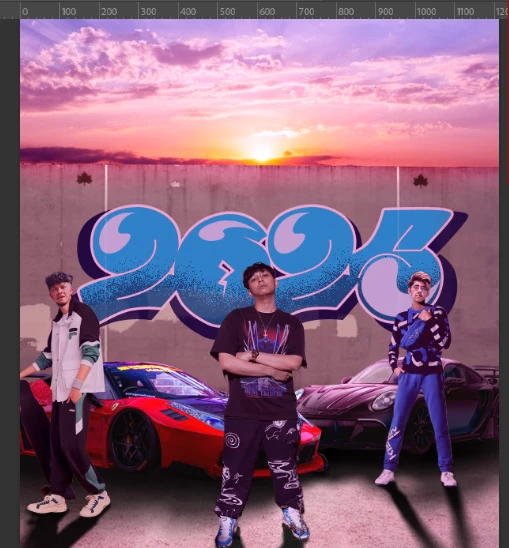
Need help this looks unnatural!
  • January 8, 2025
  • 2 replies
  • 426 views

Body size looks unnatural can someone help me with this things, i know the blend is not perfect i'll fix it myself later

Correct answer sygma_1754

https://www.youtube.com/watch?v=-QXGoE1w6_U i found it if u have better source tell me thanks btw❤️

2 replies

Trevor.Dennis
Community Expert
Community Expert
January 11, 2025

In case it helps, this is how to fix it.  Your image was really too small to work with at 509 x 548 pixels, so I upscaled it with Topaz Photo Ai

I've selected the head with the Quick Select tool, and refined the selection with Select & Mask.

Then copied that selection to a new layer. Ctrl J


Rather than increase the size of the head, which will cause loss of image quality (IQ) — remember we have already upscaled the original — we'll make the background smaller.

I have made the background a Smart Object (by right clicking the layer). This lets us make multiple attempts to get the size right without losing IQ.  Note:  I have already clicked on the Background layer's padlock to make it a normal layer.

Select the background layer, and start Free Transform.  We want the change to stay focused on the bottom of the person's neck, so I Alt clicked that location to place the center handle there. (You might need to show the center handle in Preferences.

Back to Free Transform.

Alt Drag any corner handle to resize the background.

Because we placed the Reference point at the base of the person's neck, the changes will  stay focused on that point.

I have gone way beyond to illustrate this, but remember this layer is a Smart Object.  You can keep changing the size till the end of time, and not loose any IQ.


I reckon this is about right.  I used a tiny bit of High Pass Sharpening to crisp it up a bit.

You can click to expand and copy this image to get the upscaled finished edit.

Note this has gone from 509 pixels wide to 1755 pixels.  That's 3.5 times larger with remarkable retention of image quality.  That's impressive!


Trevor.Dennis
Community Expert
Community Expert
January 8, 2025

Search Google with 'How to draw people in proportion'

There are countless drawing aid to do this, but I'd say that the lad in the center's head is too small for the body.

sygma_1754AuthorCorrect answer
Participant
January 8, 2025

https://www.youtube.com/watch?v=-QXGoE1w6_U i found it if u have better source tell me thanks btw❤️