
Participant
July 10, 2025
Question

Need help with activation of old product (Photoshop CS5)

  • July 10, 2025
  • 2 replies
  • 505 views

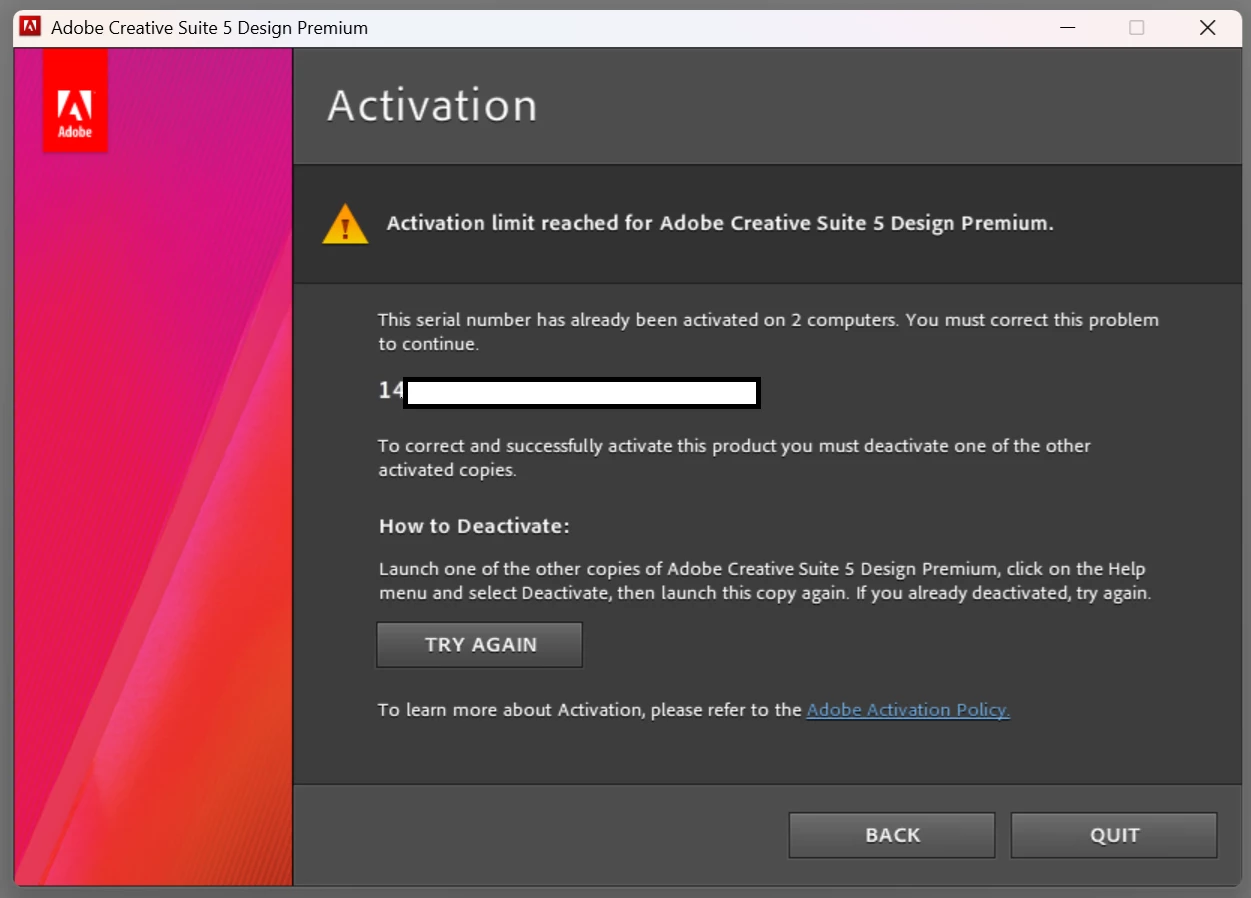
My home PC's C drive crashed, and I had to replace it with a new one and reinstall all my software. I have Adobe Creative Suite through my work, and it is installed on both my work and home computers. Additionally, I have an older version of Photoshop that I prefer to use, specifically CS5. When I tried to install and activate Photoshop CS5 on my new C drive, it indicated it is already installed on two devices, my home and work PCs. I tried deactivating my home PC, but I continue to receive the same error message that it can't be activated on a third device. When I try to contact support through chat, it sends me to my company's IT department. They can't help me with this. I need Adobe's help activating my old software. What do I do? 


2 replies

AxelMatt
Community Expert
Community Expert
July 10, 2025

I am just as confused as @Ged_Traynor

I've been reading you post several times but I don't understand which versions of Adobe software do you have installed on which computer.  I only understood so much that you'Ve installed a Creative Suite on your office pc and on your home pc. And the Home PC is crashed.  The first question is which version is the Creative Suite, CS??.


And what's about the Photoshop version? Is this a separate license and on which computer was this version installed?

I think the problem is that your acivation limit for the Creative cloud and Photoshop has reached. You have to deactivate a older installation. If this isn't possible because the computer doesn't exist anymore or is defective you're out of luck.


Adobe has stopped supporting all older versions and and reset of the activation count by the support isn't possible.


My System: Intel i7-8700K - 64GB RAM - NVidia Geforce RTX 3060 - Windows 11 Pro 25H2 -- LR-Classic 15 - Photoshop 27 - Nik Collection 8 - PureRAW 5 - Topaz Photo
Participant
July 10, 2025

Sorry - I meant I have a Creative Cloud license through work and use it mostly for InDesign. Adobe Cloud is installed on my home and work PC. Additionally, I have always had the older version of Photoshop CS5 installed on both devices, as I prefer it to the new cloud-based version. It was purchased as part of a package of Adobe Creative Suite, and I have the serial numbers for each product in the Suite. However, I only have the old Photoshop CS5 version installed. The two different systems work fine on my work device. They also worked well together on my home PC before it crashed before I could deactivate it. It seems as though I am out of luck, unfortunately, based upon everyone's comments.

AxelMatt
Community Expert
Community Expert
July 11, 2025
quote

... Additionally, I have always had the older version of Photoshop CS5 installed on both devices, as I prefer it to the new cloud-based version. It was purchased as part of a package of Adobe Creative Suite, and I have the serial numbers for each product in the Suite. However, I only have the old Photoshop CS5 version installed. The two different systems work fine on my work device. They also worked well together on my home PC before it crashed before I could deactivate it. It seems as though I am out of luck, unfortunately, based upon everyone's comments.


By @Sondra24887383h6ie


For all products in the Creative Suite you have only ONE serial number. 

As wrote before you've installed photoshop on two PCs. That's why you have reached the activation limit. To activate a new installation you have to deactivate one of the former installations.  If this isn't possible you're out of luck. There's no more support from Adobe and they can't reset the activation counter.


I think the best way is to extend you Creative Cloud subscription with Photoshop. so you've the actual version and it works perfect together with Indesign.


My System: Intel i7-8700K - 64GB RAM - NVidia Geforce RTX 3060 - Windows 11 Pro 25H2 -- LR-Classic 15 - Photoshop 27 - Nik Collection 8 - PureRAW 5 - Topaz Photo
Ged_Traynor
Community Expert
Community Expert
July 10, 2025

@Sondra24887383h6ie I'm little confused, you mention that you have the Creative Suite through work and that it's installed on your home and work PC, but you mention that your home PC crashed, yet you mention you tried to deactivate it from your home PC after installing it on your new c drive

Then you mention that you have an older version of Photoshop, specifically CS5, the Creative Suite that's installed on your home and work PC, is that CS5 or another version

jane-e
Community Expert
Community Expert
July 10, 2025

@Sondra24887383h6ie 


Adobe does not reset activations. You need to have at least one valid activation available before you can activate on another computer.


When you say, " I have Adobe Creative Suite through my work, and it is installed on both my work and home computers," do you really mean Creative Suite (CS through CS6) or do you actually mean Creative Cloud (2013 through 2025)? Which specific version of CS or CC does your work provide?


Jane