Inspiring
June 11, 2014
Answered

Need help with openDialog

  • June 11, 2014
  • 1 reply
  • 1327 views

In the Photoshop script I'm writing, I ask the user to open a file using:

     open(File(openDialog()));

That works fine. But the user will always be opening an Illustrator (.ai) file.


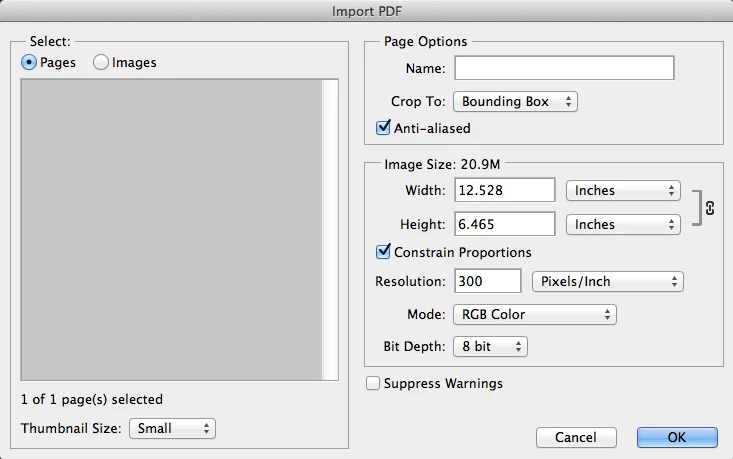
Normally that brings up a dialog box called "Import PDF".


But that dialog doesn't come up with this open command and just uses the default options. I need to set 2 values: 1) uncheck Anti-aliased, and 2) Mode to CMYK.


I'm new to this and I can't figure out how to set those options. (I don't understand Adobe's Javascript documentation.) Can someone help?

Thanks!

This topic has been closed for replies.
Correct answer sak1364

How about this:

var imagePath = "";

var dir = Folder(imagePath);

selectAIfile = dir.openDlg("Select .ai File" , "Select:*.ai");

if ( selectAIfile == null ) {                                   // User canceled

        alert("Selection Canceled");

        }

else {

  //you noted the Photohop UI Open UI would open an IMPORT PDF dialog when you try ti open and .ai file

  //that script did no open the Import PDF dialog but works and seems defauls to RGB mode, antialias etc

  //tad you need to set antialias off abd mode to  CMYK

  //open(File(selectAIfile));    // application Open opend like you stated.

  //So I recorded the UI open via Scriptlistener and included the code to turn off antialias and set CMYK

  //you stated much work however you often have to resort to Action Manager Code scripting.

  //The Photoshop Javascript Guide I saw had open option for some file type:

  //CameraRAWOpenOptions

  //DICOMOpenOptions

  //EPSOpenOptions

  //PDFOpenOptions

  //PhotoCDOpenOptions

  //RawFormatOpenOptions

  //I don't know javascript only hack at it PDFOpenOptions looked promising so I tried

  var opts = new PDFOpenOptions();

  opts.antiAlias = false;

  opts.mode =  OpenDocumentMode.CMYK;

  app.open(File(selectAIfile),opts);

        }

shorteded to

var imagePath = "";                                                             // no defult path

var dir = Folder(imagePath);                                               // Declare a folder object

var opts = new PDFOpenOptions();                                     // Declare PDFOpenOptions

opts.antiAlias = false;                                                           // Antialias Faulse

opts.mode =  OpenDocumentMode.CMYK;                         // Mode CMYK

app.open(dir.openDlg("Select .ai File" , "Select:*.ai"),opts);  //Open .ai file

Still I prefer a separate select that allows cancel and  let you work on option for file selected. Like this:  Have a problem with size though. DPI resolution make a big change in size.

var orig_ruler_units = app.preferences.rulerUnits;

app.preferences.rulerUnits = Units.PIXELS; // Set the ruler units to PIXELS

var imagePath = "";

var dir = Folder(imagePath);

selectAIfile = dir.openDlg("Select .ai File" , "Select:*.ai");

if ( selectAIfile == null ) {                                   // User canceled

        alert("Selection Canceled");

        }

else { 

  //open(File(selectAIfile));    // application Open opened like you stated.

  //you noted the Photohop UI Open UI would open an IMPORT PDF dialog when you try ti open and .ai file

  //that script did no open the Import PDF dialog but works and seems defauls to RGB mode, antialias etc

  //you need to set antialias off and mode to CMYK

  //I don't know javascript only hack at it PDFOpenOptions looked promising so I tried

        // Isolate File Name for document name strip moff the .ai

        var Name =  decodeURI(selectAIfile).replace(/\.[^\.]+$/, '');   // strip the extension off

        var imagePath = "";

        while (Name.indexOf("/") != -1 ) {                              // Strip Path

                imagePath= imagePath + Name.substr(0, Name.indexOf("/") + 1);   // get path

                Name = Name.substr(Name.indexOf("/") + 1 ,);

                }

  var opts = new PDFOpenOptions();

  opts.antiAlias = false; // No AnitAlias

  opts.bitsPerChannel = BitsPerChannelType.EIGHT // 8BIT or BitsPerChannelType.SIXTEEN;

  //opts.constrainProportions = true; // Keep original Aspect Ratio  

  opts.cropPage = CropToType.BOUNDINGBOX; // don't know if it matters with .ai file ARTBOX BLEEDBOX BOUNDINGBOX CROPBOX MEDIABOX TRIMBOX

  //opts.height =  "6000 pixels"; // set height and with the same let constrain take care of this

  opts.mode  = OpenDocumentMode.CMYK; // Set mode to CMYK GRAYSCALE LAB RGB

  opts.name  =  Name; // document name

  //opts.page  = ; // true/false Don't know if page is valid for .ai file seem to be a switch Pane number and image number PDF

  opts.resolution = 300; // I work at 300DPI the number here make a big difference in document size opened.

  opts.suppressWarnings  = true; // Not warnings

  //opts.typename = ; // Read Only can not be set

  //opts.usePageNumber = ; // Don't know if page/image number is valid for .ai file

  //opts.width = "6000 pixels";   // make width sane as height does not seem to work in cc

  // there is a note "DEPRECATED for Adobe Photoshop CC." for constrainProportions, height and width ...................

  app.open(File(selectAIfile),opts);

        }

app.preferences.rulerUnits = orig_ruler_units; // Reset units to original settings


Thanks again for your help. I finally got it figured out. I knew there had to be a simple solution:

    var OpenAIFile = new PDFOpenOptions; // This sets the parameters for opening the .ai file

        OpenAIFile.antiAlias = false;

        OpenAIFile.mode = OpenDocumentMode.CMYK;

        OpenAIFile.resolution = 300;


    var SelectedFilePath = File.openDialog("Select the file"); // Prompts user to select the .ai file

    var CurrentFile = open(SelectedFilePath, OpenAIFile); // Opens the .ai file and sets parameters

1 reply

sak1364Author
Inspiring
June 12, 2014

As I look more, I think I need to set the parameters this way

    var OpenAIFile = new PDFOpenOptions

    OpenAIFile.antiAlias = false

    OpenAIFile.mode = OpenDocumentMode.CMYK

    OpenAIFile.resolution = 300

But what Open command do I use, and how do I insert these parameters?

JJMack
Community Expert
Community Expert
June 13, 2014

I think you will need you use openDialog to select the ai file and Scriptlistener code to import the ai file. This seems to work for me though I don't have illustrator I found some .ai file on my machine. CMYK 300DPI ANTIALIAIS hard coded file mad a variable

var imagePath = "";

var dir = Folder(imagePath);

selectAIfile = dir.openDlg("Select .ai File" , "Select:*.ai");

if ( selectAIfile == null ) {                                   // User canceled

        alert("Selection Canceled");

        }

else {

        importAI(selectAIfile); // Import

        }

function importAI(file) {

        //alert(file);

        // Isolate File Name

        var Name =  decodeURI(file).replace(/\.[^\.]+$/, '');   // strip the extension off

        var imagePath = "";

        while (Name.indexOf("/") != -1 ) {                              // Strip Path

                imagePath= imagePath + Name.substr(0, Name.indexOf("/") + 1);

                Name = Name.substr(Name.indexOf("/") + 1 ,);

                }

        //alert(Name);

        // =======================================================

        var idOpn = charIDToTypeID( "Opn " );

                var desc1 = new ActionDescriptor();

                var idAs = charIDToTypeID( "As  " );

                        var desc2 = new ActionDescriptor();

                        var idNm = charIDToTypeID( "Nm  " );

                        desc2.putString( idNm, Name );

                        var idCrop = charIDToTypeID( "Crop" );

                        var idcropTo = stringIDToTypeID( "cropTo" );

                        var idboundingBox = stringIDToTypeID( "boundingBox" );

                        desc2.putEnumerated( idCrop, idcropTo, idboundingBox );

                        var idRslt = charIDToTypeID( "Rslt" );

                        var idRsl = charIDToTypeID( "#Rsl" );

                        desc2.putUnitDouble( idRslt, idRsl, 300.000000 );

                        var idMd = charIDToTypeID( "Md  " );

                        var idClrS = charIDToTypeID( "ClrS" );

                        var idECMY = charIDToTypeID( "ECMY" );

                        desc2.putEnumerated( idMd, idClrS, idECMY );

                        var idDpth = charIDToTypeID( "Dpth" );

                        desc2.putInteger( idDpth, 8 );

                        var idAntA = charIDToTypeID( "AntA" );

                        desc2.putBoolean( idAntA, false );

                        var idWdth = charIDToTypeID( "Wdth" );

                        var idPxl = charIDToTypeID( "#Pxl" );

                        desc2.putUnitDouble( idWdth, idPxl, 1943.000000 );

                        var idHght = charIDToTypeID( "Hght" );

                        var idPxl = charIDToTypeID( "#Pxl" );

                        desc2.putUnitDouble( idHght, idPxl, 276.000000 );

                        var idCnsP = charIDToTypeID( "CnsP" );

                        desc2.putBoolean( idCnsP, true );

                        var idsuppressWarnings = stringIDToTypeID( "suppressWarnings" );

                        desc2.putBoolean( idsuppressWarnings, false );

                        var idfsel = charIDToTypeID( "fsel" );

                        var idpdfSelection = stringIDToTypeID( "pdfSelection" );

                        var idpage = stringIDToTypeID( "page" );

                        desc2.putEnumerated( idfsel, idpdfSelection, idpage );

                        var idPgNm = charIDToTypeID( "PgNm" );

                        desc2.putInteger( idPgNm, 1 );

                var idPDFG = charIDToTypeID( "PDFG" );

                desc1.putObject( idAs, idPDFG, desc2 );

                var idnull = charIDToTypeID( "null" );

                desc1.putPath( idnull, new File( file ) );

        executeAction( idOpn, desc1, DialogModes.NO );

}                          

JJMack
sak1364Author
Inspiring
June 13, 2014

Oh my!

I got similar results. I'm just a newbie at this - that's too complex.

There must be an easier way. (And a more elegant way.)

Thanks for your reply!!