Participant
March 21, 2025
Question

NEED JS Script for following steps

  • March 21, 2025
  • 2 replies
  • 346 views

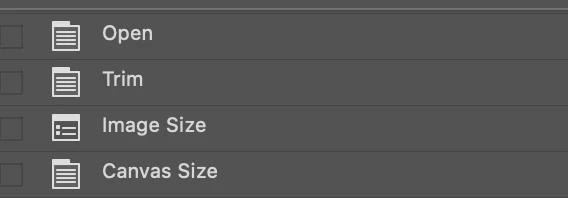
I've been learning JS scripting in Photoshop,i need Javascript for following actions the image has to trim,then image size and Canvas size,Please Someone help me with this

2 replies

Legend
March 21, 2025
preferences.rulerUnits = Units.PIXELS;
app.activeDocument.resizeCanvas(800, 600);
app.activeDocument.resizeImage(1200, 900, 96, resampleMethod.AUTOMATIC);
Participant
April 7, 2025

thank you

Stephen Marsh
Community Expert
Community Expert
March 21, 2025

@Selvakumar28185231hpek – Presuming legacy ExtendScript .jsx (not UXP .psjs), basic DOM code, for Trim:


// Trim to transparency
app.activeDocument.trim(TrimType.TRANSPARENT);


https://theiviaxx.github.io/photoshop-docs/Photoshop/Document/trim.html

https://theiviaxx.github.io/photoshop-docs/Photoshop/TrimType.html


Or here it is as Action Manager code recorded via ScriptingListener:


var idtrim = stringIDToTypeID( "trim" );
    var desc193 = new ActionDescriptor();
    var idtrimBasedOn = stringIDToTypeID( "trimBasedOn" );
    var idtrimBasedOn = stringIDToTypeID( "trimBasedOn" );
    var idtransparency = stringIDToTypeID("transparency"); // "topLeftPixelColor" || "bottomRightPixelColor"
    desc193.putEnumerated(idtrimBasedOn, idtrimBasedOn, idtransparency); // idtopLeftPixelColor || idbottomRightPixelColor
    var idtop = stringIDToTypeID( "top" );
    desc193.putBoolean( idtop, true );
    var idbottom = stringIDToTypeID( "bottom" );
    desc193.putBoolean( idbottom, true );
    var idleft = stringIDToTypeID( "left" );
    desc193.putBoolean( idleft, true );
    var idright = stringIDToTypeID( "right" );
    desc193.putBoolean( idright, true );
executeAction( idtrim, desc193, DialogModes.NO );


For the other steps, DOM code here and many examples on the forum or other online sources:


https://theiviaxx.github.io/photoshop-docs/Photoshop/Document/resizeImage.html


https://theiviaxx.github.io/photoshop-docs/Photoshop/Document/resizeCanvas.html


Participant
April 7, 2025

thank you Stephen marsh

Stephen Marsh
Community Expert
Community Expert
April 7, 2025
quote

thank you Stephen marsh


By @Selvakumar28185231hpek


You're welcome, just shout out if you get stuck.