
Need to bypass Action error in Photoshop CC script
Hi,
I have a problem running a recorded Action I created in Photoshop CC that stops when one of the Commands within the Action cannot be executed on any one image in a group the Action is meant to process as a batch.
The Action does the following: it selects all pixels that are of a pre-defined color using the Color Range command. Then it calls the Inverse (selection) command to select all other pixels that are not of the pre-defined color and Deletes them leaving on the Layer only the pixels that have the required color. When the Action completes these commands, it then Saves and Closes the open file and proceeds to the next. If any of the images that are being processed by the Action does not have pixels that have the pre-defined color the Action is seeking to Select, the Action stops and a pop-up window appears with the message: "The command "Color Range" is not currently available" with a "Continue" and a "Stop" buttons.
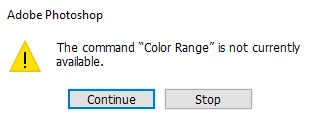
I want the Action to continue even if there are no pixels of that color to be selected. The Action should simply ignore this condition and proceed to process the next image in the group. Does anyone know how to bypass the pop-up with the "Continue" and "Stop" buttons? Any advice would be kindly appreciated as this forces me to click "Continue" every time the pop-up appears and the batch processing is no longer automated.
I tried using a Javascript (*.jsx) called from Photoshop to call the Action and try to catch the error using try-catch but it does not work because the error occurs within the Action within Photoshop and not on the Javascript itself so try-catch does not see it.
I will appreciate any suggestions on how to handle this condition during Action processing.
Thanks!
Panoramik
 AdChoices