Participant
October 11, 2025
Answered

Need to download 2023 version of PhotoShop.

  • October 11, 2025
  • 1 reply
  • 381 views

Hello.I need to reinstall Photoshop 2023 on My 2019 MacBook Pro, The 2025 versiopn lags too much. How do I do this? I can't see oit listed in the older versions on Creative Cloud. I did have it previously as part of my account.  Thanks for any help. 

Correct answer Nancy OShea

In Creative Cloud Desktop App.

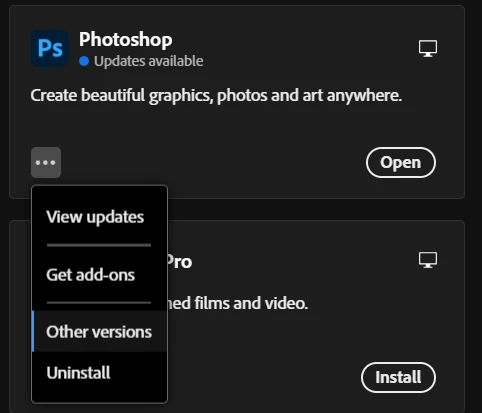
Click on More Actions (the 3 dots icon) under Photoshop ⇒ Select Other Versions.

Scroll down to 24.7.1 — the last available version in 2023. 


That said, the system requirements to use Photoshop & Creative Cloud require you to have a modern OS no more than 2 versions back.

  • Windows 11 (64-bit) versions 24H2, 23H2; Windows 10 versions 22H2, 21H2;
  • MacOS 15 (Sequoia), 14.7 (Sonoma), 13.6.7 (Ventura).

MacOS 26 Tahoe was publicly released a few weeks ago.

- https://helpx.adobe.com/creative-cloud/system-requirements.html
- https://helpx.adobe.com/photoshop/system-requirements.html
- https://helpx.adobe.com/photoshop/kb/photoshop-cc-gpu-card-faq.html


1 reply

Nancy OShea
Community Expert
Nancy OSheaCommunity ExpertCorrect answer
Community Expert
October 12, 2025

In Creative Cloud Desktop App.

Click on More Actions (the 3 dots icon) under Photoshop ⇒ Select Other Versions.

Scroll down to 24.7.1 — the last available version in 2023. 


That said, the system requirements to use Photoshop & Creative Cloud require you to have a modern OS no more than 2 versions back.

  • Windows 11 (64-bit) versions 24H2, 23H2; Windows 10 versions 22H2, 21H2;
  • MacOS 15 (Sequoia), 14.7 (Sonoma), 13.6.7 (Ventura).

MacOS 26 Tahoe was publicly released a few weeks ago.

- https://helpx.adobe.com/creative-cloud/system-requirements.html
- https://helpx.adobe.com/photoshop/system-requirements.html
- https://helpx.adobe.com/photoshop/kb/photoshop-cc-gpu-card-faq.html


Nancy O'Shea— Product User & Community Expert