
Participating Frequently
November 10, 2021
Answered

Neural filters script

  • November 10, 2021
  • 6 replies
  • 1384 views

Hello.
I need to write the action of the "Skin Smoothing" neural filter into a script JS.
With the values:
Blur "+100"
Smoothing "+50"

With the output to a new layer with a mask.
In case, if the persons neuro filter will not find - do nothing.

ScriptListener.8li does not give the necessary result. The script comes out with 9 thousand lines, and there is an error somewhere in it.


I need the script to integrate into streaming automation, to automatically distinguish between frames with people.

Neuro filter from version 22 worked fine. But the new one, if it does not find faces, it generates an error, which slows down the whole automation.


Thanks in advance for the help.
This topic has been closed for replies.
Correct answer Stephen Marsh

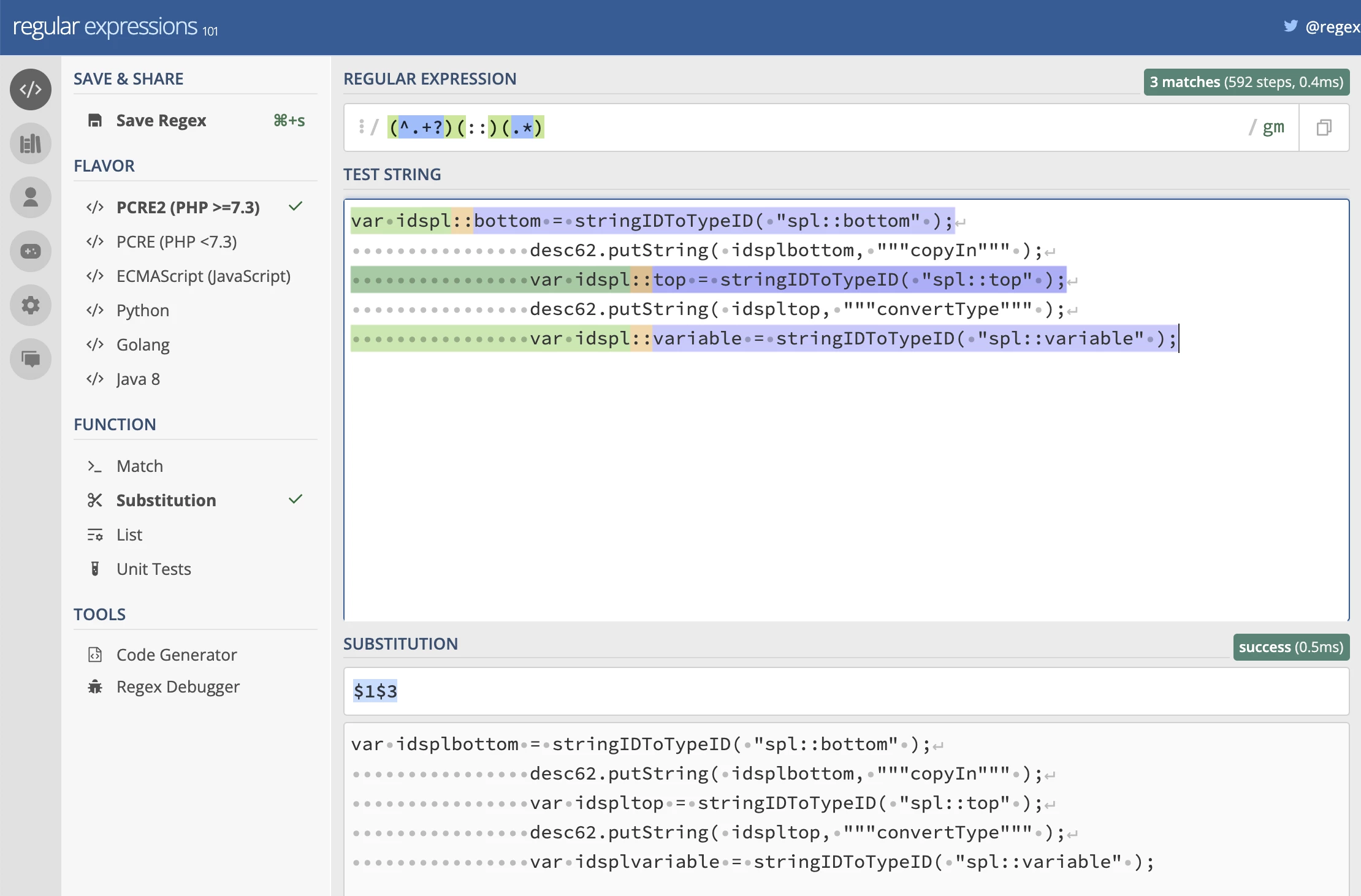
I'm reading the OP differently than some others. Remove the first :: in each line, retaining all other :: thereafter. Any regex enabled program or a website such as regex101 or regexr can fix the code for you. Here is a sample screenshot of the regex with colour highlighting:


6 replies

Kukurykus
Legend
November 13, 2021

The workaround of course let work with SL output, but let's hope the mere bug is going to be fixed.

Participating Frequently
November 13, 2021

Yes. I have the latest version of Photoshop.
Unfortunately, an error occurs when I try to play the script.
The problem is with this particular filter.


I found that the PluginData folder contains SkinSmoothingLow2 and SkinSmoothingLow. Is there any way to switch to the old version, which worked stably in my tasks? That is, to SkinSmoothingLow.

Participant
November 12, 2021

Hello,

I'm totally new in scripting and need help.
I have some scripting-code (only a snippet) from Script-Listener, but it has a few bugs. As you can see, every variable has a name with 2 colons (::). How to delete these colons without deleting the colons of the stringIDToTypeID?
Can this be fixed in the script-Listener or can this be with a regex in a script? How?


                var idspl::bottom = stringIDToTypeID( "spl::bottom" );
                desc62.putString( idsplbottom, """copyIn""" );
                var idspl::top = stringIDToTypeID( "spl::top" );
                desc62.putString( idspltop, """convertType""" );
                var idspl::variable = stringIDToTypeID( "spl::variable" );
                    var desc63 = new ActionDescriptor();
                    var idspl::ID = stringIDToTypeID( "spl::ID" );
                    desc63.putInteger( idsplID, 12385 );
                    var idspl::type = stringIDToTypeID( "spl::type" );
                    desc63.putString( idspltype, """image""" );
                var idnull = charIDToTypeID( "null" );
                desc62.putObject( idsplvariable, idnull, desc63 );
            var idnull = charIDToTypeID( "null" );
            list5.putObject( idnull, desc62 );
                var desc64 = new ActionDescriptor();
                var idspl::ID = stringIDToTypeID( "spl::ID" );
                desc64.putInteger( idsplID, 12265 );
                var idspl::bottom = stringIDToTypeID( "spl::bottom" );
                desc64.putString( idsplbottom, """copyIn""" );
                var idspl::top = stringIDToTypeID( "spl::top" );
                desc64.putString( idspltop, """resize""" );
                var idspl::variable = stringIDToTypeID( "spl::variable" );


Any help is welcome.

Regards
Oliver

JJMack
Community Expert
Community Expert
November 12, 2021

If none of the :: are correct a global replace of :: with : should do.

JJMack
Tom Ruark
Inspiring
November 12, 2021

Nothing should be a problem with that line. I would use double qoutes instead of the single quotes. Neural filters has issues with recording and playback, getting better each release. But it should do something. Make sure you upgrade to our 23.0.1 that came out yesterday.

I missed the :: for the varialbe name. See regexp solution below. I told them that :: in their key names was a bad idea. I'll see if I can fix ScriptListener for this case.

Kukurykus
Legend
November 16, 2021

Thank you for checking the other posts I merged to this thread, but why this thread was moved from Bugs section to Discussions if possibly this problem is going to be fixed in some future. Shouldn't this thread be moved back to Bugs, all the more I noticed already 3 users reported wrong Neural Filter output within short time? btw correct solution re-marked temporarily as workaround.

Kukurykus
Legend
November 11, 2021

I moved the thread to Bugs section for further investigation.

JJMack
Community Expert
Community Expert
November 10, 2021

I get an error in both version 22 and 23.  9K lines of Action manager code and an error

JJMack