


Participant
November 17, 2025
Question

Neutral Filters - Eye Direction malfunctioning
  • November 17, 2025
  • 3 replies
  • 108 views

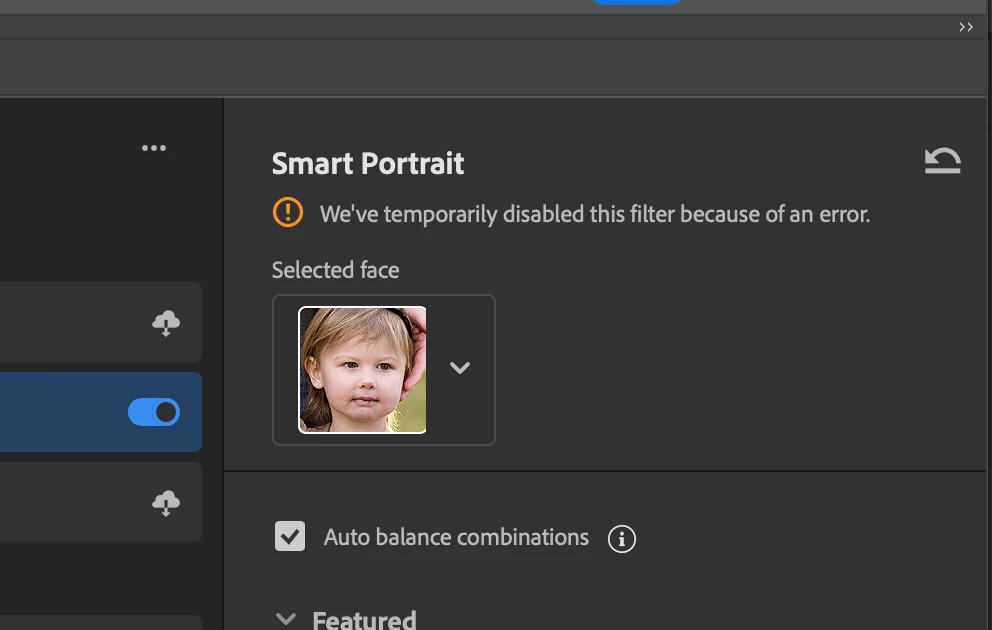
During busy photography season this filter has gotten some bug.  It will not work at all to move eyes simply.  I have cleared the cache, I'm done the backend file delete that was posted online, restarted, updated.  What gives?? How can I fix this feature?


Here's a sample pushing eyes all the way otherside - it displays error (but doesn't specify and doesn't work)

3 replies

Known Participant
November 17, 2025

Most ofthe time Smart Portrait is not working at all on ym PC.

Participant
November 17, 2025

We have the same problems, it´s not working. 


@Srishti Bali I’ve already tried everything you mentioned — including clearing the UXP plugin cache, deleting the folders, reinstalling different Photoshop versions (27.x, 26.x), resetting preferences, and restarting Photoshop and the system.

Unfortunately, the issue still persists.
The Photo Restoration / Image Restoration neural filter remains disabled and shows the same error every time, even after a completely clean setup.

What’s interesting is that the filter DID work earlier today in version 26.1, but suddenly stopped working there as well — without any changes on my side. That makes me think the problem might be on the server side rather than local.

Could you please check if there is a known server-side issue at the moment?

Srishti Bali
Community Manager
Community Manager
November 17, 2025

Hi @dania448222,


Sorry about this experience. To help us dig deeper, could you share a few details:

  • Does this happen with all photos or only specific files?

  • Are the images JPEG/RAW/other formats?

  • Is the issue the same in a brand-new Photoshop document?


Since you’ve already tried cache clearing and updates, let’s also try a manual preferences reset, which often helps with these issues:

  • Quit Photoshop.
  • Go to: ~/Library/Preferences/Adobe Photoshop [version] Settings
  • Rename this folder to something like “Backup Photoshop Settings”.
  • Restart Photoshop — a fresh set of preference files will be created automatically.


Let me know if the issue continues after this — we’ll take it from there.


Regards,

Srishti