
Inspiring
October 21, 2025
Answered

New camera RAW files

  • October 21, 2025
  • 2 replies
  • 309 views

Would someone tell me why the RAW files from my new camera will not display as a thumbnail?

All I get is the RAW file icon which makes it hard to select a particular image from a big batch.

I am using a new FUJIFILM X-E5 camera (released August 2025).

I am working on a new iMac 24-inch 2024.

My photoshop and Camera RAW are up to date.

Would I be correct in guessing that Adobe hasn't added this camera to Photoshop yet?
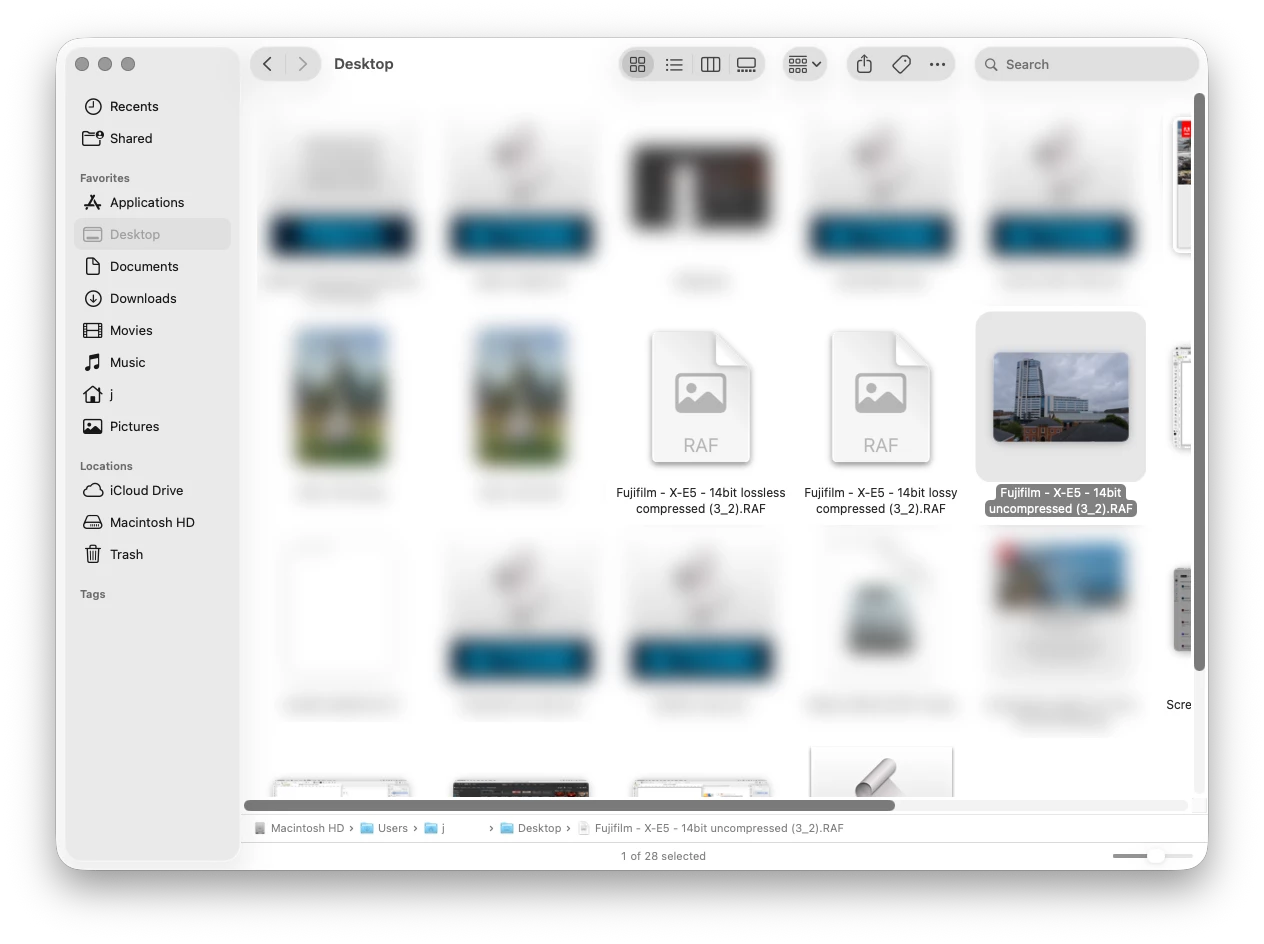


Correct answer Jeff Arola

Looks like Apple supports the uncompressed FUJIFILM X-E5 raf files, but not the compressed versions.


You can go to Apple>About This Mac>More Info>System Report>Software>Raw Support and see that the FUJIFILM X-E5

is listed, however, only the uncompressed files from that camera that i tested were able to display the thumbnails in Finder

on macOS Tahoe 26.0.1


You should be able to see thumbnails of the files in Adobe Bridge.


files for testing were from here:

https://raw.pixls.us/

2 replies

Jeff Arola
Community Expert
Jeff ArolaCommunity ExpertCorrect answer
Community Expert
October 21, 2025

Looks like Apple supports the uncompressed FUJIFILM X-E5 raf files, but not the compressed versions.


You can go to Apple>About This Mac>More Info>System Report>Software>Raw Support and see that the FUJIFILM X-E5

is listed, however, only the uncompressed files from that camera that i tested were able to display the thumbnails in Finder

on macOS Tahoe 26.0.1


You should be able to see thumbnails of the files in Adobe Bridge.


files for testing were from here:

https://raw.pixls.us/

Inspiring
October 21, 2025

You may be correct.  The camera was set to lossless compressed. (default I think).  I'll set it to uncompressed and see what happens.

Thanks!

Rob_Cullen
Community Expert
Community Expert
October 21, 2025

X-E5 has been supported since  (Camera Raw v17.4)  according to site link- what is your CR version? 

https://helpx.adobe.com/camera-raw/kb/camera-raw-plug-supported-cameras.html

Your screen-clip is a Finder page- am I correct?  If so the thumbnail preview is a Mac display problem. Can you [open] a file with Photoshop?

Perhaps wait for Mac person to reply with more knowledgable advice.


Regards. My System: Windows-11, Lightroom-Classic 15.1.1, Photoshop 27.3.1, ACR 18.1.1, Lightroom 9.0, Lr-iOS 10.4.0, Bridge 16.0.2 .
Inspiring
October 21, 2025

Yes it was the Finder page but the same thing happens in P/S.  CR is the lastest version.  I can open the files OK but can't see the thumbnails like I could with my older Fujifilm X-T5. As suggested in another answer it could be that the new camera was set to 'lossless compressed'. (default)  I'll try it out on 'uncompressed'.


Thanks for your help