Known Participant
May 1, 2026
Question

New Color Picker Why?

  • May 1, 2026
  • 4 replies
  • 42 views

Is there a way to return to the older color picker? I don’t what this is besides unusable. Thanks for any help. 

    4 replies

    Chris3000Author
    Known Participant
    May 1, 2026

    Thanks! Version 26.9.0 and I have no idea about 32 bit mode. I haven’t changed any settings. The only color pickers I have are Apple and this abomination. 


    jane-e
    Community Expert
    Community Expert
    May 1, 2026

    @Chris3000 


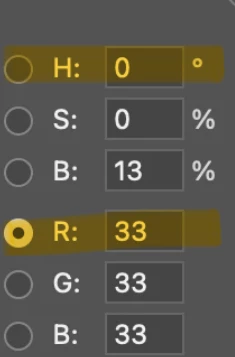
    Thanks for the screenshot! Instead of “R” (Red), select “H” (Hue).


    Jane

    jane-e
    Community Expert
    Community Expert
    May 1, 2026

    @Chris3000 


    Are you in 32-bit mode? It is designed for HDR (High Dynamic Range) workflows and has a different color picker. Switch to 16- or 8-bit to see the one you are used to.


    In Photoshop Preferences > General, you can choose between the color picker for Adobe or your OS (macOS or Windows OS).


    The screenshot Jeff asked for will help us to better assist if this doesn’t answer your question.


    Jane


    Conrad_C
    Community Expert
    Community Expert
    May 1, 2026

    It hasn’t changed recently, so what might have happened is maybe it got switched into a different mode by accident. Jeff Arola’s suggestion is good: Can you show a screen shot of the “wrong” color picker you’re seeing?

    Jeff Arola
    Community Expert
    Community Expert
    May 1, 2026

    What version of Photoshop and operating system are you using?


    As far as i can tell, the color picker hasn’t changed.


    Can you provide a screenshot of what your seeing?