Participant
September 21, 2025
Answered

New "Layer from Background" does not appear in Layers panel

  • September 21, 2025
  • 3 replies
  • 154 views

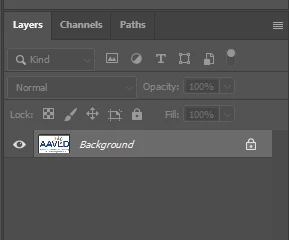
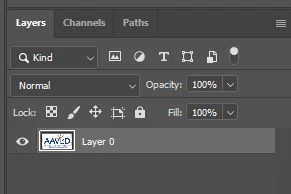
I'm trying to add a "layer from background", but when I do this, my "background" layer with my image changes to "layer 0", and no new layer appears in my Layers panel. I'm just trying to add a frame around my image using some online instructions (https://helpx.adobe.com/ph_fil/photoshop/how-to/add-border-frame-around-photo.html). Maybe this is my mistake, but shouldn't this appear as a new layer that I can then manipulate? Thanks for your time!


Correct answer jane-e
quote

my "background" layer with my image changes to "layer 0",

(https://helpx.adobe.com/ph_fil/photoshop/how-to/add-border-frame-around-photo.html).

By @vinc31003


Keep following the tutorial you linked to. Later screenshots show that the unique Background layer was converted to a regular layer in Step 2.


Jane


3 replies

jane-e
Community Expert
jane-eCommunity ExpertCorrect answer
Community Expert
September 21, 2025
quote

my "background" layer with my image changes to "layer 0",

(https://helpx.adobe.com/ph_fil/photoshop/how-to/add-border-frame-around-photo.html).

By @vinc31003


Keep following the tutorial you linked to. Later screenshots show that the unique Background layer was converted to a regular layer in Step 2.


Jane


Stephen Marsh
Community Expert
Community Expert
September 21, 2025

@vinc31003 as @D Fosse wrote, this is correct and expected behaviour for this specific command.

D Fosse
Community Expert
Community Expert
September 21, 2025

Not at my computer, but that sounds like what it's supposed to do. A floating layer (Layer 0) is not the same as a Background layer.


Try Layer > New Layer.